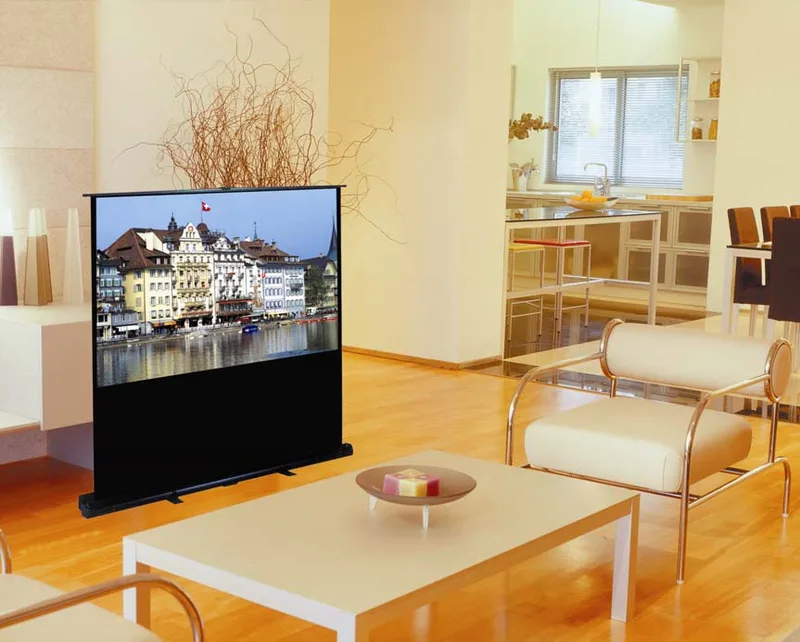
JA
Elite Screens logo
公式取扱説明書

Elite Screens ezCinema Plus (F68XWS1)

6 ページ·184 KB·液晶・薄型テレビ·PDF·EN
Elite Screens ezCinema Plus (F68XWS1)
目次 3セクション Elite ez Cinema Plus Series · Putting screen away · Please visit link below for full warranty information 表示非表示
Page 1 of the Elite Screens ezCinema Plus (F68XWS1) user manual — Precautions:
1ページ · クリックして拡大
1ページ
Elite Screens ezCinema Plus (F68XWS1) — Elite ez Cinema Plus Series diagram (page 1)
図 1 · Elite ez Cinema Plus Series

Portable Floor Pull-Up Screen Elite ez Cinema Plus Series

FOR MODELSF68XWS1 / F60XWV1 / F84XWV1 / F74XCH1 /

F84XCH1

USER’S GUIDE

Elite Screens ezCinema Plus (F68XWS1) — F84XCH1 diagram (page 1)
図 2

Precautions:

Page 2 of the Elite Screens ezCinema Plus (F68XWS1) user manual — Elite ez Cinema Plus Series
2ページ · クリックして拡大
2ページ

Do not place screen near or beside a fireplace or high temperature objects such as a gas stove to avoid damage to the screen or prevent a fire.
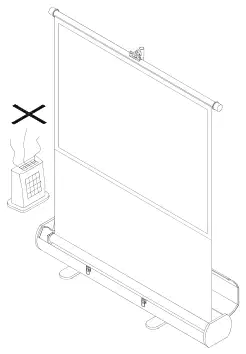
Elite Screens ezCinema Plus (F68XWS1) — Elite ez Cinema Plus Series diagram (page 2)
図 3 · Elite ez Cinema Plus Series

Place the screen beyond the reach of children.
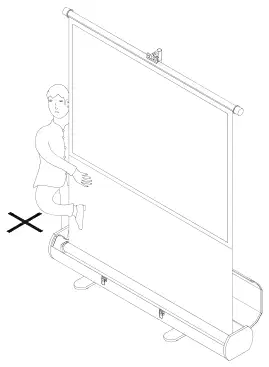
Elite Screens ezCinema Plus (F68XWS1) — Elite ez Cinema Plus Series diagram (page 2)
図 4 · Elite ez Cinema Plus Series
Page 3 of the Elite Screens ezCinema Plus (F68XWS1) user manual — Elite ez Cinema Plus Series
3ページ · クリックして拡大
3ページ

and away from any fire activity such as a fireworks display. 1. Extending base feet: Locate the base feet on the bottom of the box cover of each end and rotate the footboard until it forms a right angle between the footboard and the cover box.

Elite Screens ezCinema Plus (F68XWS1) — Elite ez Cinema Plus Series diagram (page 3)
図 5 · Elite ez Cinema Plus Series
2. Open the box cover: Unlock the buckles on both sides of the box to open the box cover.
Elite Screens ezCinema Plus (F68XWS1) — Elite ez Cinema Plus Series diagram (page 3)
図 6 · Elite ez Cinema Plus Series
3. Pulling out the screen: Carefully lift the screen with the handle and stop at the desired position.
Elite Screens ezCinema Plus (F68XWS1) — Elite ez Cinema Plus Series diagram (page 3)
図 7 · Elite ez Cinema Plus Series
Page 4 of the Elite Screens ezCinema Plus (F68XWS1) user manual — Putting screen away
4ページ · クリックして拡大
4ページ
Elite Screens ezCinema Plus (F68XWS1) — Putting screen away diagram (page 4)
図 8 · Putting screen away

Putting screen away

1. Retracting screen into case : Press the screen’s handle slowly in a downward motion to allow the screen to retract back into the housing.
Elite Screens ezCinema Plus (F68XWS1) — Putting screen away diagram (page 4)
図 9 · Putting screen away
2. Draw the base feet back : Slightly lift one end of the box and turn the two feet at the bottom of the box till they are in a parallel line with the box.
Page 5 of the Elite Screens ezCinema Plus (F68XWS1) user manual — Putting screen away
5ページ · クリックして拡大
5ページ
Elite Screens ezCinema Plus (F68XWS1) — Putting screen away diagram (page 5)
図 10 · Putting screen away
3. Closing it up : Lastly, snap the buckles in place on both sides to secure screen closure.
Elite Screens ezCinema Plus (F68XWS1) — Putting screen away diagram (page 5)
図 11 · Putting screen away
4. Storing the screen : The recommended place for storage would be a corner spot or in a closet, but the ultimate choice is up to you.

The following points should be noted to assure the sound performance of the screen 1. Never use your hand to touch the screen surface 2. Never scrabble on the screen 3. Don't scratch the screen with hard pieces. 4. Please use clean cotton cloth or soft fur brushes to remove the dust on the screen.

Page 6 of the Elite Screens ezCinema Plus (F68XWS1) user manual — Fill this in!!
6ページ · クリックして拡大
6ページ

Warranty Policy - Manual, Tripod, Pull-up Floor, and Fixed Frame Screens

  • One (1) year warranty parts and labor from purchase date as follows (except for

refurbished units as specified below):

  • Refurbished units carry a 90-day parts and labor warranty.
  • Demo units or open box items are AS IS items and do not carry a warranty.
  • Each party will be responsible for one way shipping during the warranty period.
  • DOA (Defective On Arrival): Must be reported within 7 business days of receipt .

A RMA (Return Merchandise Authorization) number must be issued in order to

process a replacement. Elite Screens will replace the DOA (Defective On Arrival) unit

with a brand new replacement *(see exceptions below) after the DOA unit is received

and/or confirmed defective. Once the product is received, Elite Screens will send out a

new *unit to the customer by ground service (subject to inventory availability). Should

a problem be reported after the 7-day grace period, the item must be shipped to us for

warranty repair.

  • Missing Parts must be reported within the 7-day (DOA) grace period. If reported after

7 days, customer will be only be responsible for shipping and handling fees. If reported

after 30 days of receipt, customer is responsible for cost of the parts and shipping &

handling fees.

Please visit link below for full warranty information

http://www.elitescreens.com/services.html

*A new or refurbished replacement will be sent out to the customer depending on the type of purchase (new or

refurbished) or based on stock availability.

Fill this in!!

For the convenience of service, record the following information in the space below. The

serial number can be located on the packaging box or inside the screen’s box.

Screen Model:

Serial Number:

Date of Purchase:

Dealer / Reseller Purchased from:

Tel562-483-8198

www.elitescreens.com

service@elitescreens.com

Elite Screens ezCinema Plus (F68XWS1)について質問する

ユーザーまたはスタッフが通常1日以内に回答します。あなたの質問が次の人の助けにもなります。

Add your email to get notified when it’s answered — no spam, ever.

0 questions
Elite Screens ezCinema Plus (F68XWS1)に関する質問はまだありません

最初の質問を投稿しましょう。他のユーザーや当チームが回答します。

原本

Elite Screens ezCinema Plus (F68XWS1) 取扱説明書(PDF)

6 ページ·184 KB·液晶・薄型テレビ·PDF
上のページをクリックするとここに表示されます
ページ 1 / …
100%
ページを読み込み中…