JA
FujiFilm logo
公式取扱説明書

FujiFilm 3228

136 ページ·3.5 MB·カメラレンズ·PDF·EN
FujiFilm 3228
目次 8セクション Australian RCM · Before Using This Product · http://www.fujifilm.com/support/digital_cameras/ software/#firmware · Attaching the Lens · … 表示非表示
Page 1 of the FujiFilm 3228 user manual
1ページ · クリックして拡大
1ページ
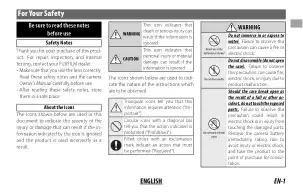
For Your Safety Be sure to read these notes before useWARNING Do not use in the bathroom or showerDo not immerse in or expose to Safety Noteswater. Failure to observe this precaution can cause a fi re or electric shock. Do not disassembleDo not disassemble (do not open the case). Failure to observe this precaution can cause fi re, electric shock, or injury due to product malfunction. Do not touch internal partsShould the case break open as the result of a fall or other ac- cident, do not touch the exposed parts. Failure to observe this precaution could result in electric shock or in injury from touching the damaged parts. Remove the camera battery immediately, taking care to avoid injury or electric shock, and take the product to the point of purchase for consultation.
Page 2 of the FujiFilm 3228 user manual
2ページ · クリックして拡大
2ページ
WARNING Do not place on unstable sur- faces. The product may fall, causing injury. Do not view the sun through the lens or camera viewf inders. Failure to observe this precaution can cause permanent visual impairment.
CAUTION Keep out of the reach of small children. This product could cause injury in the hands of a child. Do not handle with wet hands. Failure to observe this precaution can cause electric shock. Keep the sun out of the frame when shooting backlit subjects. Sunlight focused into the camera when the sun is in or close to the frame can cause fi re or burns. When the product is not in use, replace the lens caps and store out of direct sunlight. Sunlight focused by the lens can cause fi re or burns. Do not carry the camera or lens while they are attached to a tripod. The product can fall or strike other objects, causing injury.

For Customers in the U. S. A. For Customers in the U. S. A. Tested To Comply With FCC Standards FOR HOME OR OFFICE USE

FCC Statement: This device complies with Part 15 of the FCC Rules. Operation is subject to the follow- ing two conditions: (1) This device may not cause harmful interference, and (2) this device must ac- cept any interference received, including interfer- ence that may cause undesired operation.

  • CAUTION : This equipment has been tested and found to comply with the limits for a Class B digital device, pursuant to Part 15 of the FCC Rules. These limits are designed to provide reasonable protection against harmful interference in a residential installation. This equipment generates, uses, and can radiate radio frequency energy and, if not installed and used in accordance with the instructions, may cause harmful interference to radio communications. However, there is no guarantee that interference will not occur in a particular installation. If this equipment does cause harmful interference to radio or television reception, which can be determined by turning the equipment off and on, the user is encouraged to try to correct the interference by one or more of the following measures:
  • Reorient or relocate the receiving antenna.
  • Increase the separation between the equipment and receiver.
CAUTION Do not use or store in locations that are exposed to steam, or smoke or are very humid or extremely dusty. Failure to observe this precaution can cause fi re or electric shock. Do not leave in direct sunlight or in locations subject to very high temperatures, such as in a closed vehicle on a sunny day. Failure to observe this precaution can cause fi re.
Page 3 of the FujiFilm 3228 user manual — Australian RCM
3ページ · クリックして拡大
3ページ
  • Connect the equipment into an outlet on a circuit diff erent from that to which the receiver is connected.
  • Consult the dealer or an experienced radio/TV technician for help.
  • You are cautioned that any changes or modifi - cations not expressly approved in this manual could void the user’s authority to operate the equipment.
  • diators, heat registers, stoves, or other apparatus (including amplifi ers) that produce heat.
  • Protect the power cord from being walked on or pinched particularly at plugs, convenience receptacles, and the point where they exit from the apparatus.
  • Only use attachments/accessories specifi ed by the manufacturer.
  • Unplug this apparatus during lightning storms or when unused for long periods of time.
  • Refer all servicing to qualifi ed service personal. Servicing is required when the apparatus has been damaged in any way, such as power supply cord or plug is damaged, liquid has been spilled or objects have fallen into the apparatus, the apparatus has been exposed to rain or moisture, does not operate normally, or has been dropped.

By ensuring this product is disposed of correctly, you will help prevent potential negative conse- quences to the environment and human health, which could otherwise be caused by inappropriate waste handling of this product.

The recycling of materials will help to conserve nat- ural resources. For more detailed information about recycling this product, please contact your local city offi ce, your household waste disposal service or the shop where you purchased the product.

In Countries Outside the European Union, Norway, Iceland and Liechtenstein: If you wish to discard this product, including the batteries or accumulators, please contact your local authorities and ask for the correct way of disposal.

For Customers in Canada For Customers in Canada CAN ICES-3 (B)/NMB-3(B) CAUTION: This Class B digital apparatus complies with Canadian ICES-003.

Disposal of Electrical and Electronic Equipment in Disposal of Electrical and Electronic Equipment in Private Households Private Households

Australian RCM

  • IMPORTANT SAFETY INSTRUCTIONS
  • Read these instructions.
  • Keep these instructions.
  • Heed all warnings.
  • Follow all instructions.
  • Do not use this apparatus near water (excluding waterproof products).
  • Clean only with a dry cloth.
  • Do not block any ventilation openings. Install in accordance with the manufacturer’s instructions.
  • Do not install near any heat sources such as ra-

In the European Union, Norway, Iceland and Liechtenstein: This symbol on the product, or in the manual and in the warranty, and/or on its packaging in- dicates that this product shall not be treated as household waste. Instead it should be taken to an applicable collection point for the recycling of electrical and electronic equipment.

Page 4 of the FujiFilm 3228 user manual — http://www.fujifilm.com/support/digital_cameras/ software/#firmware
4ページ · クリックして拡大
4ページ

Before Using This Product

  • Use a blower to remove dust and lint from the lens surfaces. To remove smudges and fi ngerprints, apply a small amount of ethanol or lens cleaner to a soft, clean cotton cloth or lens-cleaning tissue and clean from the center outwards using a circular motion, taking care not to leave smears or touch the glass with your fi ngers.
  • Never use organic solvents such as paint thinner or benzene to clean the lens.
  • Attach the front and rear caps when the lens is not in use.
  • If the lens will not be used for an extended period, store it in a cool, dry location to prevent mold and rust. Do not store in direct sunlight or with naphtha or camphor moth balls.
  • Keep the lens dry. Rusting of the internal mechanism can cause irreparable damage.
  • Leaving the lens in extremely hot locations could cause damage or warping.

Some lens features are not available with older versions of the camera fi rmware. Be sure to up- date the camera fi rmware to the latest version. Instructions on viewing the camera fi rmware version and updating camera fi rmware are available from the following website:

http://www.fujifilm.com/support/digital_cameras/ software/#firmware

If you do not have access to a computer, sup- port is available from the local distributor listed in the “FUJIFILM Worldwide Network” material provided with your camera.

  • Product Care
  • When using a lens hood, do not pick up or hold the camera using only the hood.
  • Keep the lens signal contacts clean.
Page 5 of the FujiFilm 3228 user manual — Before Using This Product
5ページ · クリックして拡大
5ページ
FujiFilm 3228 — Before Using This Product diagram (page 5)
図 1 · Before Using This Product

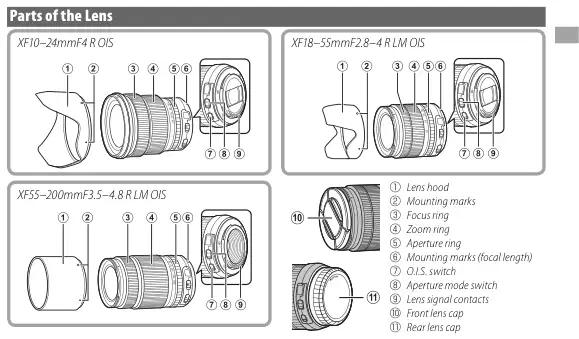
XF55–200mmF3.5–4.8 R LM OIS A Lens hood B Mounting marks C Focus ring D Zoom ring E Aperture ring F Mounting marks (focal length) G O.I.S. switch H Aperture mode switch I Lens signal contacts J Front lens cap K Rear lens cap

Page 6 of the FujiFilm 3228 user manual — Attaching the Lens
6ページ · クリックして拡大
6ページ

Attaching the Lens

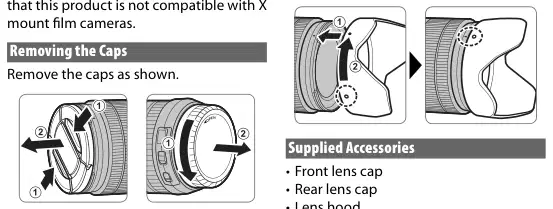
Attaching the Hood

See the camera manual for information on attaching and removing lenses. Note that this product is not compatible with X mount fi lm cameras.

When attached, lens hoods reduce glare and protect the front lens element.
FujiFilm 3228 — Attaching the Lens diagram (page 6)
図 2 · Attaching the Lens
  • Front lens cap
  • Rear lens cap
  • Lens hood
  • Cloth wrapping
Page 7 of the FujiFilm 3228 user manual — Zoom
7ページ · クリックして拡大
7ページ

Zoom

Aperture

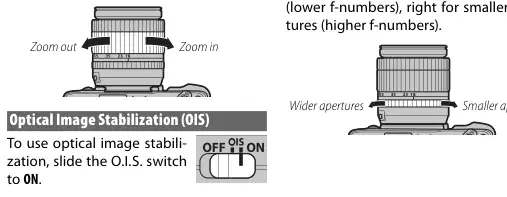
Rotate the zoom ring left to zoom out, re- ducing magnifi cation and increasing the area visible in the frame. Rotate the ring right to zoom in, increasing magnifi cation so that the subject occupies more of the frame.

For auto aperture control, slide the aperture mode switch to A.

To adjust aperture manually, slide the switch to Z and rotate the aperture ring. Rotate the ring left for wider apertures (lower f-numbers), right for smaller aper- tures (higher f-numbers).
FujiFilm 3228 — Zoom diagram (page 7)
図 3 · Zoom

To use optical image stabili- zation, slide the O.I.S. switch to ON.

Page 8 of the FujiFilm 3228 user manual — Specifi cations
8ページ · クリックして拡大
8ページ

Specifi cations

Type XF10–24mmF4 R OIS XF18–55mmF2.8–4 R LM OIS XF55–200mmF3.5–4.8 R LM OIS Lens construction 14 elements in 10 groups (includes 4 aspherical and 4 extra low dispersion elements)

14 elements in 10 groups (includes 1 aspherical and 2 extra low dispersion elements) Focal length (35 mm format equivalent) f=10–24 mm (15–36 mm) f=18–55 mm (27–84 mm) f=55–200 mm (84–305 mm) Angle of view 110°–61.2° 76.5°–29° 29°–8.1° Max. aperture f/4 f/2.8–4.0 f/3.5–4.8 Min. aperture f/22 f/22 f/22 Aperture control

14 elements in 10 groups (includes 3 aspherical and 1 extra low dispersion elements)

Number of blades 7 (rounded diaphragm opening) 7 (rounded diaphragm opening) 7 (rounded diaphragm opening) Stop size ⁄ EV (16 stops) ⁄ EV (19 stops) ⁄ EV (17 stops) Focus range Normal: 0.5 m–infi nity (zoom range) Macro: 24 cm

Normal: 0.6 m–infi nity (zoom range) Macro: 30 cm–10 m (W); 40 cm–10 m (T)

Normal1.1 m–infi nity ( zoom range ) Macro : 1.1 m–3.0 m

Max. magnifi cation T : 0.16 × T : 0.15 × T : 0.18 × External dimensions: Diameter × Length* (approx.) * distance from camera lens mount fl ange

⌀78.0 × 87.0 mm W: ⌀65.0 × 70.4 mm T : ⌀65.0 × 97.9 mm

W⌀ 75.0 × 118 mm T : ⌀ 75.0 × 177 mm

Weight* (approx.) * excluding caps and hoods 410 g 310 g 580 g

Filter size ⌀72 mm ⌀58 mm ⌀62 mm Q Improvements may result in unannounced changes to specifi cations and appearance.

Q Owing to how this lens is constructed, the “Distance indicator” displayed by the camera may in some cases diff er from the actual

focus distance. Use the “Distance indicator” as a guide only.

FujiFilm 3228について質問する

ユーザーまたはスタッフが通常1日以内に回答します。あなたの質問が次の人の助けにもなります。

Add your email to get notified when it’s answered — no spam, ever.

0 questions
FujiFilm 3228に関する質問はまだありません

最初の質問を投稿しましょう。他のユーザーや当チームが回答します。

原本

FujiFilm 3228 取扱説明書(PDF)

136 ページ·3.5 MB·カメラレンズ·PDF
上のページをクリックするとここに表示されます
ページ 1 / …
100%
ページを読み込み中…