

Your Universal Remote Control requires 2 AAA alkaline batteries(not included). To install the batteries: 1. Turn the remote over and push down on the cover and slide it off. 2. Insert the batteries, matching the batteries to the (+) mark inside the battery case. 3. Slide the battery cover back into place. NOTE: Programmed codes will remain in memory for a short period of time allowing for battery replacement. If batteries have been dead for a prolonged period of time, reprogram- ming may be required.
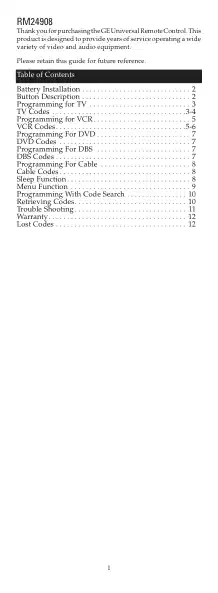
Battery Installation · Button Description · Programming For TV

Abex 172 Admiral 011, 173 Adventura 174 Aiko 016 Alleron 046 Amtron 038 Akai 002 Anam National 003 AOC 004, 005, 006, 007 Audiovox 038 Belcor 004 Bell & Howell 083,162 Bradford 038 Brokwood 004 Candle 004, 006, 008 Celebrity 002 Citizen 006, 016, 038, 171, 174, 177 Colortyme 004, 006 Concerto 004, 006 Contec/Cony . . 012, 013, 038 Craig 038 Crown 038, 171 Curtis Mathes 000, 004, 006, 015, 105, 162, 171 CXC 038 Daewoo . . 004, 005, 006, 016, 017, 127, 171, 190 Daytron 006, 171
Dimensia 000 Dumont 151 Dynatech 004 Electroband 002 Electrohome. . . 002, 003, 004, 006, 019, 022 Emerson 004, 006, 012, . . 023, 024, 025, 026, 027, 028, . .029, 030, 031, 032, 033, 034, 035, 036, 037, 038, . .039, 041, 042, 043, 044, 047, 123, 124, 162, 171, 177, 179, . . 191 Envision 004, 006 Fisher 048, 049, 051, 162 Fujitsu 046 Funai 038, 046 Futuretec 038 GE . . .000, 003, 004, 006, 022, . .052, 054, 055, 087, 164, 165, 166, 167, 168, 181 Gibralter 004, 151 Grundy 038, 046, 171 Hallmark 004, 006 Harvard 038 Hitachi . . . 004, 006, 012, 013, 059, 060, 061, 135, 136, 137, . . 138, 139, 140, 141, 142, 143, . . 144, 145, 146, 148, 150, 179
TV Codes

IMA 038 Infinity 162 Janeil 174 JBL 062 JCB 002 JC Penney 000, 004, 005, . .006, 008, 022, 052, 054, 058, 064, 072, 087, 105, 163, 171, . . 172, 181 Jensen 004, 006 JVC 006, 012, 013, 054, . .060, 065, 066, 067, 123, 157, 158, 159 182 Kawasho 002, 004, 006 Kenwood 004, 006, 019 Kloss Novabeam . . 068, 069, 174, 183 KTV 038, , 070, 171, 177 Loewe 062 Logik 083 Luxman 004, 006 LXI 000, 049, 062 Magnavox . . . 004, 006, 008, . .019, 062, 068, 069, 075, 076, 077, 088, 130, 131, 132, 133, . . 134, 183, 219, 235 Majestic 083 Marantz 004, 006, 062 Megatron 006, 059 Memorex 001, 006, 082, 083, 162 MGA 004, 005, 006, 019, 022, 051, 079, 080, 082 Midland . . 054, 151, 171, 172, 181 Minutz 052 Mitsubishi 004, 005, 006, . .019, 022, 051, 079, 080, 081, 082, 125, 135 Montgomery Ward 083 Motorola 003, 173 MTC 004, 005, 006 Multitech 038 NAD 006, 072, 185 NEC 003, 004, 005, 006 Nikko 006, 016 NTC 016 Onwa 038 Optimus 185 Optonica 095, 173 Orion 035, 191 Panasonic 003, 054, 062, 070 Philco 003, 004, 005,006, . .008, 012, 019, 062, 068, 069, 075, 077, 183 Philips . . . 003, 004, 008, 012, 019, 062, 068, 069, 075, 076, . . 086, 087 Pilot 004 Pioneer . . 004, 006, 090, 091, 092, 136, 179, 185 Portland . . 004, 005, 006, 016, 171
Price Club 105 Prism 054 Proton 004, 093 Pulsar 151 Pulser 004 Quasar 003, 054, 070 . . 006, 012, 038, 049, 162, 171 RCA 000, 003, 004, 005, . .006, 007, 019, 096, 098, 099, 100, 101, 102, 103, 129, 179, . . 181, 188, 190, 203, 212, 233 Realistic . . 000, 004, 049, 195 Runco 151 Sampo 004, 006, 171, 172 Samsung 004, 005, 006, . .012, 015, 017, 019, 104, 105, 106, 171, 172 Sansui 191 Sanyo 004, 048, 049, 080, 162, 169, 180 Scotch 006 Scott 004, 006, 012, 024, 035, 038, 046 Sears 000, 004, 006, 013, . .019, 046, 048, 049, 051, 066, 072, 180, 181, 189 Sharp 004, 006, 012, 029 095, 111,112, 113,122, 171, 173 Shogun 004 Signature 001, 083 Simpson 008 Sony 002, 218 Soundesign . . . 004, 006, 008, 038, 046 Squareview 189 SSS 004, 038 Starlite 038 Supre-Macy 174 Supreme 002 Sylvania 004, 008, 006, . .019, 062, 068, 069, 075, 076, 077, 088, 116, 161, 183 Symphonic 033, 038 Tandy 173 Tatung 003 Technics 054 Techwood 004, 006 Teknika 004, 005, 006, 008,012, 013, 016, 038, 046, . . 076, 082, 083, 105, 170, 171 Tera 004, 012, 093 TMK 004, 006 Toshiba 049, 072, 105, 118, 160, 161, 162 Totevision 171 Universal 052, 087 Victor 066, 182 Vidtech 004, 005, 006 Viking 174 Wards 000, 001, 004, 005, . .006, 019, 024, 033, 046, 052, 062, 068, 069, 075, 076, 083, . . 087, 088, 095, 119, 120 Yamaha . . 004, 005, 006, 019 Zenith 004, 051, 083, 151,
TV Codes

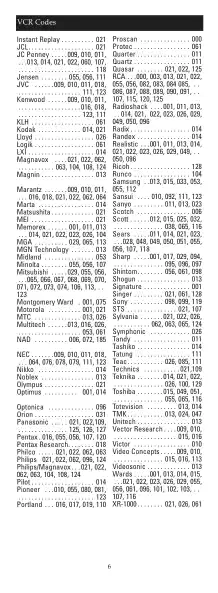
Admiral 001 Adventura 026 Aiko 027 Aiwa 026 Akai . . .003, 005, 007, 008, 111, 112, 113 American High 021 Asha 013 Audio Dynamics 009, 010 Audiovox 014 Bell & Howell 011 Beaumark 013 Broksonic 012, 025 Calix 014 Candle 013, 014, 015, 016, 017, 018, 019 Cannon 021, 022 Capehart 020, 110 Carver 062 CCE 027, 061 Citizen 013, 014, 015, 016, 017, 018, 019, 027, Colortyme 009 Colt 061 Craig 013, 014, 023, 061 Curtis Mathes 000, 004, 006, 015, 105, 162, 171 Cybernex 013 Daewoo . . .015, 017, 019, 025, 026, 027, 028, 110
Daytron 110 DBX 009, 010 Dimensia 000 Dynatech 026 Electrohome 014, 029 Electrophonic 014 Emerson 012, 014, 015, . . .021, 024, 025, 026, 029, 030, 031, 031, 032, 033, 034, 036, . . 037, 037, 038, 039, 040, 041, . . 042, 044, 045, 046, 047, 065, . . . 105, 113, 116, 119, 117, 130 Fisher 011, 023, 048, 049, 050, 051, 052, 118 Fuji 1021, 119 Funai 026 Futuretec 038 Garrard 026
GE 000, 013, 021, 022, 053, 115, 120 Goldstar . . . 009, 014, 018, 054 Gradiente 026 Harley Davidson 026 Harman Kardon 009 Harwood 061 Headquarter 011 Hitachi 055, 056, 057, 107, 111, 120 Hi-Q 023
Programming For VCR · VCR Codes


The DVD codes are programmed using the VCR•DVD key. CODE LIST
Aiwa 350 Hitachi 351 JVC 161, 352 Konka 353, 354 Magnavox 162, 356, 357 Mitubishi 163 Panasonic 355 Philips 162, 356, 357
Pioneer 165 Proscan 160 RCA 160 Sanyo 359 Samsung 034 Sony 166, 360, 361 Toshiba 167, 362, 363 Zenith 364
Alphastar 079 Echosphere 078 Echostar 089 GE 071, 080, 081 Hitachi SYS I 084 Hitachi SYS II 083 Hughes 077, 083, 090 JVC 082 Magnavox 085
Panasonic 075 Philips 085 Primestar 076 Proscan 071, 080, 081 RCA 071, 080, 081 Sony 072 Toshiba 073 Uniden 086

The cable codes are programmed using the DBS•CABLE key.
ABC . . .001, 003, 004, 005, 006, 007 Antronix 008, 009 Archer 008, 009, 010, 011 Cabletenna 008 Cableview 008 Century 011 Citizen 011 Colour Voice 012, 013 Comtronics 015 Contec/Cony 016 Eastern 017 Garrard 011 GC Electronics 009 Gemini 018, 019 General Instrument 001, 003, 049 Hamlin 035 Hitachi 003 Jerrold . . . 001, 003, 005, 007, 018, 023, 024, 046, 049 Magnavox 025 Movie Time 027, 028 NSC 027, 028 Oak 016, 029 Panasonic 000, 048 Philips 011, 012, 013, 019,
025, 030, 031, 032 Philips/Magnavox 011, 012, 013, 019, 025, 030, 031, 032 Pioneer 033, 034 RCA 000, 047, 049 Realistic 009 Regal 022, 035 Regency 017 Rembrandt 003 Samsung 034 Scientific Atlanta . . . 006, 036, 037, 038 Signal 018 Signature 003 Sprucer 000 Standard Componts 039 Starcom 001, 007, 018 Stargate 018 Starquest 018 Tocom 004, 023 Tusa 018 TV86 027 Unika 008, 009, 011 United Cable 001 Viewstar . . . 015, 016, 025, 027 Zenith 050, 051
The Sleep Function will turn off your TV automatically after the user programs the time interval from one (1) to ninety- nine (99) minutes.
To Turn Off SLEEP Timer: 1. Sleep timer program will be cancelled and reset to zero by either of the following:
Press and hold SLEEP button until INDICATOR LIGHT blinks or press OFF•ON button, turning
Programming For Cable · Cable Codes · Sleep Function

TV off. Menu Function
The Menu Function is used to make changes in the selected settings such as setting color, channels, timer, etc. The MENU button invokes TV, and SAT modes. Each menu will vary from brand to brand.
Entering the Menu Mode:
VOL UP/DOWN buttons will operate as CURSOR RIGHT/LEFT.
CHAN UP/DOWN buttons will operate as CURSOR UP/DOWN.
Not all functions in competitive models and brands of televisions may be fully supported.
For RCA, GE, ProScan TVs pushing the MENU button will select the highlighted item. The numeric buttons may also be used to select the MENU choice.
To exit the Menu Mode and clear the screen, push the device but- ton you have chosen on the remote.
Special notes: 1. Because of the wide variety of menu formats, some experiment- ing may be required. 2. SONY: Pressing the ENTER button while in menu mode returns to previous menu. 3. ZENITH: Push the menu button a second time to move from the SET-UP MENU to the VIDEO MENU.

Programming With Code Search
If your TV, VCR, DBS Satellite System or Cable Box does not respond after you have tried all the codes for your brand, or if your brand is not listed, try searching your code by following the steps below:
Identifying Codes From Your Universal Remote
If you need to find the three-digit code for your TV, VCR, DBS or Cable Box after your device is set-up, use this procedure.
Retrieving Codes

SOLUTION
A) Replace the batteries with 2 new AAA alkaline batteries. B) Check if batteries are properly installed.
Red light not blinking when you press any key.
A) Try all the codes listed for your brand. B) Try the Code Search method. Start Code Search over again to locate the proper code for full compatibility
The remote does not operate your devices.
Not performing commands properly
Try the VCR code for your brand. Some combo units, however, may require both a TV and VCR code for full operation.
Problems programming a TV/ VCR Combo Unit
As a safety feature on your remote, you must press the REC button twice.
If your original remote required ENTER after a channel, press ENTER after you select a chan- nel. A) Make sure you have new bat- teries and you are aiming your remote at your device. B) Check that batteries are prop- erly installed.
Remote must remain aimed at television after sleep is set in order for it to work.
No response after pressing a key
Due to some designs, the origi- nal remote will only perform these functions.
Trouble Shooting · VCR not responding · Problems changing channels

90 Day Limited Warranty
Jasco Products Company warrants this product to be free from manufacturing defects for a period of ninety days from the origi- nal date of consumer purchase. This warranty is limited to the repair or replacement of this product only and does not extend to consequential or incidental damage to other products that may be used with this unit. This warranty is in lieu of all other warranties express or implied. Some states do not allow limita- tions on how long an implied warranty lasts or permit the exclu- sion or limitation of incidental or consequential damages, so the above limitations may not apply to you. This warranty gives you specific rights, and you may also have other rights which vary from state to state. If unit should prove defective within the war- ranty period, return prepaid with dated proof of purchase to: Jasco Products Company 311 N.W. 122nd Oklahoma City, OK 73114
Enclosed with this remote is a sticker on which you should write the codes for each device you programmed. Apply the sticker to the back of the remote or somewhere convenient for future reference.
Also on the sticker is our website address which, should you lose your codes or programming instructions, you can find available on our website:
ユーザーまたはスタッフが通常1日以内に回答します。あなたの質問が次の人の助けにもなります。
最初の質問を投稿しましょう。他のユーザーや当チームが回答します。