
Manual Feeder / for i800 Series Scanners A-61530_EN Part No. 8CK187 January 2006
The Kodak Manual Feeder / for i800 Series Scanners provides a flat work surface to aid in manual feeding.
This document provides instructions on how to install and use the manual feeder.
Installing and using the Manual Feeder Before installing the manual feeder the elevator tray must be in the lowest position.
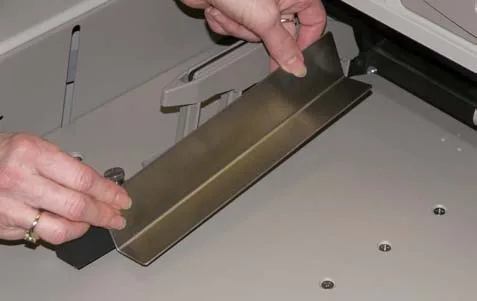
Attaching the manual feeder side guides After installing the manual feeder, attach the side guides that are packed with the manual feeder.
to lower the elevator tray.
The manual feeder has two locations for the side guides. Depending on the size of the documents you are scanning:
use the holes closest to the center of the manual

feeder if you are scanning documents smaller than 22.23 cm (8.75 in.), or
use the holes farthest away from the center of the
manual feeder if you are scanning documents larger than 22 cm (8.66 in.).


to lower the elevator tray to its lowest position.
icon.

EASTMAN KODAK COMPANY Document Imaging Rochester, New York 14650
Kodak is a trademark of Eastman Kodak Company.
© Eastman Kodak Company, 2006
A-61530 _EN 1/2006 Part No. 8CK187


ユーザーまたはスタッフが通常1日以内に回答します。あなたの質問が次の人の助けにもなります。
最初の質問を投稿しましょう。他のユーザーや当チームが回答します。