


I-FLY PCMCIA WIRELESS CARD
A02-WPCM-11B
A02-WPCM-11B_GE01(August 2003)

Installation Windows 98/2000/ME/XP The following installation operates under Windows 2000. The procedures will be the same for Windows 98/ME/XP. NOTE: Be sure that there is no PCMCIA adaptor connected to the computer at this stage.
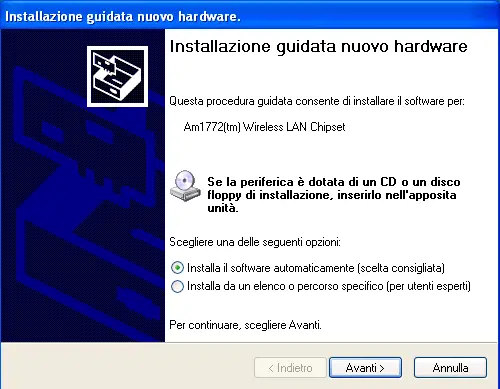
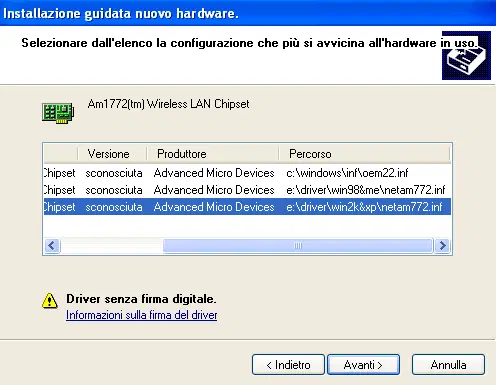
1) Power on the computer and allow Windows 98/2000/ME/XP to load fully. 2) Insert the driver CD into the CD-ROM device and execute the “Setup.exe” program. The installshield wizard box will appear, click “Next“ to continue. 3) Click “Browse“ to locate the driver on your CD-ROM, then click “Next“ to select the right folder. 4) The following wizard box will appear to show the folder’s information. 5) After Windows 2000 finishes copying files, it shows “Windows has finished installing the software for this device.” Click “Finish” to complete the installation. 6) Message notifying you to restart your computer may pop up. Select “Yes” to restart your computer. 7) After reboot, connect the Wireless PCMCIA CARD to the PCMCIA port, and the Windows System will found the “NEW HARDWARE”, then click “NEXT”.

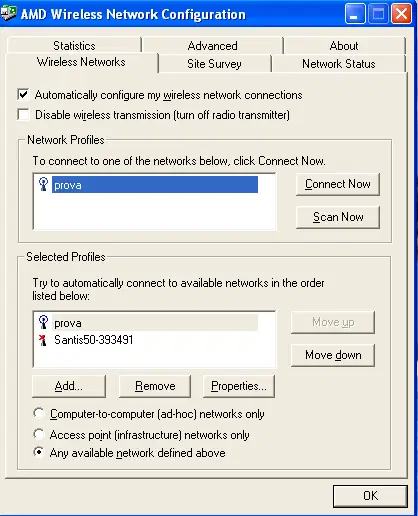
icon is not shown on the system tray , it means that the installation was not successful. Select “Uninstall” from menù “AVVIO/PROGRAMMI/Wireless LAN Utility” to remove the device, then restart your computer and repeat the installation. For activate the wireless connection , select “Automatically configure my wireless connection” and “any available network defined above” clicking on menù “AMD
selecting “Wireless Networks”, then click “SCAN NOW”.
Wireless configuration”

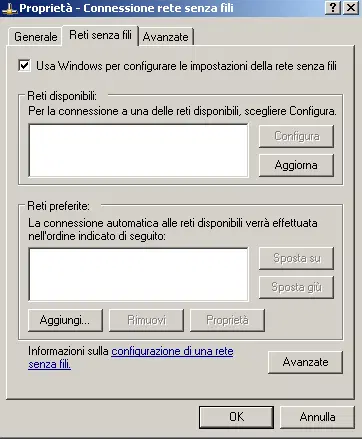
** Windows XP: Windows XP has built-in support for wireless networking utility.
will appear in the "System Tray". Click twice on the network connection icon, then click on “Next”, then at the menu “Network wireless” and lately disactivate “Use windows for setting wireless network”.

SUPPORT If you have any problems with the product, please contact the dealer where you bought this product. If you have any other questions you can contact the Atlantis Land company directly at the following address:
ユーザーまたはスタッフが通常1日以内に回答します。あなたの質問が次の人の助けにもなります。
最初の質問を投稿しましょう。他のユーザーや当チームが回答します。