

English, Français, Español, Português
Antes de usar (o ensamblar) el producto lea cuidadosamente este instructivo
© 1998 Texas Instruments Incorporated

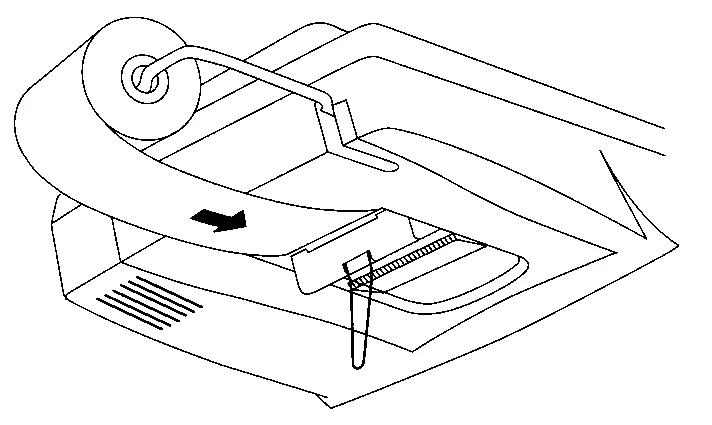
Installing the Paper Roll

Replacing the 2-Colour Ink Ribbon


& Advances the paper. 2 Clears the entire pending operation except the memory or the grand total. O Changes the sign (+ or –) of the displayed number. > Interprets the number in the display as a percentage. I Clears an entry or an error or overflow. = Computes the percentage of change between two values. (The price increase from 9.75 to 11.25 is 1.50 and the percentage increase is 15.38%) # Calculates the selling price and profit or loss amount on an item. ( Removes the last digit entered in the display. 4 Prints a reference number or date without affecting calculations. / Pressed once, displays and prints the grand total of all totals. Pressed twice, clears the grand total. This is active only if PRINTER = GT. RDisplays and prints the total, but does not clear the total. Q Displays and prints the total and clears the total. Also resets the item counter (IC) to zero.

0 Displays and prints the value in memory and clears the memory. Also clears M from the display and resets the memory item count to zero. ; Displays and prints the subtotal in memory but does not clear the memory. F Subtracts the displayed value from memory. If a multiplication or division operation is pending, F completes it and subtracts the result from memory. N Adds the displayed value to memory. If a multiplication or division operation is pending, N completes it and adds the result to memory.
+ Lets you add and subtract numbers without entering the decimal point (key in 5321 to enter 53.21).
F The number of decimal places varies based on the result.
0,2,3,4,6 Sets the number of decimal places to 0, 2, 3, 4, or 6.
Positive entries and results are printed in black; negative entries and results are printed in red.
OFF Calculations are displayed but not printed.
ON Calculations are displayed and printed.
IC Both the printer and item counter are active. To clear the item counter, press Q or 0.
GT Accumulates a running grand total of all calculations you perform until you clear the grand total. To print a grand total, press /. To clear the grand total, press / again.
( Results are rounded down (if DECIMAL = 1, 2.33 rounds to 2.3).
5/4 Results are rounded up or down, depending on the value and decimal setting (if DECIMAL = 2, 2.349 rounds to 2.35).
' Results are rounded up (if DECIMAL = 1, 2.33 rounds to 2.4).

If you have not pressed an operation key:
If you have pressed an operation key:
Error and Overflow Conditions and Indicators
If you divide by zero or calculate a selling price using a margin of 100%, an error occurs. The calculator prints 0 .* and displays ERROR and 0.
An overflow occurs if you calculate a result with too many digits for the calculator to display or print. When this occurs, the calculator:
To clear an error or overflow, press I. The memory is not cleared unless the error or overflow occurred in a memory calculation.
Correcting Entry Errors

Addition and Subtraction 12.41 – 3.95 + 5.40 = 13.86
DECIMAL = +, PRINTER = IC, ROUND = 5/4
2 1241 9 12.41 12.41 +
540 9 13.86 5.40 +
Multiplication and Division 11.32 Q (–6) P 2 = –33.96
DECIMAL = F, PRINTER = ON, ROUND = 5/4
6 O ' –67.92 6. – P
2 3 2. =
–33.96 33.96 –∗
Squares 2.52 = 6.25
2 2.5 ? 3
2.5 2.5 6.25
Reciprocals 1/25 = 0.04
2 25 ' 3 3

DECIMAL = 2, ROUND = 5/4, PRINTER = ON
Multiplication with Memory Keys You need the total of 3 items at 10.50 and 5 items at 4.95. By using the memory keys, you will not disturb a current calculation.
0 † 10.5 ? 3 N 10.5 x
4.95 ? 5 N 4.95 x
; †† M 56.25 56.25 M U
4.95 ? 5 F ††† 4.95 x
0 31.50 31.50 M ∗
† 0 prints the current memory total and clears the memory. †† You calculate a memory subtotal to see the current total amount of your order. ††† You decide not to order the last item.
DECIMAL = 2, ROUND = 5/4, PRINTER = ON
Calculating a Profit Amount An item cost you 65.00. You want to earn a 40% profit. Calculate the selling price.
40 3 40. 43.333333333 % @∗
108.33 108.33 ∗

Calculating a Loss Amount An item cost you 35,000. You must sell it, but can only afford to lose 33.3%. Calculate the selling price.
33.3 O 3 33.3 8,743.435859 –% T ∗
26,256.56 26,256.56 ∗
DECIMAL = F, ROUND = 5/4, PRINTER = ON
Percent 49 x 15%
2 49 ? 49. 49. x
15 > 7.35 15. 7.35 %
Add-On 1,450 + 15%
2 1450 ? 1,450 1,450. x
15 > 217.5 15. 217.5 %
9 1,667.5 1,667.5 + %
Discount 69.95 - 10%
2 69.95 ? 69.95 69.95 x
10 > 6.995 10. 6.995 %
. 62.95 62.955 -%
Percent Ratio 29.5 is what percent of 25?
2 29.5 ' 29.5 29.5. ö
25 > 118. 25. 118. %

DECIMAL = F, ROUND = 5/4, PRINTER = ON
Multiplying by a Constant 5 x 3 = 15 5 x 4 = 20
The first number in a multiplication problem is the constant multiplier.
2 5 ? 5. 5. x
3 3 3. =
4 3 4. =
Dividing by a Constant 66 ÷ 3 = 22 90 ÷ 3 = 30
The second number in a division problem is the constant divisor.
2 66 ' 66. 66. ÷
3 3 3. =
90 3 90. 90. =
ユーザーまたはスタッフが通常1日以内に回答します。あなたの質問が次の人の助けにもなります。
最初の質問を投稿しましょう。他のユーザーや当チームが回答します。

