To control the heating, the thermostat must measure the most repre-
sentative room temperature in your home. As the temperature measure-
ment probe is in the transmitter unit, you must place the unit:
– wall-mounted or placed on a shelf or accessible furniture at a height of
1.50 m,
– away from heat sources (fireplaces, sunlight) and draughts (windows,
Before mounting in the final position, ensure no object can block the
transmission between the transmitter and the radiator’s receiver.
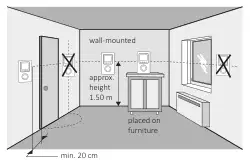
Do not install the
a wall in contact with
the outside or in an
(e.g. garage, etc.).
doors), · thermostat on · unheated room

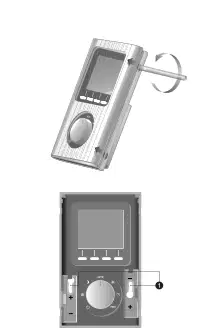
a screwdriver. Use the screw-
driver to remove the batteries
supplied from the unit.
mostat using the screws and pegs
or fit onto a flush-mounted box
(❶, distance between centres
60 mm).
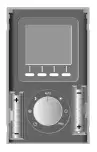
that they are correctly fitted.
thermostat.

Turn the knob to Shutdown and press the
right-hand button for 5 seconds until H601
(maintenance menu reserved for the
installer).
Press OK.
The screen displays CF01.
5 sec.
CF01 – Correction of room temperature
measurement.
If there is a difference between the tempera-
ture noted (thermometer) and the tempera-
ture measured and displayed by the unit, the
menu acts on the measurement of the probe
so as to compensate for this difference (from
-4° C to +4° C in steps of 0.1° C).
Press + or – to make your choice, OK to
confirm it and go to the next menu.

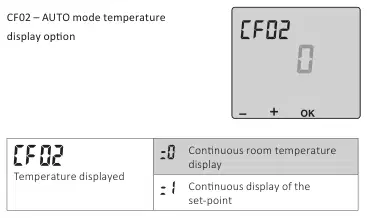
Press + or – to make your choice, OK to confirm it and
go to the next menu.
CF03 – Infrared test (not applied in some
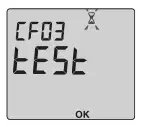
The transmitter sends a frame to the receiver
every 3 seconds. Check that the receiver LED
flashes each time it receives the frames.
Turn the knob to exit the configuration
mode.
receivers)

You can carry out a general reset to return to the factory settings:
– the installer settings (grayed out on the start up menus),
– the time and day,
– default program.
Turn the knob to Shutdown then press the
left-hand button for 10 seconds until init is
displayed.
Press OK to confirm or C to cancel.
Return to the shutdown mode display.
10 sec.
– set-point temperatures,

Turn the knob to .
The days flash. Press + or – to make your
choice, OK to confirm it and go to the next
setting. Repeat the operations to set the
hours and minutes.
Turn the knob to exit the setting
mode.
Turn the knob to:
– to set the frost protection temperature
(5° C to 15° C, 7° C by default),
– to set the economy temperature
(10° C to 30° C, 15° C by default),
– to set the comfort temperature (10° C
to 30° C, 66.20° F by default), Press +
or – to make your choice.
Turn the knob to exit the setting mode.
Day Hours · Minutes

When starting up, the “Comfort mode from 6 a.m. to 11 p.m.” program is
applied to all the days of the week. To change the programming, turn the
knob to PROG. The 1st time slot flashes on and off.
Programming starts on day 1 at midnight.
Press the or buttons to create different Economy or Comfort
periods.
Go to the next program change Confirm and go to the next day
for 1 hour Comfort for 1 hour
Press and hold the OK button for 3 seconds to confirm the program you
created and copy it to the next day.
Economy mode

Press the OK button to confirm and continue on to the next day to pro-
gram it separately.
h 0 h 8 h 6 h 3 2 h 7 1 h 0
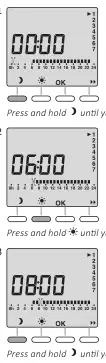
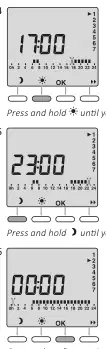
Press and hold until you reach 6:00 Press and hold until you reach 23:00
Press and hold until you reach 8:00 Press and hold until you reach 00:00
Press and hold until you reach 17:00 Copy and confirm or simply confirm

Press the button repeatedly to check the accuracy of the Comfort and
Economy periods you created.
Verification of the different or periods
Press OK to check the next day.
To exit the mode, turn the knob to another mode.
Time slot consulted · Program profile

Turn the knob to AUTO.
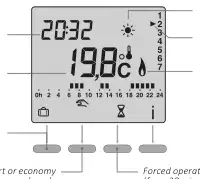
Current setting (e.g. comfort)
Forced operation (from 30 minutes to 4 hours)
manual mode (up to program change)
When starting up, the temperature measured by the thermostat is
displayed (the symbol appears above the ° C).
Press the button i to display the set-point temperature.
– press i: measured temperature.
mode (knob turned to ), continuous Comfort mode ( ) or continuous
Frost Protection mode ( ).

This mode is used to set a temperature
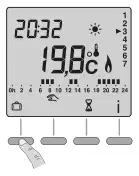
(5 to 15° C) for a period that can be set from
1 to 365 days.
From the automatic mode (AUTO), press
the button. The number of days flash on
and off.
Press + or – to set the number of days.
19 January, indicate 9 days. Automatic opera-
tion will restart on 19 January at 00.00 h.
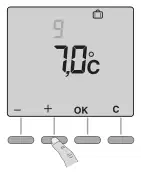
Press OK to confirm. The temperature flashes
on and off. Press + or – to set the tempera-
ture. Press OK to confirm.
To cancel the absence mode (e.g. when
returning early), press the C button or turn
the knob.

( ) Up to the next program change
Manual mode is the current mode
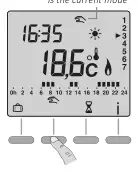
This mode is used to go from comfort to
economy mode (or conversely) until the next
program change.
the button allows you to go to comfort
mode. To cancel the manual mode, press the
button again or turn the knob.
( ) Forced operation can be set from 30
minutes to 4 hours
This mode makes it possible
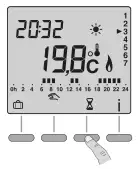
to program a forced operation
for the heating from 30 minutes
to 4 hours.
From the automatic mode (AUTO),
press the button.

Manual mode is the current
The manual mode period flashes
on and off.
Press + or – to set the period required
(e.g. 1.5 hours).
Press OK to confirm. To cancel the manual
mode, press the C button or turn the knob.
To shut down the heating (in summer, for
example).
Turn the knob to . The thermostat displays
the room temperature measured.
mode · Measured temperature

From the moment the battery level symbol
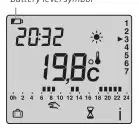
appears, you have around 3 months to
change them (2 LR03 or AAA-type 1.5 V
alkaline batteries).
The following precautions must be re-
spected:
– ensure that the +/– polarities are correct
when the batteries are fitted into the unit,
– do not dispose of used batteries in unau-
thorized places (you should respect the
environment by taking the batteries to
a suitable collection site),
– do not recharge them,
– you have approximately 45 seconds to
change the batteries before the time set-
ting is reset to zero (in this case, reset the
time and date).
Battery level symbol

plied), autonomy greater than 2 years for normal use




des piles Allure en cours (ex : confort) Température
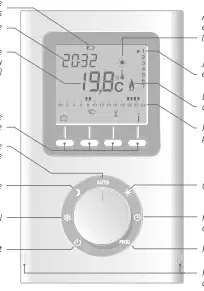
Repères d’ouverture du capot
ユーザーまたはスタッフが通常1日以内に回答します。あなたの質問が次の人の助けにもなります。
最初の質問を投稿しましょう。他のユーザーや当チームが回答します。