JA
ION logo
公式取扱説明書

Ion MOBILE DJ

20 ページ·604 KB·DJパーティーミュージック機器·PDF·EN
Ion MOBILE DJ
目次 14セクション GUIDE D'UTILISATION RAPIDE · MOBILE DJ · GUÍA DE INICIO RÁPIDO · QUICKSTART GUIDE · … 表示非表示
Page 1 of the Ion MOBILE DJ user manual — NEDERLANDS ( 17 – 19 )
1ページ · クリックして拡大
1ページ

GUIDE D'UTILISATION RAPIDE

MOBILE DJ

GUÍA DE INICIO RÁPIDO

QUICKSTART GUIDE

KURZANLEITUNG

SNELSTARTGIDS

NEDERLANDS ( 17 – 19 )

FRANÇAIS ( 8 – 10 )

GUIDA RAPIDA

ITALIANO ( 11 – 13 )

DEUTSCH ( 14 – 16 )

ENGLISH ( 2 – 4 )

ESPAÑOL ( 5 – 7 )

Page 2 of the Ion MOBILE DJ user manual — TOP PANEL SIDE PANEL
2ページ · クリックして拡大
2ページ

QUICKSTART GUIDE 1. Make sure all items listed on the front of this guide are included in the box. 2. READ SAFETY INSTRUCTION BOOKLET BEFORE USING THE PRODUCT. 3. MAKE SURE THAT YOU HAVE COMPLETELY CHARGED THE BATTERY PRIOR TO FIRST USE FOR MAXIMUM BATTERY LIFE. 4. Study this setup diagram. 5. Place product in an appropriate position for operation. 6. Make sure all input devices such as microphones, CD players, mp3 players, and linked amplifiers/PAs are turned off and volume settings are set at "zero." 7. Switch everything on in the following order:

BOX CONTENTS ƒ MOBILE DJ ƒ Microphone cable ƒ Microphone ƒ Power cable ƒ Quickstart Guide ƒ Safety Instructions & Warranty Information Booklet
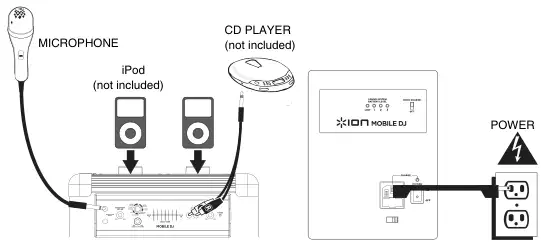
  • audio input sources (i.e. microphones, instruments, CD/MP3 Players)
  • MOBILE DJ 8. When turning off, always reverse this operation:
  • MOBILE DJ
  • audio input sources
  • RECHARGEABLE BATTERIES Rechargeable lead-acid batteries are the same type used in automobiles. As with your car battery, how you use this battery has a significant impact on its lifespan. With proper use and treatment, a lead-acid battery can last for years. Here are some recommendations for getting the longest life from the internal battery. GENERAL USAGE
  • Fully charge the battery before using it.
  • Avoid completely draining the battery.
  • For maximum life, drain the battery 80% once a month.
  • Charge the battery completely after each use.
  • When fully charged, the battery may be left for up to a week.
  • You may leave the unit plugged in for up to two weeks. STORAGE
  • Avoid storing in high temperatures and moist places.
  • For long-term storage, periodically recharge the battery.
  • If you do not charge the battery for six months, it may not charge. REPAIR
  • As the battery nears the end of its life, it may lose its ability to recharge. If this occurs, contact your local authorized ION Audio service center.
  • Do not attempt to service, modify, or replace the battery yourself. DISPOSAL
  • Bring the unit to a recycling center or dispose of in accordance with local ordinances.
Ion MOBILE DJ — TOP PANEL SIDE PANEL diagram (page 2)
図 1

TOP PANEL SIDE PANEL

Page 3 of the Ion MOBILE DJ user manual — 2 3 3 2 4 5 6 7
3ページ · クリックして拡大
3ページ

SIDE PANEL FEATURES 1. POWER IN (IEC) – Insert the included power cable here and connect the other end to a power source, which will simultaneously power and charge the unit. The charge indicator will illuminate when the battery is charging.

2. VOLTAGE SELECTOR * – Set this to the correct voltage for your location.

* WARNING: U.S. users should set this switch to "100- 120V" whereas U.K. and most European users should set this to "220-240V." Selecting the improper voltage can damage the unit.

3. POWER SWITCH – Turns MOBILE DJ on or off. Please note that while MOBILE DJ is connected to a power source, the battery will charge.
4. BATTERY LEVEL INDICATOR – When the unit is on, these lights indicate the remaining battery power. Battery life varies based on volume and usage.
5. DOCK CHARGE SWITCH – To charge your iPod when the unit is on, set this switch to the "charge" position. TOP PANEL FEATURES

2 3 3 2 4 5 6 7

1. POWER LED – This light will illuminate when MOBILE DJ is on.
2. MICROPHONE INPUTS (1/4") – These 1/4" mono inputs can be used to connect a microphone to the unit.
3. AUX INPUT (STEREO RCA) – This stereo RCA input can be used to connect a CD, MP3, or other audio source. To connect to a portable device with a 1/8" stereo headphone jack, use a standard 1/8"-to-RCA stereo cable.
4. MICROPHONE VOLUME – This knob controls the volume of the MICROPHONE INPUTS.
5. MASTER VOLUME – This knob controls the MOBILE DJ's speaker volume.
6. CROSSFADER – Blends music playing between Docks A and B. Sliding this to the left plays Dock A; sliding to the right plays Dock B.
7. EFFECT SELECTION KNOB – This knob selects which effect is applied to the MICROPHONE INPUTS. You can choose from any one of the effects described in the EFFECTS section.
8. EFFECT AMOUNT – This knob controls how much of the selected effect you hear.
Page 4 of the Ion MOBILE DJ user manual — TOP PANEL SIDE PANEL
4ページ · クリックして拡大
4ページ
  • EFFECTS ROTATING SPEAKER EFFECT ROTARY: Fast rotary speaker simulator creates the classic, lush Doppler effect of an organ’s spinning horn. Effective on guitars, vocals, keyboards and other instruments. REVERB EFFECTS HALL 1: A large, bright concert hall reverberation effect suitable for vocals and instruments. HALL 2: A large, warm concert hall reverberation effect suitable for drums, piano and other instruments. ROOM 1: A medium-sized, moderately bright reflective room reverberation effect suitable for vocals, lead guitars and other instruments. ROOM 2: A small, very reflective bright room reverberation effect suitable for drums and percussion as well as electric guitars and other instruments. ROOM 3: A large, warm room reverberation effect suitable for acoustic instruments. PLATE 1: A lush, smooth vocal plate reverb with a long decay time and warm tonality. PLATE 2: An emulation of vintage plate reverb with bright, slightly tinny tonality and a medium-length decay. PLATE 3: A short, bright plate reverb effective for creating subtle spaces. MODULATION EFFECTS CHORUS: A complex, 6-voice chorus ensemble effect with short delays often referred to as a "Chorus / Doubler". Discrete stereo signal path. Slow and watery. FLANGE: Classic stereo flange: a slow, slightly metallic sweep with a discrete stereo signal path. DELAY EFFECTS DELAY 1: A simple slap-back echo with no feedback particularly effective on vocals and rhythm guitars. DELAY 2: Medium-length poly-rhythmic delay with crossover feedback. 3 to 4 ratio between L and R delay times (291 to 388ms) for 3/4 vs. 4/4 feel. Useful for solo instruments where a long, trailing echo effect is desired. MULTI EFFECTS CHORUS – ROOM 1: Room reverb into a slow flanging modulation creates a spacey effect. CHORUS – ROOM 2: Fast modulation provides a dramatic chorus effect in a small room for a very lush chorus + reverb sound with a discrete stereo signal path. BYPASS: Bypasses the effects processor – no effects will be heard. IMPORTANT NOTES Use this troubleshooting guide if the sound is distorted at high volumes.
  • Input is "clipping" (distorting): Try lowering the input gain or the volume control on your sound source or music instrument.
  • Output is "clipping" (distorting): Lower the main volume level.
  • There is too much bass: Try adjusting the tone or EQ control on your sound source to lower the bass level. This will allow you to play the music louder before "clipping" (distortion) occurs.
  • The link cable: is being plugged into the instrument or MIC input instead of the RCA line input. Important: With all large speakers, an initial "break-in" period is needed to perform at optimal levels. To properly "break in" your MOBILE DJ, play an audio source at medium volume for a few hours. SPECIFICATIONS
Input VoltageAC 100–120V / 60Hz, 220–240V / 50Hz
Input Wattage50W
Output Wattage22W (Peak)
Frequency Response (±3dB)77Hz–20kHz

Time required to fully charge the MOBILE DJ: under 4 hours Battery life: Over 12 hours* when fully charged.

* Note: Battery life may vary based on temperature, age, and volume usage of product.

Ion MOBILE DJについて質問する

ユーザーまたはスタッフが通常1日以内に回答します。あなたの質問が次の人の助けにもなります。

Add your email to get notified when it’s answered — no spam, ever.

0 questions
Ion MOBILE DJに関する質問はまだありません

最初の質問を投稿しましょう。他のユーザーや当チームが回答します。

原本

Ion MOBILE DJ 取扱説明書(PDF)

20 ページ·604 KB·DJパーティーミュージック機器·PDF
上のページをクリックするとここに表示されます
ページ 1 / …
100%
ページを読み込み中…