JA
Harman Kardon logo
公式取扱説明書

Harman Kardon Citation MultiBeam 700 Speaker

44 ページ·1.7 MB·スピーカー·PDF·ENDEFRITNL
Harman Kardon Citation MultiBeam 700 Speaker
目次 33セクション 1 APP · The Google Assistant setup · Google Home · AirPlay setup · … 表示非表示
Page 1 of the Harman Kardon Citation MultiBeam 700 Speaker user manual
1ページ · クリックして拡大
1ページ
Harman Kardon Citation MultiBeam 700 Speaker diagram (page 1)
図 1

C I T A T I O N M U L T I B E A M 7 0 0

Page 2 of the Harman Kardon Citation MultiBeam 700 Speaker user manual — The Google Assistant setup
2ページ · クリックして拡大
2ページ

1 APP

The Google Assistant setup

Google Home

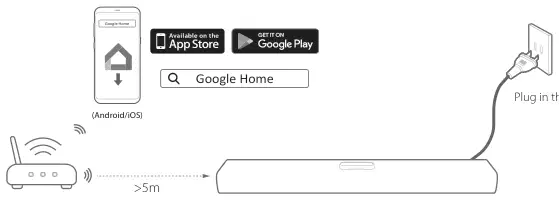
Download the Google Home app and set up your Citation MultiBeam 700.

All product features will be set up.

Page 3 of the Harman Kardon Citation MultiBeam 700 Speaker user manual — AirPlay setup
3ページ · クリックして拡大
3ページ

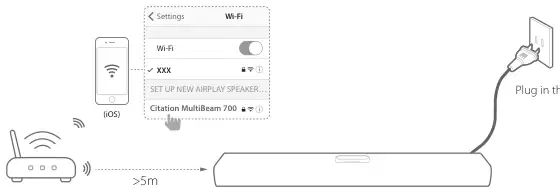
AirPlay setup

Harman Kardon Citation MultiBeam 700 Speaker — AirPlay setup diagram (page 3)
図 2 · AirPlay setup

Plug in the power

For AirPlay only users, skip the Google Home app; on your iOS device, go to Settings > Wi-Fi and select “Citation MultiBeam 700” under SET UP NEW AIRPLAY SPEAKER ... Follow the onscreen instructions to complete setup.

Google Voice Assistant and Chromecast will require additional set up with the Google Home app.

Page 4 of the Harman Kardon Citation MultiBeam 700 Speaker user manual — Remote control x1
4ページ · クリックして拡大
4ページ

2 PRODUCT TOUR

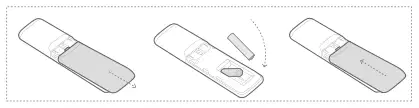
HDMI cable x1

Citation MultiBeam 700 x1

Optical cable x1

Regional power cord x1 (varies depending on country)

Wall mounting kit
Harman Kardon Citation MultiBeam 700 Speaker — HDMI cable x1 diagram (page 4)
図 3 · HDMI cable x1

Remote control x1

Page 5 of the Harman Kardon Citation MultiBeam 700 Speaker user manual — Lights when active
5ページ · クリックして拡大
5ページ

Top & Front

Back

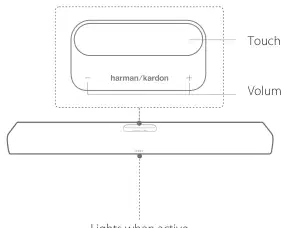
Harman Kardon Citation MultiBeam 700 Speaker — Top & Front diagram (page 5)
図 4 · Top & Front
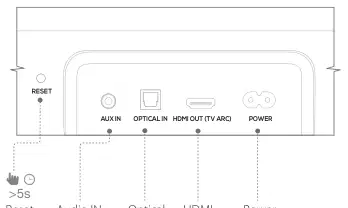
Harman Kardon Citation MultiBeam 700 Speaker — Top & Front diagram (page 5)
図 5 · Top & Front

Touch screen

AUX IN OPTICAL IN HDMI OUT (TV ARC) POWER

Lights when active

Power Optical Audio IN HDMI Reset

Page 6 of the Harman Kardon Citation MultiBeam 700 Speaker user manual — Touch screen
6ページ · クリックして拡大
6ページ

3 CONTROL / INFORMATION ON TOUCH SCREEN

Touch screen

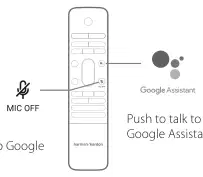
Wi-Fi status Push to talk to Google Assistant

Mic mute/unmute

Set up other Citation speakers Bluetooth status

HDMI ARC source

Page 7 of the Harman Kardon Citation MultiBeam 700 Speaker user manual — OPTICAL
7ページ · クリックして拡大
7ページ

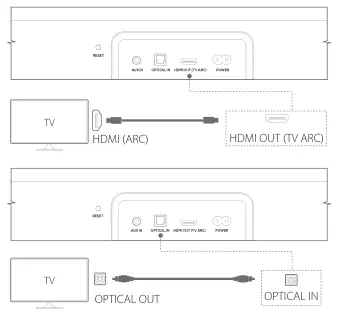
4 CONNECT TO YOUR TV

Harman Kardon Citation MultiBeam 700 Speaker — 4 CONNECT TO YOUR TV diagram (page 7)
図 6

Option 1 (Best):

HDMI

AUX IN OPTICAL IN HDMI OUT (TV ARC) POWER

Option 2:

OPTICAL

AUX IN OPTICAL IN HDMI OUT (TV ARC) POWER

Page 8 of the Harman Kardon Citation MultiBeam 700 Speaker user manual — 5 WALL MOUNT THE CITATION MULTIBEAM 700
8ページ · クリックして拡大
8ページ

5 WALL MOUNT THE CITATION MULTIBEAM 700

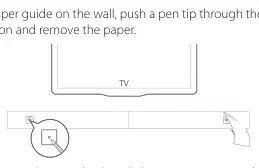
Use tape to stick the wall-mounted paper guide on the wall, push a pen tip through the center of each mounting hole to mark the wall-mounted bracket location and remove the paper.
Harman Kardon Citation MultiBeam 700 Speaker — 5 WALL MOUNT THE CITATION MULTIBEAM 700 diagram (page 8)
図 7

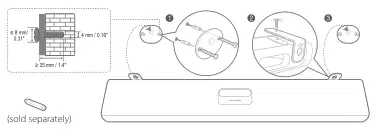
Screw the wall mount brackets on the pen mark; screw the threaded mounting post into the back of the Citation MultiBeam 700, then hook the Citation MultiBeam 700 on the wall.
Harman Kardon Citation MultiBeam 700 Speaker — 5 WALL MOUNT THE CITATION MULTIBEAM 700 diagram (page 8)
図 8
Page 9 of the Harman Kardon Citation MultiBeam 700 Speaker user manual — Add Citation MultiBeam 700 to your home Wi-Fi network:
9ページ · クリックして拡大
9ページ

6 GET STARTED

Harman Kardon Citation MultiBeam 700 Speaker — 6 GET STARTED diagram (page 9)
図 9

Plug in the power

Add Citation MultiBeam 700 to your home Wi-Fi network:

Download and run the Google Home app on a phone or tablet.

Follow the instructions on the touch screen and Google Home app to finish the setup.

* Enable Bluetooth (iPhone / iPad).

Page 10 of the Harman Kardon Citation MultiBeam 700 Speaker user manual — 7 SET UP MULTIBEAM™ SURROUND SOUND
10ページ · クリックして拡大
10ページ

7 SET UP MULTIBEAM™ SURROUND SOUND

Automatic MultiBeam Calibration (AMC) will optimize the soundbar sound settings for a better surround sound experience.
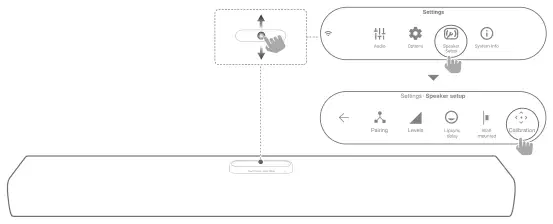
Harman Kardon Citation MultiBeam 700 Speaker — 7 SET UP MULTIBEAM™ SURROUND SOUND diagram (page 10)
図 10
Page 11 of the Harman Kardon Citation MultiBeam 700 Speaker user manual — 8 CHROMECAST
11ページ · クリックして拡大
11ページ

8 CHROMECAST

Harman Kardon Citation MultiBeam 700 Speaker — 8 CHROMECAST diagram (page 11)
図 11
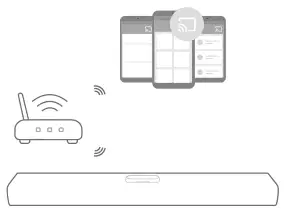
1. Open Chromecast supported app.
2. Play Music.
3. Tap the cast icon and select “Citation MultiBeam 700”. e.g. Spotify Pandora TuneIn Deezer Google Play Music

* Device can support multi-room control provided by Chromecast built-in, more details you can refer to Google Home app.

Page 12 of the Harman Kardon Citation MultiBeam 700 Speaker user manual — 9 AirPlay
12ページ · クリックして拡大
12ページ

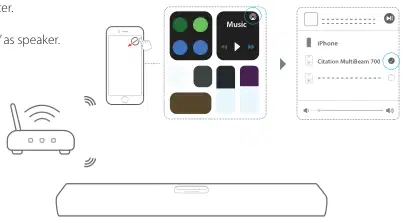
9 AirPlay

1. On an iOS device, enter the Control Center.
Harman Kardon Citation MultiBeam 700 Speaker — 9 AirPlay diagram (page 12)
図 12 · 9 AirPlay
2. Tap to select “Citation MultiBeam 700” as speaker.
3. Start audio streaming from an app.
Page 13 of the Harman Kardon Citation MultiBeam 700 Speaker user manual — 10 GOOGLE ASSISTANT
13ページ · クリックして拡大
13ページ

10 GOOGLE ASSISTANT

Harman Kardon Citation MultiBeam 700 Speaker — 10 GOOGLE ASSISTANT diagram (page 13)
図 13
Harman Kardon Citation MultiBeam 700 Speaker — 10 GOOGLE ASSISTANT diagram (page 13)
図 14

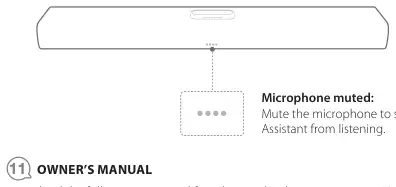
Microphone muted: Mute the microphone to stop Google Assistant from listening.

Download the full owner’s manual from harmankardon.com Téléchargez le mode d’emploi complet sur harmankardon.com Descárgate el Manual de usuario completo en: harmankardon.com Laden Sie die vollständige Bedienungsanleitung von harmankardon.com Scarica il manuale dell’utente integrale da harmankardon.com Download de complete gebruikershandleiding van harmankardon.com

Last ned hele brukerhåndboken fra harmankardon.com Ladda ner hela bruksanvisningen från harmankardon.com Hent hele brugsanvisningen fra harmankardon.com 『Owner’s Manual』 (取扱説明書) (全文)をharmankardon.com か らダウンロードしてください

harmankardon.com 에서 사용자 매뉴얼 전체를 다운로드하십시오 Unduh Buku Petunjuk Pemilik yang lengkap dari harmankardon.com/wireless

Page 14 of the Harman Kardon Citation MultiBeam 700 Speaker user manual — 12 SPECIFICATIONS
14ページ · クリックして拡大
14ページ

12 SPECIFICATIONS

  • Note: CITATION MULTIBEAM 700 is in compliance with European Commission Regulation (EC) No 1275/2008 and (EU) No 801/2013. Power consumption
  • Off Mode: N/A
  • Standby: N/A
  • Network Standby*: 2.0 Watts Time to networked standby: 18 minutes * Networked standby: in the condition of any wireless connection of the device is activated, if no provide any audio or video signal to the device, it will automatically into networked standby mode in 18 minutes. Any audio or video recover will bring device from standby to operation mode.
  • Model Name: CITATION MULTIBEAM 700
  • Power supply: 100 - 240 V ~ 50 / 60Hz
  • Output power: 210 W RMS
  • Bluetooth version: 4.2
  • Bluetooth transmitter frequency range: 2402 – 2480 MHz
  • Bluetooth transmitter power: <10 dBm (EIRP)
  • Bluetooth transmitter modulation: GFSK,π/4 DQPSK, 8DPSK
  • Wireless network: 802.11a/b/g/n/ac (2.4GHz/5GHz)
  • 2.4G Wi-Fi transmitter frequency range: 2412 – 2472 MHz (2.4GHz ISM Band, USA 11 Channels, Europe and others 13 Channels)
  • 2.4G Wi-Fi transmitter power: <20 dBm (EIRP)
  • 2.4G Wi-Fi modulation: DBPSK, DQPSK, CCK, QPSK,BPSK,16QAM, 64QAM
  • 5G WISA transmitter power: < 14 dBm (EIRP)
  • 5G WISA modulation: OFDM, BPSK, QPSK, 16QAM
  • 5G WISA transmitter frequency range: 5.15 - 5.35 GHz, 5.470 - 5.725GHz, 5.725 - 5.825 GHz
  • 5G Wi-Fi transmitter power: < 23 dBm (EIRP)
  • 5G Wi-Fi modulation: QPSK, BPSK, 16QAM, 64QAM, 256QAM
  • 5G Wi-Fi transmitter frequency range: 5.15 - 5.35GHz, 5.470 - 5.725GHz, 5.725 - 5.825GHz
Page 15 of the Harman Kardon Citation MultiBeam 700 Speaker user manual — 12 SPECIFICATIONS
15ページ · クリックして拡大
15ページ

This device complies with Part 15 of the FCC rules and Industry Canada license-exempt RSS standard(s). Operation is subject to the following two conditions: (1) this device may not cause harmful interference, and (2) this device must accept any interference received, including interference that may cause undesired operation. CAN ICES-3 (B) / NMB-3 (B). IC Caution: User should also be advised that: (i) the device for operation in the band 5150 - 5250 MHz is only for indoor use to reduce the potential for harmful interference to co- channel mobile satellite systems; (ii) the maximum antenna gain permitted for devices in the bands 5250 - 5350 MHz and 5470 - 5725 MHz shall comply with the e.i.r.p. limit: and (iii) the maximum antenna gain permitted for devices in the band 5725 - 5825 MHz shall comply with the e.i.r.p. limits specified for point-to- point and non point-to-point operation as appropriate. (iv) Users should also be advised that high-power radars are allocated as primary users (i.e. priority users) of the bands 5250 - 5350 MHz and 5650 - 5850 MHz and that these radars could cause interference and/ or damage to LE-LAN devices. Les utilisateurs devraient aussi être avisés que (i) les dispositifs fonctionnant dans la bande 5150-5250 MHz sont réservés uniquement pour une utilisation à l’intérieur afin de réduire

les risques de brouillage préjudiciable aux systèmes de satellites mobiles utilisant les mêmes canaux; (ii) le gain maximal d’antenne permis pour les dispositifs utilisant les bandes 5 250-5 350 MHz et 5 470-5 725 MHz doit se conformer à la limite de p.i.r.e.; (iii) le gain maximal d’antenne permis (pour les dispositifs utilisant la bande 5 725-5 825 MHz) doit se conformer à la limite de p.i.r.e. spécifiée pour l’exploitation point à point et non point à point, selon le cas.De plus, les utilisateurs de radars de haute puissance sont désignés utilisateurs principaux (c.-à-d., qu’ils ont la priorité) pour les bandes 5 250-5 350 MHz et 5 650-5 850 MHz et que ces radars pourrai ent causer du brouillage et/ou des dommages aux dispositifs LAN-EL. Warning: Changes or modifications to this unit not expressly approved by the party responsible for compliance could void the user’s authority to operate the equipment. NOTE: This equipment has been tested and found to comply with the limits for a Class B digital device, pursuant to Part 15 of the FCC Rules. These limits are designed to provide reasonable protection against harmful interference in a residential installation. This equipment generates, uses and can radiate radio frequency energy and, if not installed and used in accordance with the instructions, may cause harmful interference to radio communications. However, there is no guarantee that interference will not occur in a particular installation. If this equipment does cause harmful

Page 16 of the Harman Kardon Citation MultiBeam 700 Speaker user manual — 12 SPECIFICATIONS
16ページ · クリックして拡大
16ページ
  • interference to radio or television reception, which can be determined by turning the equipment off and on, the user is encouraged to try to correct the interference by one or more of the following measures:
  • Reorient or relocate the receiving antenna.
  • Increase the separation between the equipment and receiver.
  • Connect the equipment into an outlet on a circuit different from that to which the receiver is connected.
  • Consult the dealer or an experienced radio/TV technician for help. High power radars are allocated as primary users of the 5.25 to 5.35 GHz and 5.65 to 5.85 GHz bands. These radar stations can cause interference with and/or damage this device. No configuration controls are provided for this wireless equipment allowing any change in the frequency of operations outside the FCC grant of authorization for US operation according to Part 15.407 of the FCC rules. FCC/IC Radiation Exposure Statement: This equipment complies with FCC/IC RSS-102 radiation exposure limits set forth for an uncontrolled environment. This equipment should be installed and operated with minimum distance 20cm between the radiator and your body. Cet équipement est conforme aux limites d’exposition aux radiations FCC/ IC CNR-102 établies pour un environnement non contrôlé. Cet équipement doit être installé et utilisé avec une distance minimale de 20 cm entre le radiateur et votre corps. 해당 무선설비는 운용중 전파혼신 가능성이 있으므로 인명 안전과 관련된 서비스는 할 수 없습니다 .

Use Restriction: This device is restricted to indoor use when operating in the 5150 to 5350 MHz frequency range in following countries:
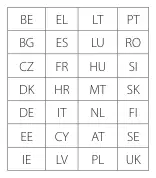
Harman Kardon Citation MultiBeam 700 Speaker — 12 SPECIFICATIONS diagram (page 16)
図 15

Belgium (BE), Greece (EL), Lithuania (LT), Portugal (PT), Bulgaria (BG), Spain (ES), Luxembourg (LU), Romania (RO), Czech Republic (CZ), France (FR), Hungary (HU), Slovenia (SI), Denmark (DK), Croatia (HR), Malta (MT), Slovakia (SK), Germany (DE), Italy (IT), Netherlands (NL), Finland (FI), Estonia (EE), Cyprus (CY), Austria (AT), Sweden (SE), Ireland (IE), Latvia (LV), Poland (PL) and United Kingdom (UK).

This product contains open source software. For your convenience, the source code and relevant build instruction for software licensed under the GPL is available at http//www.harmankardon.com/ opensource. You may also obtain this information by contacting us at OpenSourceSupport@Harman.com

Page 37 of the Harman Kardon Citation MultiBeam 700 Speaker user manual — 12 SPECIFICATIONS
37ページ · クリックして拡大
37ページ

The Bluetooth® word mark and logos are registered trademarks owned by the Bluetooth SIG, Inc. and any use of such marks by HARMAN International Industries, Incorporated is under license. Other trademarks and trade names are those of their respective owners.

Chromecast built- in, Google Play and the Google Play logo are trademarks of Google LLC. Chromecast built-in may require subscription(s). The Google Assistant requires an internet connection and is not available in certain countries and languages. Availability and performance of certain features and services are device, service and network-dependent and may not be available in all areas. Controlling certain devices in your home requires compatible smart devices. Subscriptions for services and applications may be required and additional terms, conditions and/or charges may apply.

The Wi-Fi CERTIFIED™ Logo is a certification mark of the Wi-Fi Alliance®.

Apple®, AirPlay®, iPad®, iPad Air®, iPad Pro®, and iPhone® are trademarks of Apple Inc., registered in the U.S. and other countries. Use of the Works with Apple badge means that an accessory has been designed to work specifically with the technology identified in the badge and has been certified by the developer to meet Apple performance standards. To control this AirPlay 2–enabled speaker, iOS 11.4 or later is required.

Manufactured under license from Dolby Laboratories. Dolby, Dolby Audio, and the double-D symbol are trademarks of Dolby Laboratories.

The terms HDMI, HDMI High-Definition Multimedia Interface, and the HDMI Logo are trademarks or registered trademarks of HDMI Licensing Administrator, Inc.


Page 38 of the Harman Kardon Citation MultiBeam 700 Speaker user manual — 12 SPECIFICATIONS
38ページ · クリックして拡大
38ページ
Page 38 of the Harman Kardon Citation MultiBeam 700 Speaker user manual — 12 SPECIFICATIONS
Page 39 of the Harman Kardon Citation MultiBeam 700 Speaker user manual — CH_HK_CITATION MULTIBEAM 700_QSG_GLOBAL_SOP_V11
39ページ · クリックして拡大
39ページ

CH_HK_CITATION MULTIBEAM 700_QSG_GLOBAL_SOP_V11

情報源

参考資料・リンク

この取扱説明書で参照されているリンク(メーカー、サポート、ダウンロード等)。

Harman Kardon Citation MultiBeam 700 Speakerについて質問する

ユーザーまたはスタッフが通常1日以内に回答します。あなたの質問が次の人の助けにもなります。

Add your email to get notified when it’s answered — no spam, ever.

0 questions
Harman Kardon Citation MultiBeam 700 Speakerに関する質問はまだありません

最初の質問を投稿しましょう。他のユーザーや当チームが回答します。

原本

Harman Kardon Citation MultiBeam 700 Speaker 取扱説明書(PDF)

44 ページ·1.7 MB·スピーカー·PDF
上のページをクリックするとここに表示されます
ページ 1 / …
100%
ページを読み込み中…