JA
Soundcore logo
公式取扱説明書

Soundcore Life Dot 2

132 ページ·8.2 MB·デジタル家電·PDF·EN
Soundcore Life Dot 2
目次 11セクション Soundcore Life Dot 2 · USER MANUAL · Charging · Powering On/Off · … 表示非表示
Page 1 of the Soundcore Life Dot 2 user manual — Soundcore Life Dot 2
1ページ · クリックして拡大
1ページ

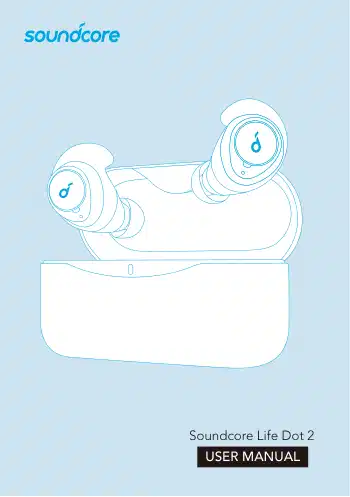
Soundcore Life Dot 2

USER MANUAL

Page 2 of the Soundcore Life Dot 2 user manual — Soundcore Life Dot 2
2ページ · クリックして拡大
2ページ
Čeština06 Dansk 11 11 Deutsch 16 16 ελληνικά 21 21 Español 26 26 Suomi 31 31 Français 36 36 Magyar 41 41 Italiano 46 46 Nederlands 51 51 Norsk 56 56 Język polski 61 61
Pусский71 Slovenský Jazyk 76 76 Slovenski Jezik 81 81 Svenska 86 86 Türkçe 91 91 日本語 96 96 한국어 101 101 简体中文 106 106 繁體中文 111 111 Portugues do Brasil 116 116 ةيبَِرعَ ل 121 121 תירב 126 ִ 126

English 01 · Português 66

Page 3 of the Soundcore Life Dot 2 user manual — ON
3ページ · クリックして拡大
3ページ

Charging

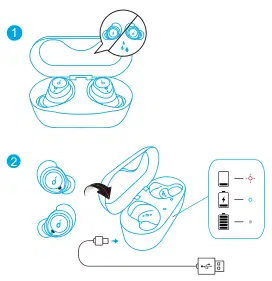
  • Open or close the charging case to activate the LED battery indicator.
  • Fully charge both the earbuds and the charging case before the first use.
  • To prevent damage, use the provided USB-C cable.
  • Fully dry off the earbuds and the USB port before charging.
Soundcore Life Dot 2 — Charging diagram (page 3)
図 1 · Charging
Flashing redLow battery Steady whiteBeing charged Light offFully charged
Soundcore Life Dot 2 — Charging diagram (page 3)
図 2 · Charging

Powering On/Off

The earbuds will automatically power on when taken out of the charging case and power off when placed back into the charging case.
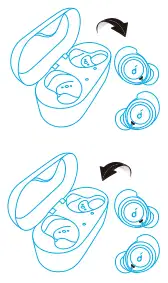
Soundcore Life Dot 2 — Powering On/Off diagram (page 3)
図 3 · Powering On/Off

ON

OFF

Page 4 of the Soundcore Life Dot 2 user manual — Pairing
4ページ · クリックして拡大
4ページ
  • To manually power on, press and hold the multi-function button on both earbuds for 1 second until the LED indicator turns white for 1 second.
  • To manually power off, press and hold the multi-function button on either earbud for 8 seconds until the LED indicator turns red for 1 second.

Pairing

True Wireless Stereo Connection

The right earbud will automatically connect with the left earbud when taken out of the charging case.

Slowly flashing whiteTWS connecting Rapidly flashing white (Primary earbud) Slowly flashing white (Secondary earbud)TWS connected
  • The right earbud is the primary earbud by default. In TWS mode, place either one of the earbuds into the charging case, the other one will switch to be the primary earbud.
  • When powered on and connected, if either one of the earbuds is out of battery and powered off, you can keep using the other one.

Bluetooth Pairing with your Device

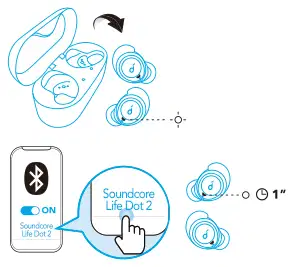
1. Take the earbuds out of the charging case or manually power on the earbuds, the earbuds enter the Bluetooth pairing mode successfully when the LED indicator on either earbud flashes white.
2. Turn on Bluetooth on your device and click “Soundcore Life Dot 2”. The LED indicator on either earbud will turn white for 1 second when Bluetooth connected.
Page 5 of the Soundcore Life Dot 2 user manual — Wearing
5ページ · クリックして拡大
5ページ
Soundcore Life Dot 2 — Wearing diagram (page 5)
図 4 · Wearing
Soundcore Life Dot 2 — Wearing diagram (page 5)
図 5 · Wearing
Rapidly flashing whiteBluetooth pairing Steady white for 1 secondBluetooth connected
  • When earbuds are out of the charging case and powered off, to manually enter Bluetooth pairing mode, press and hold the multi-function button on both earbuds for 3 seconds.
  • Each time you power on your Soundcore earphones, it will automatically connect to your last successfully connected device if available within the Bluetooth range.

Wearing

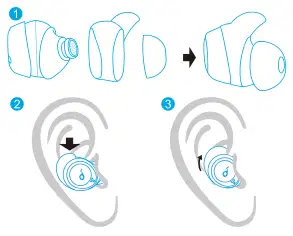
1. Choose the EarTips and EarWings that fit your ears best. 2. Insert the earbuds into the inner canal of your ears. 3. Turn and find the most comfortable position.
Soundcore Life Dot 2 — Wearing diagram (page 5)
図 6 · Wearing
Page 6 of the Soundcore Life Dot 2 user manual — Button Controls
6ページ · クリックして拡大
6ページ

Button Controls

Play / Pause Press once (L or R)

Next track Press and hold for 1 second (R)

Previous trackPress and hold for 1 second (L) Volume up / downControl volume via the connected device
Answer / End a callPress once (L or R) Put the current call on hold and answer an incoming call Reject a callPress and hold for 1 second (L or R) Transfer a call between earphones and mobile phone Switch between held call and active call

Activate Siri or other voice assistant software Press twice (L or R)

Play / PausePress once (L or R) Answer / End a call Reject a callPress and hold for 1 second (L or R) Activate Siri or other voice assistant software

Mono mode

Page 7 of the Soundcore Life Dot 2 user manual — Specifications
7ページ · クリックして拡大
7ページ

Reset

1. Place the earbuds into the charging case and make sure they are being charged. 2. Press and hold the button on both earbuds for 8 seconds until the LED indicators on earbuds flash red for 3 times.

All the memory data will be cleared.

Specifications

Specifications are subject to change without notice.

Input 5V 2.5A

Rated output power 5 mW (@1% THD)

Battery capacity85 mA x 2 (earbuds); 2600 mA (charging case) Charging time 1.5 hours Playtime (varies by volume level and content)8 hours (Total 100 hours with the charging case) Driver size 8 mm x 2 Frequency response20 Hz - 20 kHz Impedance 16 Ω Waterproof levelIPX5 Bluetooth version V 5.0 Bluetooth range10 m / 33 ft

8”

Soundcore Life Dot 2について質問する

ユーザーまたはスタッフが通常1日以内に回答します。あなたの質問が次の人の助けにもなります。

Add your email to get notified when it’s answered — no spam, ever.

0 questions
Soundcore Life Dot 2に関する質問はまだありません

最初の質問を投稿しましょう。他のユーザーや当チームが回答します。

原本

Soundcore Life Dot 2 取扱説明書(PDF)

132 ページ·8.2 MB·デジタル家電·PDF
上のページをクリックするとここに表示されます
ページ 1 / …
100%
ページを読み込み中…