JA
公式取扱説明書

PMS Electronic Logging Device (PMSE01)

72 ページ·3.1 MB·通信機器·PDF·EN
PMS Electronic Logging Device (PMSE01)
目次 8セクション Table of Contents · 2….....................Login/Certification of Records · 9….....................................Unassigned Record · 21…...............................................Editing HOS · … 表示非表示
Page 2 of the PMS Electronic Logging Device (PMSE01) user manual — Table of Contents
2ページ · クリックして拡大
2ページ
PMS Electronic Logging Device (PMSE01) — Table of Contents diagram (page 2)
図 1 · Table of Contents

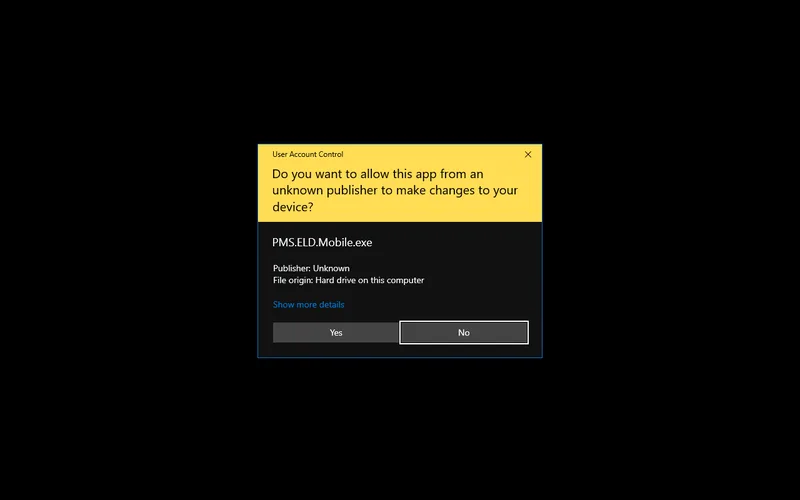
Press on the PMS ELD icon.

PMS Electronic Logging Device (PMSE01) — Table of Contents diagram (page 2)
図 2 · Table of Contents

Press Yes.

Login/Certification of Records

Page 3 of the PMS Electronic Logging Device (PMSE01) user manual — Table of Contents
3ページ · クリックして拡大
3ページ
PMS Electronic Logging Device (PMSE01) — Table of Contents diagram (page 3)
図 3 · Table of Contents

Press Log In. You do NOT need to select anything from the drop down menu.

PMS Electronic Logging Device (PMSE01) — Table of Contents diagram (page 3)
図 4 · Table of Contents

Enter your driver PIN and Press Next.

Login/Certification of Records

Page 4 of the PMS Electronic Logging Device (PMSE01) user manual — Table of Contents
4ページ · クリックして拡大
4ページ
PMS Electronic Logging Device (PMSE01) — Table of Contents diagram (page 4)
図 5 · Table of Contents

Enter your Truck Number and Press Next.

PMS Electronic Logging Device (PMSE01) — Table of Contents diagram (page 4)
図 6 · Table of Contents

Enter your Trailer Number and Press Next.

Login/Certification of Records

Page 5 of the PMS Electronic Logging Device (PMSE01) user manual — Table of Contents
5ページ · クリックして拡大
5ページ
PMS Electronic Logging Device (PMSE01) — Table of Contents diagram (page 5)
図 7 · Table of Contents

Answer Yes or No to the posed question. If yes, you can continue logging in. Note: You may have to Press Yes multiple times if you have been off duty for multiple days.

PMS Electronic Logging Device (PMSE01) — Table of Contents diagram (page 5)
図 8 · Table of Contents

If you select No from this screen, you must fill out some additional information.

Login/Certification of Records

Page 6 of the PMS Electronic Logging Device (PMSE01) user manual — Table of Contents
6ページ · クリックして拡大
6ページ
PMS Electronic Logging Device (PMSE01) — Table of Contents diagram (page 6)
図 9 · Table of Contents

Press Add Event to enter any missing information.

PMS Electronic Logging Device (PMSE01) — Table of Contents diagram (page 6)
図 10 · Table of Contents

Fill out the form and when you are finished, Press Save. You will then be returned to the final Login screen.

Login/Certification of Records

Page 7 of the PMS Electronic Logging Device (PMSE01) user manual — Table of Contents
7ページ · クリックして拡大
7ページ
PMS Electronic Logging Device (PMSE01) — Table of Contents diagram (page 7)
図 11 · Table of Contents

Once your data entry is recorded, Press Close.

PMS Electronic Logging Device (PMSE01) — Table of Contents diagram (page 7)
図 12 · Table of Contents

If you did not enter sufficient data, you must Press Close, which will take you back to the previous screen.

Login/Certification of Records

Page 8 of the PMS Electronic Logging Device (PMSE01) user manual — Table of Contents
8ページ · クリックして拡大
8ページ
PMS Electronic Logging Device (PMSE01) — Table of Contents diagram (page 8)
図 13 · Table of Contents

Select the Product you are carrying and Press Finish.

Login/Certification of Records

Page 9 of the PMS Electronic Logging Device (PMSE01) user manual — Table of Contents
9ページ · クリックして拡大
9ページ

Unassigned Record ***An Unassigned Record prompt may show up next if the truck was driven recently but no driver was logged in. All truck moves must be assigned to a driver.***

PMS Electronic Logging Device (PMSE01) — Table of Contents diagram (page 9)
図 14 · Table of Contents

Press Yes or No. -If you select Yes, then you will claim the previous driving logs. -If you select No, then the unassigned logs will automatically be sent to the office and be assigned from there.

***If the office assigns a missing log to you, you must accept the missing event(s).***

PMS Electronic Logging Device (PMSE01) — Table of Contents diagram (page 9)
図 15 · Table of Contents

Press Accept OR Decline, then press Finish.

Page 10 of the PMS Electronic Logging Device (PMSE01) user manual — Table of Contents
10ページ · クリックして拡大
10ページ
PMS Electronic Logging Device (PMSE01) — Table of Contents diagram (page 10)
図 16 · Table of Contents

Press on the Inspections tab.

PMS Electronic Logging Device (PMSE01) — Table of Contents diagram (page 10)
図 17 · Table of Contents

Press Perform Inspection.

Inspections

Page 11 of the PMS Electronic Logging Device (PMSE01) user manual — Table of Contents
11ページ · クリックして拡大
11ページ
PMS Electronic Logging Device (PMSE01) — Table of Contents diagram (page 11)
図 18 · Table of Contents

Press Satisfactory. Doing so will check-mark all the above boxes. You may then unselect any boxes that are not satisfactory. Sign in the box and Press Save. Note: if you Press Non-Satisfactory, the truck cannot be driven.

PMS Electronic Logging Device (PMSE01) — Table of Contents diagram (page 11)
図 19 · Table of Contents

If you would like to view any previous inspections, select it from the list Press View Inspection.

Inspections

Page 12 of the PMS Electronic Logging Device (PMSE01) user manual — Table of Contents
12ページ · クリックして拡大
12ページ

Press on the Home tab to return to the Home Screen.

Inspections

Page 13 of the PMS Electronic Logging Device (PMSE01) user manual — Table of Contents
13ページ · クリックして拡大
13ページ
PMS Electronic Logging Device (PMSE01) — Table of Contents diagram (page 13)
図 20 · Table of Contents

If any Malfunctions or Diagnostics exist, they will appear on this screen.

Press on "Malfunctions" or "Diagnostics" to read the details of each.

PMS Electronic Logging Device (PMSE01) — Table of Contents diagram (page 13)
図 21 · Table of Contents

Press on any "Malfunction" or "Diagnostic" line to view the details of each. For a complete list of Data Diagnostic / Malfunction Events, please see the last page of the ELD manual.

Malfunctions/Diagnostics

Page 14 of the PMS Electronic Logging Device (PMSE01) user manual — Table of Contents
14ページ · クリックして拡大
14ページ
PMS Electronic Logging Device (PMSE01) — Table of Contents diagram (page 14)
図 22 · Table of Contents

This screen shows any Malfunctions that are present. Press Close to return to the home screen.

***If a Malfunction occurs over an extended period of time and paper logs

must be used, then a written notice of the Malfunction must be provided and turned in to the main office within 8 days.***

PMS Electronic Logging Device (PMSE01) — Table of Contents diagram (page 14)
図 23 · Table of Contents

This screen shows any diagnostics that are present. Press Close to return to the home screen.

Malfunctions/Diagnostics

Page 15 of the PMS Electronic Logging Device (PMSE01) user manual — Malfunction Events
15ページ · クリックして拡大
15ページ

Diagnostics/Malfunctions Will the Diagnostic Actions Required clear automatically? Power Data Turn on tablet before you start Yes, if power is restored. (ex. ELD does not record the engine the truck engine turning on or off in the past 24 hours) Engine Syncronization Data Plug in VNA cord Yes, if VNA communicates with (ex. VNA could be unplugged or defective) the ELD. Missing Required Data Elements Edit any past events that are Yes, once no past events are (ex. a data entry must include either highlighted in red missing data. 1. city, state, and zip code OR 2. mile marker and intersection) Data Transfer Call PMS No, the issue must be resolved (ex. The "Officer" function is not working) by PMS Unidentified Driving Records Claim any unlogged driving time Yes (ex. The truck was driven without a OR reject the driving time and it driver being logged in) will be assigned by the home office

Diagnostic Events

Will the Malfunction Actions Required clear automatically? Power Compliance Check power cord Yes, if power is restored and (ex. 30+ minutes of engine hours has is fully functional for 24 hours accumulated without the tablet being *Call home office if power does turned on) not restore or if problem persists Engine Syncronization Compliance Check VNA cord Yes, if VNA communicates with (ex. VNA could be unplugged or defective) the ELD *Call home office if problem persists Timing Compliance Call PMS No, the timing function (ex. The tablet and server are showing between the server and ELD different clock times) must be resolved by the home office Positioning Compliance Check external GPS unit on ELD Yes, if the GPS is fully (ex. The truck was moved while the unit to make sure it has power functional for 24 hours ELD was turned off and it could not and is plugged into the tablet register the movement)

Malfunction Events

*Call home office if the problem persists Data Recording Compliance Call home office No, the issue must be (ex. There is a problem with the ELD resolved by the home office recording and storing data on the tablet) Data Transfer Compliance Call home office No, the issue must be (ex. the "Officer" function is not working resolved by the home office and has failed multiple times)

Page 16 of the PMS Electronic Logging Device (PMSE01) user manual — Diagnostic Events
16ページ · クリックして拡大
16ページ

Duty Status/ On Duty

Press On Duty.

The "Time Until Break" field has been highlighted to show your time remaining until a break is required if there is less than one hour remaining.

Page 17 of the PMS Electronic Logging Device (PMSE01) user manual — Diagnostic Events
17ページ · クリックして拡大
17ページ

Press on HOS to review your current Hours of Service.

PMS Electronic Logging Device (PMSE01) — Diagnostic Events diagram (page 17)
図 24 · Diagnostic Events

On the HOS screen you can see your current day's Off Duty, Personal, Driving, and On Duty recorded times. To Navigate between days, you can Press the Previous Day or Next Day buttons. To view driving records, Press Driver Records.

Duty Status/HOS

Page 18 of the PMS Electronic Logging Device (PMSE01) user manual — Diagnostic Events
18ページ · クリックして拡大
18ページ
PMS Electronic Logging Device (PMSE01) — Diagnostic Events diagram (page 18)
図 25 · Diagnostic Events

To view Unidentifed Records, Press the Unidentified Records button.

is for viewing only. To return from the Unidentifed Records screen, Press Close.

Duty Status/HOS

Page 19 of the PMS Electronic Logging Device (PMSE01) user manual — Diagnostic Events
19ページ · クリックして拡大
19ページ

Duty Status/HOS 7 Day

Press on HOS 7 Day.

PMS Electronic Logging Device (PMSE01) — Diagnostic Events diagram (page 19)
図 26 · Diagnostic Events

On the HOS screen you can see your current day's Off Duty, Personal, Driving, and On Duty recorded times. To add a document (ex. BOL), Press the Add Document button.

Page 20 of the PMS Electronic Logging Device (PMSE01) user manual — Diagnostic Events
20ページ · クリックして拡大
20ページ

Duty Status/HOS 7 Day

PMS Electronic Logging Device (PMSE01) — Diagnostic Events diagram (page 20)
図 27 · Diagnostic Events

Enter a document number and Press Save. You will be returned to the HOS 7 Day Page.

PMS Electronic Logging Device (PMSE01) — Diagnostic Events diagram (page 20)
図 28 · Diagnostic Events
Page 21 of the PMS Electronic Logging Device (PMSE01) user manual — Diagnostic Events
21ページ · クリックして拡大
21ページ
PMS Electronic Logging Device (PMSE01) — Diagnostic Events diagram (page 21)
図 29 · Diagnostic Events

If an event must be added or edited, Press the Edit button.

PMS Electronic Logging Device (PMSE01) — Diagnostic Events diagram (page 21)
図 30 · Diagnostic Events

To create an event, Press Add Event. Note: If you missed a previous punch, you will need to add the punch here. If you missed an entire shift, you will need to add two events: one for the opening punch and another event for a closing punch.

Editing HOS

Page 22 of the PMS Electronic Logging Device (PMSE01) user manual — Diagnostic Events
22ページ · クリックして拡大
22ページ
PMS Electronic Logging Device (PMSE01) — Diagnostic Events diagram (page 22)
図 31 · Diagnostic Events

Press the field located under Time.

PMS Electronic Logging Device (PMSE01) — Diagnostic Events diagram (page 22)
図 32 · Diagnostic Events

Press the Hour, Minute, and AM/PM fields to select and use the arrows on the right to adjust the time. Press Save when finished and it will return you to the previous screen.

Editing HOS

Page 23 of the PMS Electronic Logging Device (PMSE01) user manual — Diagnostic Events
23ページ · クリックして拡大
23ページ

Press the field located under New Status (this field defaults to "Off Duty").

PMS Electronic Logging Device (PMSE01) — Diagnostic Events diagram (page 23)
図 33 · Diagnostic Events

Once the desired New Duty Status is selected, Press Save. You will be returned to the previous screen.

Editing HOS

Page 24 of the PMS Electronic Logging Device (PMSE01) user manual — Diagnostic Events
24ページ · クリックして拡大
24ページ

Press Save when finished. Note: The Time and New Status default to 12:00 AM and Off Duty, so remember to change those if necessary. Also, a comment is needed or it won't let you save.

PMS Electronic Logging Device (PMSE01) — Diagnostic Events diagram (page 24)
図 34 · Diagnostic Events

This is the confirmation screen that approves your event change. Press Close. Press Close.

Editing HOS

Page 25 of the PMS Electronic Logging Device (PMSE01) user manual — Diagnostic Events
25ページ · クリックして拡大
25ページ
PMS Electronic Logging Device (PMSE01) — Diagnostic Events diagram (page 25)
図 35 · Diagnostic Events

From this page you will be able to see all of your added events. You may choose to Add Event or Edit Event (only if needed). Press Close to return to the home screen. Note: If you missed an entire shift, you will need to add two events: one for the opening punch and another event for a closing punch.

Editing HOS

Page 26 of the PMS Electronic Logging Device (PMSE01) user manual — Diagnostic Events
26ページ · クリックして拡大
26ページ

Duty Assignment Troubleshooting Duty Assignment Troubleshooting If you are on "Personal" time and turn the engine off, when you turn the engine back on you will be asked if you are still on "Personal" time. (Answer Yes or No) Note: If you Press No, you will still be "Off Duty".

PMS Electronic Logging Device (PMSE01) — Diagnostic Events diagram (page 26)
図 36 · Diagnostic Events

***Automatic Switching of Duties May Occur if: 1. You exceed 5 mph (will change from "On Duty" to "Driving") 2. You are unmoved for 5 minutes, you will be asked if you are still driving. If you answer Yes, then your duty will remain "Driving". If you answer No, then your duty will change from "Driving" to "On Duty"

If you do not answer the prompt within 1 minute, your duty will be automatically changed from "Driving" to "On Duty".

***Note: Once your status is set to "Driving", you must come to a complete stop for 3 seconds before you can change your status.***

Duty Status/Yard Move

Page 27 of the PMS Electronic Logging Device (PMSE01) user manual — Diagnostic Events
27ページ · クリックして拡大
27ページ

Press on Yard Move if you are moving a vehicle within a plant lot. Note: All yard moves must be recorded since the truck computer will record a change in GPS location.

PMS Electronic Logging Device (PMSE01) — Diagnostic Events diagram (page 27)
図 37 · Diagnostic Events

Type in your Reason for a Yard Move and Press Save. Note: If you are on "Yard Move" and turn the engine off, when you turn the engine back on you will NOT be asked if you are still on "Yard Move". Your status will automatically change to "On Duty".

DutyStatusSleeper/Driving
Page 28 of the PMS Electronic Logging Device (PMSE01) user manual — Diagnostic Events
28ページ · クリックして拡大
28ページ

Press on Sleeper or Driving to record your current status. Note: All changes will be recorded in your HOS log.

Officer

Page 29 of the PMS Electronic Logging Device (PMSE01) user manual — Diagnostic Events
29ページ · クリックして拡大
29ページ

If a DOT Officer wishes to Transfer data, Press Officer. Also be prepared to show HOS 7 Day.

PMS Electronic Logging Device (PMSE01) — Diagnostic Events diagram (page 29)
図 38 · Diagnostic Events

Select which method of data transfer the officer requests. You will be automatically directed to the next page. You may Press Close to return to the Home screen. For further "Officer" instructions, refer to appendix A (in the back of the manual).

Officer

Page 30 of the PMS Electronic Logging Device (PMSE01) user manual — Diagnostic Events
30ページ · クリックして拡大
30ページ
PMS Electronic Logging Device (PMSE01) — Diagnostic Events diagram (page 30)
図 39 · Diagnostic Events

Enter a comment for the data transfer and Press Save.

PMS Electronic Logging Device (PMSE01) — Diagnostic Events diagram (page 30)
図 40 · Diagnostic Events

Once your data transfer is confirmed, Press Close.

Off Duty/ Personal

Page 31 of the PMS Electronic Logging Device (PMSE01) user manual — Diagnostic Events
31ページ · クリックして拡大
31ページ

Press Off Duty, then Press Personal.

PMS Electronic Logging Device (PMSE01) — Diagnostic Events diagram (page 31)
図 41 · Diagnostic Events

Type in a reason for your Personal time and Press Save.

Logging Out

Page 32 of the PMS Electronic Logging Device (PMSE01) user manual — Diagnostic Events
32ページ · クリックして拡大
32ページ

Press Log Out. Note: You must be "Off Duty" to be able to select "Log Out".

PMS Electronic Logging Device (PMSE01) — Diagnostic Events diagram (page 32)
図 42 · Diagnostic Events

Press Yes. Note: Once you log out, data will begin to upload to the server. Make sure you have a good Wifi signal or else the upload may get disrupted.

Logging Out

Page 33 of the PMS Electronic Logging Device (PMSE01) user manual — Diagnostic Events
33ページ · クリックして拡大
33ページ
PMS Electronic Logging Device (PMSE01) — Diagnostic Events diagram (page 33)
図 43 · Diagnostic Events

Press Yes.

Closing Application

Page 34 of the PMS Electronic Logging Device (PMSE01) user manual — Diagnostic Events
34ページ · クリックして拡大
34ページ
PMS Electronic Logging Device (PMSE01) — Diagnostic Events diagram (page 34)
図 44 · Diagnostic Events

Press Close.

PMS Electronic Logging Device (PMSE01) — Diagnostic Events diagram (page 34)
図 45 · Diagnostic Events

Press Yes.

Additional Support

Page 35 of the PMS Electronic Logging Device (PMSE01) user manual — Diagnostic Events
35ページ · クリックして拡大
35ページ
PMS Electronic Logging Device (PMSE01) — Diagnostic Events diagram (page 35)
図 46 · Diagnostic Events

For Additional Support, Press the PMS icon in the top left of the Home Screen.

PMS Electronic Logging Device (PMSE01) — Diagnostic Events diagram (page 35)
図 47 · Diagnostic Events

For Additional Support, Call the phone number listed.

Appendix AOfficer Instructions
Page 36 of the PMS Electronic Logging Device (PMSE01) user manual — Diagnostic Events
36ページ · クリックして拡大
36ページ

If you are pulled over by a DOT officer, you may transfer data in 3 ways using the "Officer" button. The instructions for each are listed below:

USB 1. Insert the flash drive into the USB port of the tablet. (The flash drive is provided by the DOT officer) 2. Press the USB button. 3. A screen will pop up that will verify that the data transfer was successful.

Bluetooth 1. Press the Bluetooth button 2. Press "Add Bluetooth or other device" 3. In the following pop-up box, when asked which type of device you want to add, press "Bluetooth". (It will be the top option) 4. Select the device you wish to pair to from the list (the DOT officer will know which one).

PMS Electronic Logging Device (PMSE01) — Diagnostic Events diagram (page 36)
図 48 · Diagnostic Events

Web 1. Press the Web button 2. A screen will pop up that will verify that the data transfer was successful. Note: You must have internet access for this function to work


Page 37 of the PMS Electronic Logging Device (PMSE01) user manual — Diagnostic Events
37ページ · クリックして拡大
37ページ
Page 37 of the PMS Electronic Logging Device (PMSE01) user manual — Diagnostic Events
Page 38 of the PMS Electronic Logging Device (PMSE01) user manual — Diagnostic Events
38ページ · クリックして拡大
38ページ
Page 38 of the PMS Electronic Logging Device (PMSE01) user manual — Diagnostic Events
Page 39 of the PMS Electronic Logging Device (PMSE01) user manual — Diagnostic Events
39ページ · クリックして拡大
39ページ
Page 39 of the PMS Electronic Logging Device (PMSE01) user manual — Diagnostic Events
Page 40 of the PMS Electronic Logging Device (PMSE01) user manual — Diagnostic Events
40ページ · クリックして拡大
40ページ
Page 40 of the PMS Electronic Logging Device (PMSE01) user manual — Diagnostic Events
Page 41 of the PMS Electronic Logging Device (PMSE01) user manual — Diagnostic Events
41ページ · クリックして拡大
41ページ
Page 41 of the PMS Electronic Logging Device (PMSE01) user manual — Diagnostic Events
Page 42 of the PMS Electronic Logging Device (PMSE01) user manual — Diagnostic Events
42ページ · クリックして拡大
42ページ
Page 42 of the PMS Electronic Logging Device (PMSE01) user manual — Diagnostic Events
Page 43 of the PMS Electronic Logging Device (PMSE01) user manual — Diagnostic Events
43ページ · クリックして拡大
43ページ
Page 43 of the PMS Electronic Logging Device (PMSE01) user manual — Diagnostic Events
Page 44 of the PMS Electronic Logging Device (PMSE01) user manual — Diagnostic Events
44ページ · クリックして拡大
44ページ
Page 44 of the PMS Electronic Logging Device (PMSE01) user manual — Diagnostic Events
Page 45 of the PMS Electronic Logging Device (PMSE01) user manual — Diagnostic Events
45ページ · クリックして拡大
45ページ
Page 45 of the PMS Electronic Logging Device (PMSE01) user manual — Diagnostic Events
Page 46 of the PMS Electronic Logging Device (PMSE01) user manual — Diagnostic Events
46ページ · クリックして拡大
46ページ
Page 46 of the PMS Electronic Logging Device (PMSE01) user manual — Diagnostic Events
Page 47 of the PMS Electronic Logging Device (PMSE01) user manual — Diagnostic Events
47ページ · クリックして拡大
47ページ
Page 47 of the PMS Electronic Logging Device (PMSE01) user manual — Diagnostic Events
Page 48 of the PMS Electronic Logging Device (PMSE01) user manual — Diagnostic Events
48ページ · クリックして拡大
48ページ
Page 48 of the PMS Electronic Logging Device (PMSE01) user manual — Diagnostic Events
Page 49 of the PMS Electronic Logging Device (PMSE01) user manual — Diagnostic Events
49ページ · クリックして拡大
49ページ
Page 49 of the PMS Electronic Logging Device (PMSE01) user manual — Diagnostic Events
Page 50 of the PMS Electronic Logging Device (PMSE01) user manual — Diagnostic Events
50ページ · クリックして拡大
50ページ
Page 50 of the PMS Electronic Logging Device (PMSE01) user manual — Diagnostic Events
Page 51 of the PMS Electronic Logging Device (PMSE01) user manual — Diagnostic Events
51ページ · クリックして拡大
51ページ
Page 51 of the PMS Electronic Logging Device (PMSE01) user manual — Diagnostic Events
Page 52 of the PMS Electronic Logging Device (PMSE01) user manual — Diagnostic Events
52ページ · クリックして拡大
52ページ
Page 52 of the PMS Electronic Logging Device (PMSE01) user manual — Diagnostic Events
Page 53 of the PMS Electronic Logging Device (PMSE01) user manual — Diagnostic Events
53ページ · クリックして拡大
53ページ
Page 53 of the PMS Electronic Logging Device (PMSE01) user manual — Diagnostic Events
Page 54 of the PMS Electronic Logging Device (PMSE01) user manual — Diagnostic Events
54ページ · クリックして拡大
54ページ
Page 54 of the PMS Electronic Logging Device (PMSE01) user manual — Diagnostic Events
Page 55 of the PMS Electronic Logging Device (PMSE01) user manual — Diagnostic Events
55ページ · クリックして拡大
55ページ
Page 55 of the PMS Electronic Logging Device (PMSE01) user manual — Diagnostic Events
Page 56 of the PMS Electronic Logging Device (PMSE01) user manual — Diagnostic Events
56ページ · クリックして拡大
56ページ
Page 56 of the PMS Electronic Logging Device (PMSE01) user manual — Diagnostic Events
Page 57 of the PMS Electronic Logging Device (PMSE01) user manual — Diagnostic Events
57ページ · クリックして拡大
57ページ
Page 57 of the PMS Electronic Logging Device (PMSE01) user manual — Diagnostic Events
Page 58 of the PMS Electronic Logging Device (PMSE01) user manual — Diagnostic Events
58ページ · クリックして拡大
58ページ
Page 58 of the PMS Electronic Logging Device (PMSE01) user manual — Diagnostic Events
Page 59 of the PMS Electronic Logging Device (PMSE01) user manual — Diagnostic Events
59ページ · クリックして拡大
59ページ
Page 59 of the PMS Electronic Logging Device (PMSE01) user manual — Diagnostic Events
Page 60 of the PMS Electronic Logging Device (PMSE01) user manual — Diagnostic Events
60ページ · クリックして拡大
60ページ
Page 60 of the PMS Electronic Logging Device (PMSE01) user manual — Diagnostic Events
Page 61 of the PMS Electronic Logging Device (PMSE01) user manual — Diagnostic Events
61ページ · クリックして拡大
61ページ
Page 61 of the PMS Electronic Logging Device (PMSE01) user manual — Diagnostic Events
Page 62 of the PMS Electronic Logging Device (PMSE01) user manual — Diagnostic Events
62ページ · クリックして拡大
62ページ
Page 62 of the PMS Electronic Logging Device (PMSE01) user manual — Diagnostic Events
Page 63 of the PMS Electronic Logging Device (PMSE01) user manual — Diagnostic Events
63ページ · クリックして拡大
63ページ
Page 63 of the PMS Electronic Logging Device (PMSE01) user manual — Diagnostic Events
Page 64 of the PMS Electronic Logging Device (PMSE01) user manual — Diagnostic Events
64ページ · クリックして拡大
64ページ
Page 64 of the PMS Electronic Logging Device (PMSE01) user manual — Diagnostic Events
Page 65 of the PMS Electronic Logging Device (PMSE01) user manual — Diagnostic Events
65ページ · クリックして拡大
65ページ
Page 65 of the PMS Electronic Logging Device (PMSE01) user manual — Diagnostic Events
Page 66 of the PMS Electronic Logging Device (PMSE01) user manual — Diagnostic Events
66ページ · クリックして拡大
66ページ
Page 66 of the PMS Electronic Logging Device (PMSE01) user manual — Diagnostic Events
Page 67 of the PMS Electronic Logging Device (PMSE01) user manual — Diagnostic Events
67ページ · クリックして拡大
67ページ
Page 67 of the PMS Electronic Logging Device (PMSE01) user manual — Diagnostic Events
Page 68 of the PMS Electronic Logging Device (PMSE01) user manual — Diagnostic Events
68ページ · クリックして拡大
68ページ
Page 68 of the PMS Electronic Logging Device (PMSE01) user manual — Diagnostic Events
Page 69 of the PMS Electronic Logging Device (PMSE01) user manual — Diagnostic Events
69ページ · クリックして拡大
69ページ
Page 69 of the PMS Electronic Logging Device (PMSE01) user manual — Diagnostic Events
Page 70 of the PMS Electronic Logging Device (PMSE01) user manual — Diagnostic Events
70ページ · クリックして拡大
70ページ
Page 70 of the PMS Electronic Logging Device (PMSE01) user manual — Diagnostic Events
Page 71 of the PMS Electronic Logging Device (PMSE01) user manual — Diagnostic Events
71ページ · クリックして拡大
71ページ
Page 71 of the PMS Electronic Logging Device (PMSE01) user manual — Diagnostic Events
Page 72 of the PMS Electronic Logging Device (PMSE01) user manual — Diagnostic Events
72ページ · クリックして拡大
72ページ
Page 72 of the PMS Electronic Logging Device (PMSE01) user manual — Diagnostic Events
トラブル解決

トラブルシューティング

よくあるトラブル、考えられる原因、対処法。

問題考えられる原因対処法
Engine Syncronization Data (ex. VNA could be unplugged or defective p.15
Missing Required Data Elements (ex. a data entry must include either 1. city, state, and zip code OR 2. mile marker and intersection) p.15
Data Transfer (ex. The "Officer" function is not working) p.15
Unidentified Driving Records (ex. The truck was driven without a driver being logged in) p.15
Check power cord p.15
*Call home office if power does p.15
not restore or if problem persists p.15
Engine Syncronization Compliance (ex. VNA could be unplugged or defective)Check VNA cord p.15
Engine Syncronization Compliance (ex. VNA could be unplugged or defective) p.15
Engine Syncronization Compliance (ex. VNA could be unplugged or defective)*Call home office if problem p.15
Engine Syncronization Compliance (ex. VNA could be unplugged or defective)persists p.15
Timing Compliance (ex. The tablet and server are showing different clock times)Call PMS p.15
Timing Compliance (ex. The tablet and server are showing different clock times) p.15
Positioning Compliance (ex. The truck was moved while the ELD was turned off and it could not register the movement)Check external GPS unit on ELD p.15
Positioning Compliance (ex. The truck was moved while the ELD was turned off and it could not register the movement)unit to make sure it has power p.15
Positioning Compliance (ex. The truck was moved while the ELD was turned off and it could not register the movement)and is plugged into the tablet p.15
Positioning Compliance (ex. The truck was moved while the ELD was turned off and it could not register the movement) p.15
Positioning Compliance (ex. The truck was moved while the ELD was turned off and it could not register the movement)*Call home office if the problem p.15
Positioning Compliance (ex. The truck was moved while the ELD was turned off and it could not register the movement)persists p.15
Data Recording Compliance (ex. There is a problem with the ELD recording and storing data on the tablet)Call home office p.15
Data Recording Compliance (ex. There is a problem with the ELD recording and storing data on the tablet) p.15
Data Transfer Compliance (ex. the "Officer" function is not working and has failed multiple times)Call home office p.15
Data Transfer Compliance (ex. the "Officer" function is not working and has failed multiple times) p.15

PMS Electronic Logging Device (PMSE01)について質問する

ユーザーまたはスタッフが通常1日以内に回答します。あなたの質問が次の人の助けにもなります。

Add your email to get notified when it’s answered — no spam, ever.

0 questions
PMS Electronic Logging Device (PMSE01)に関する質問はまだありません

最初の質問を投稿しましょう。他のユーザーや当チームが回答します。

原本

PMS Electronic Logging Device (PMSE01) 取扱説明書(PDF)

72 ページ·3.1 MB·通信機器·PDF
上のページをクリックするとここに表示されます
ページ 1 / …
100%
ページを読み込み中…