Skmei watch direct sales www.skmei-watch.com
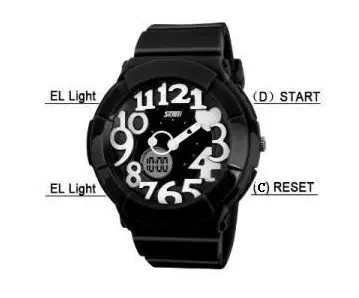
Features:
4 Digitals LCD display,Hour,Minutes,Month/Date. Battery code:Japanese CR2016/SR626SW,dual time zone El backlight Operational Manual: At any mode,press EL key, the EL back light on for 3 seconds.In any Normal Mode,Press D key to show date/seconds, press C key to select Month/Date/Hours /Minutes,press D key to adjust Month/Date/Hours /Minutes. Time&date setting:
In any Normal Mode,Press D key to show the date and seconds. In any Normal Mode, press C key two times enter into setting mode. Press C key the “Month” appearing. Press D to adjust “Month” Press C key the “Date” appearing. Press D to adjust “Date”. Press C key the “Hours” flashing. Press D t o adjust “Hours” Press C key the “Minutes”flashing. Press D to adjust “Minutes” Press C key to exit.
ユーザーまたはスタッフが通常1日以内に回答します。あなたの質問が次の人の助けにもなります。
最初の質問を投稿しましょう。他のユーザーや当チームが回答します。