

BATTERY-POWERED LAVALIER MICROPHONE
USER GUIDE


i. CSLM20B battery-powered lavalier microphone ii. Tie-clip x 2 iii. Windshield x 2 iv. LR44 Battery v. ¼” Adapter vi. Carry pouch

i. Plug the 3.5mm TRRS connector into the headphone jack of the smartphone/laptop. The lavalier microphone will be used as the default microphone while shooting video & recording audio. Slide the switch on the battery module to smartphone/laptop mode.
i. Plug the 3.5mm TRRS connector into the microphone input on the camera/recorder. Insert the LR44 battery into the battery module, with polarity as indicated. Slide the switch on the battery module to Camera mode.
i. Use the given ¼” adapter to plug the microphone into the microphone input of the mixer-amplifier. Insert the LR44 battery in the battery module, with polarity as indicated. Slide the switch on the battery module to Camera mode.

i. The benefit of a microphone attached to the user's clothes is that the microphone will maintain a constant working distance independent of the user's movements and thus ensure a constant output level. Also, a clip-on microphone allows the user to move about freely and keep their hands free.
ii. Hold the lavalier microphone firmly & attach the tie-clip to the microphone at a point just below the microphone body, as shown. Attach the windshield on the microphone.
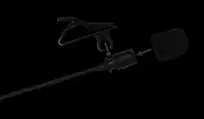
iii. Attach the microphone to the user’s upper body,
placing it as close as possible to his/her mouth.

i. Omnidirectional lavalier microphone with 3.5mm TRRS jack ii. Perfect for recording, podcast, interviews, vlogging, etc. iii. Compatible with smartphones & most
DSLR cameras iv. Can be used with mixer-amplifiers v. Extra-long cable
ユーザーまたはスタッフが通常1日以内に回答します。あなたの質問が次の人の助けにもなります。
最初の質問を投稿しましょう。他のユーザーや当チームが回答します。

