JA
Lenovo logo
公式取扱説明書

Lenovo ThinkPad T14 (Gen1)

7 ページ·295 KB·ノートパソコン·PDF·EN
Lenovo ThinkPad T14 (Gen1)
目次 8セクション Setup Guide · Initial Setup · Overview · Customer Replaceable Units (CRUs) · … 表示非表示
Page 1 of the Lenovo ThinkPad T14 (Gen1) user manual — Setup Guide
1ページ · クリックして拡大
1ページ

Setup Guide

Page 2 of the Lenovo ThinkPad T14 (Gen1) user manual — Initial Setup
2ページ · クリックして拡大
2ページ

Initial Setup

* Lenovo USB-C to VGA Adapter

* Lenovo HDMI to VGA Adapter

* Lenovo USB-C to DisplayPort Adapter
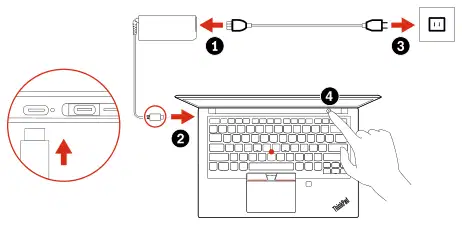
Lenovo ThinkPad T14 (Gen1) — Initial Setup diagram (page 2)
図 1 · Initial Setup

* For selected models

Page 3 of the Lenovo ThinkPad T14 (Gen1) user manual — Overview
3ページ · クリックして拡大
3ページ

Overview

Lenovo ThinkPad T14 (Gen1) — Overview diagram (page 3)
図 2 · Overview
Page 4 of the Lenovo ThinkPad T14 (Gen1) user manual — Overview
4ページ · クリックして拡大
4ページ

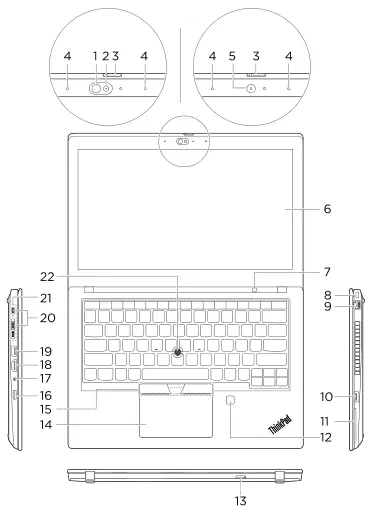
* 1. Infrared LED * 2. Camera with IR function * 3. ThinkShutter * 4. Microphones * 5. Camera * 6. Multi-touch screen 7. Power button 8. Security-lock slot 9. Ethernet connector 10. Always On USB 3.2 connector

* 12. Fingerprint reader * 13. Nano-SIM-card slot 14. TrackPad 15. TrackPoint® buttons 16. microSD card slot 17. Audio connector

18. HDMI TM connector 19. USB 3.2 connector Gen 1 20. USB-C™ (3.2 Gen 2) connectors 21. Docking-station connector 22. TrackPoint pointing stick

Gen 1 * 11. Smart-card slot

Read the statement on USB transfer rate in the User Guide. Refer to the Safety and

Warranty Guide for accessing the User Guide.

* For selected models

Page 5 of the Lenovo ThinkPad T14 (Gen1) user manual — Customer Replaceable Units (CRUs)
5ページ · クリックして拡大
5ページ

Customer Replaceable Units (CRUs)

  • ac power adapter
  • Base cover assembly
  • Coin-cell battery
  • Keyboard *
  • Nano-SIM-card tray
  • M.2 solid-state drive *
  • M.2 solid-state drive bracket *
  • Memory module
  • Power cord
  • Speaker assembly *
  • Wireless WAN card
  • Always On USB 3.2 connector Gen

1 board • Always On USB 3.2 connector Gen

1 board bracket Refer to the User Guide for CRU definition.

* For selected models

Page 6 of the Lenovo ThinkPad T14 (Gen1) user manual — Additional information
6ページ · クリックして拡大
6ページ

Additional information

European Union — compliance with the Radio Equipment Directive

TechnologyFrequency band [MHz]Maximum transmit power WLAN 802.11b/g/n/ax2400 - 2483.5< 20 dBm WLAN 802.11a/n/ac/ax5150 - 5725< 23 dBm WLAN 802.11a/n/ac/ax5725 - 5875< 13.98 dBm Bluetooth BR/EDR/LE2400 - 2483.5< 20 dBm WWAN UMTS1/8< 24.5 dBm WWAN LTE1/3/7/8/20/28< 24 dBm

Hereby, Lenovo (Singapore) Pte. Ltd., declares that the radio equipment type ThinkPad T14 Gen 1 is in compliance with Directive 2014/53/EU. The full text of the system EU declaration of conformity is available at the following Internet address: https://www.lenovo.com/us/en/compliance/eu- doc This radio equipment operates with the following frequency bands and maximum radio-frequency power:

Usage of all the radio devices is limited to indoor in the band 5150 MHz to 5350 MHz (channels 36, 40, 44, 48, 52, 56, 60, 64).

Page 7 of the Lenovo ThinkPad T14 (Gen1) user manual — E-manual
7ページ · クリックして拡大
7ページ

E-manual

Lenovo ThinkPad T14 (Gen1) — E-manual diagram (page 7)
図 3 · E-manual

First Edition (April 2020)

© Copyright Lenovo 2020.

LIMITED AND RESTRICTED RIGHTS NOTICE: If data or software is delivered pursuant to a General Services Administration “GSA” contract, use, reproduction, or disclosure is subject to

restrictions set forth in Contract No. GS-35F-05925.

Reduce I Reuse I Recycle

Lenovo ThinkPad T14 (Gen1)について質問する

ユーザーまたはスタッフが通常1日以内に回答します。あなたの質問が次の人の助けにもなります。

Add your email to get notified when it’s answered — no spam, ever.

0 questions
Lenovo ThinkPad T14 (Gen1)に関する質問はまだありません

最初の質問を投稿しましょう。他のユーザーや当チームが回答します。

原本

Lenovo ThinkPad T14 (Gen1) 取扱説明書(PDF)

7 ページ·295 KB·ノートパソコン·PDF
上のページをクリックするとここに表示されます
ページ 1 / …
100%
ページを読み込み中…