

Please see www.insigniaproducts.com for the latest Quick Start Guide and troubleshooting.
DUAL CONTROLLER CHARGING STATION FOR PLAYSTATION®5
NS-PS5CHRG2
PACKAGE CONTENTS
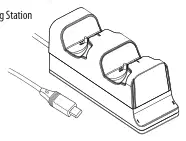
Before using your new product, please read these instructions to prevent any damage.

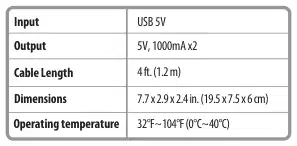
Charges two PS5 controllers Sturdy weighted base with anti-slip rubber feet LED charging indicators Powered by USB cable (4 ft.)
Use the product only as instructed. Read all instructions before operating the product. Do not disassemble any of the components. Do not place or store the product in a humid area and do not expose it to water or rain. Failure to follow these directions may void the warranty.

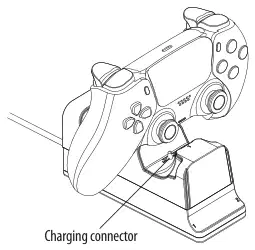
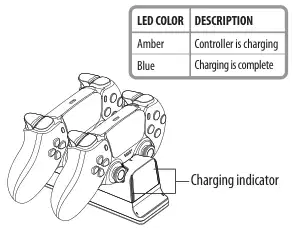
1 Place the Charging Station on a flat and stable surface. 2 Plug the USB power cable into a PS5 console or compatible USB charging adapter. 3 Align the charging port at the bottom on the PS5 controller with the charging connector on the charging station. The LED turns amber while charging, then turns blue when f inished. Caution: Do not use excess force when connecting your controller.


This device complies with part 15 of the FCC Rules. Operation is subject to the following two conditions: (1) This device may not cause harmful interference, and (2) this device must accept any interference received, including interference that may cause undesired operation. Warning: Changes or modifications to this unit not expressly approved by the party responsible for compliance could void the user’s authority to operate the equipment. Note: This equipment has been tested and found to comply with the limits for a Class B digital device, pursuant to Part 15 of the FCC Rules. These limits are designed to provide reasonable protection against harmful interference in a residential installation. This equipment generates, uses and can radiate radio frequency energy and, if not installed and used in accordance with the instructions, may cause harmful interference to radio communications. However, there is no guarantee that interference will not occur in a particular installation. If this equipment does cause harmful interference to radio or television reception, which can be determined by turning the equipment off and on, the user is encouraged to try to correct the interference by one or more of the following measures: - Increase the separation between the equipment and receiver.Reorient or relocate the receiving antenna. - CIncrease the separation between the equipment and receiver. - Connect the equipment into an outlet on a circuit different from that to which the receiver is connected. - Consult the dealer or an experienced radio/TV technician for help.
FCC Information

ICES-003 Statement This Class B digital apparatus complies with Canadian ICES-003. Cet apparel numérique de la classe B est conforme à la norme NMB-003 du Canada.
ONE-YEAR LIMITED WARRANTY Visit www.insigniaproducts.com for details.
This product is not sponsored or approved by Sony. INSIGNIA is a trademark of Best Buy and its affiliated companies. Distributed by Best Buy Purchasing, LLC 7601 Penn Ave South, Richfield, MN 55423 U.S.A. ©2021 Best Buy. All rights reserved. Made in China English V3-21-0118
この取扱説明書で参照されているリンク(メーカー、サポート、ダウンロード等)。
ユーザーまたはスタッフが通常1日以内に回答します。あなたの質問が次の人の助けにもなります。
最初の質問を投稿しましょう。他のユーザーや当チームが回答します。

