



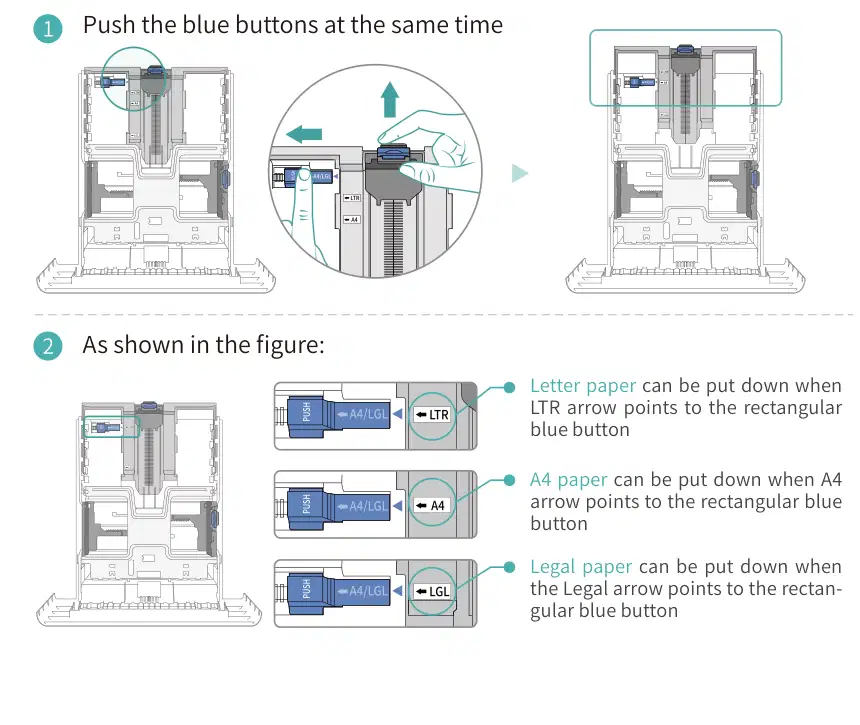
Letter paper can be put down when LTR arrow points to the rectangular blue button
A4 paper can be put down when A4 arrow points to the rectangular blue button
Legal paper can be put down when the Legal arrow points to the rectan- gular blue button

There are Five conditions paper jam possible as below: A) Middle Jam Step1: Pull paper tray out, then gently pull the jammed paper out, and Install paper tray.


C) Duplex Unit Jam Step1: Remove the duplex printing unit from the back of the printer, then remove the jammed paper from the duplex unit, If the paper does not come out along with the duplex unit, open the tray and remove the jammed paper directly from the bottom.

D) Paper Jam occurs on the standard feed tray Step1: Open the tray, then gently pull the jammed paper out, after taking papers jammed out, please reinstall the paper tray inside the printer and close the front cover, then the printer will recover printing automatically.

E) Paper Jam occurs on the manual feed tray Step1: Open the tray, then gently pull the jammed paper out, after taking papers jammed out, please reinstall the paper tray inside the printer and close the front cover, then the printer will recover printing automatically.

この取扱説明書で参照されているリンク(メーカー、サポート、ダウンロード等)。
ユーザーまたはスタッフが通常1日以内に回答します。あなたの質問が次の人の助けにもなります。
最初の質問を投稿しましょう。他のユーザーや当チームが回答します。
