
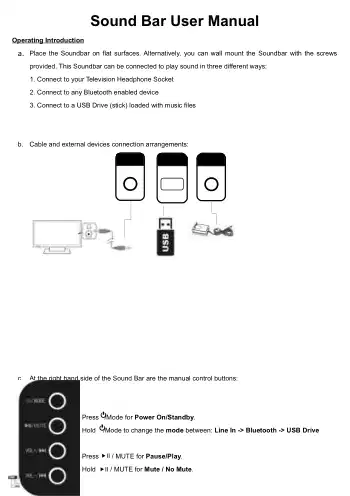

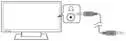
a. Place the Soundbar on flat surfaces. Alternatively, you can wall mount the Soundbar with the screws
provided. This Soundbar can be connected to play sound in three different ways:
b. Cable and external devices connection arrangements:
USB
DC 12V IN
c. At the right hand side of the Sound Bar are the manual control buttons:
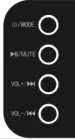
Press /Mode for Power On/Standby.
Hold /Mode to change the mode between: Line In -> Bluetooth -> USB Drive
Press II / MUTE for Pause/Play.
Hold II / MUTE for Mute / No Mute.
Operating Introduction

Press VOL+ /I for Volume up.
Hold VOL+ /I for Next USB Drive Song.
Press VOL- / I for Volume down.
Hold VOL- / I for Previous USB Drive Song.
USB drive when USB Drive in (no USB drive will flash Lod and skip to next mode in seconds)
Front indicator Lights:
bt font: Flashing means Bluetooth is waiting to pair with your Bluetooth enabled device.
bt lit and static means a Bluetooth device is paired.
Line In · Bluetooth

e. Remote control buttons
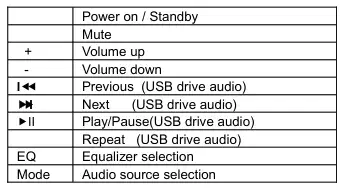
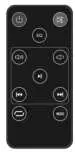
* EQ (Equalizer) Preset Music tone settings to suit personal taste
While playing music continually press the EQ button to toggle between the
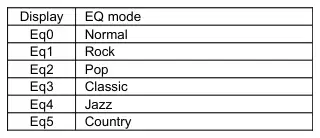
different presets · Technical Specification

. Sound bar
. Manual
. 3.5mm to 3.5MM audio cable
. Screws x 2
. Remote control with batteries
. Mains Power supply
Please notice - All products are subject to change without any notice. We take reservations for errors and omissions in the manual.
Electric and electronic equipment contains materials, components and substances that can be hazardous to your health and the environment, if the waste material (discarded electric and electronic equipment) is not handled correctly.
Electric and electronic equipment is marked with the crossed out trash can symbol, seen above. This symbol signifies that electric and electronic equipment should not be disposed of with other household waste, but should be disposed of separately.
Packing List

All cities have established collection points, where electric and electronic equipment can either be submitted free of charge at recycling stations and other collection sites, or be collected from the households. Additional information is available at the technical department of your city.
Hereby, Inter Sales A/S declares that the radio equipment type DSB-2010 is in compliance with Directive 2014/53/EU. The full text of the EU declaration of conformity is available at the following internet address: www.denver- electronics.com and then click the search ICON on topline of website. Write modelnumber: DSB-2010.Now enter product page, and red directive is found under downloads/other downloads
DENVER ELECTRONICS A/S
Omega 5A, Soeften DK-8382 Hinnerup Denmark www.facebook.com/denverelectronics
ユーザーまたはスタッフが通常1日以内に回答します。あなたの質問が次の人の助けにもなります。
最初の質問を投稿しましょう。他のユーザーや当チームが回答します。

