JA
Easythreed logo
公式取扱説明書

Easythreed 3D Printer (X3)

4 ページ·118 KB·プリンター·PDF·EN
Easythreed 3D Printer (X3)
目次 2セクション Easythreed X3 3D Printer · Install Manual 表示非表示
Page 1 of the Easythreed 3D Printer (X3) user manual — Easythreed X3 3D Printer
1ページ · クリックして拡大
1ページ
Easythreed 3D Printer (X3) — Easythreed X3 3D Printer diagram (page 1)
図 1 · Easythreed X3 3D Printer

Easythreed X3 3D Printer

Install Manual

Easythreed 3D Printer (X3) — Easythreed X3 3D Printer diagram (page 1)
図 2 · Easythreed X3 3D Printer

This manual is written in accordance

with EasyThreed X3 3D printer。

Printer upgrades and equipment models

are slightly different, is a normal phenomenon,

based on the actual products received.

User’s manual inside TF card.

Page 2 of the Easythreed 3D Printer (X3) user manual — Easythreed X3 3D Printer
2ページ · クリックして拡大
2ページ

Parts List:Take out parts from package , check if all parts have as listed below。

Easythreed 3D Printer (X3) — Easythreed X3 3D Printer diagram (page 2)
図 3 · Easythreed X3 3D Printer
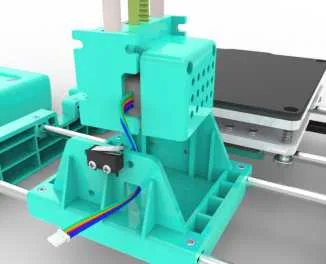
1. Install the XZ Axis set to the Printer Base.
Easythreed 3D Printer (X3) — Easythreed X3 3D Printer diagram (page 2)
図 4 · Easythreed X3 3D Printer
2. Install it downward in the direction of this arrow
1. Put Z-axis motor wire through this hole

`

Page 3 of the Easythreed 3D Printer (X3) user manual — Easythreed X3 3D Printer
3ページ · クリックして拡大
3ページ

2.After insert the XZ Axis, Fixed with 2 screws.

Easythreed 3D Printer (X3) — Easythreed X3 3D Printer diagram (page 3)
図 5 · Easythreed X3 3D Printer
3. Connect the Z-axis motor line to the output line of the printer control box as

shown in the figure below..

Easythreed 3D Printer (X3) — Easythreed X3 3D Printer diagram (page 3)
図 6 · Easythreed X3 3D Printer

Z-axis motor end-to-end docking

Fixed with screws

Page 4 of the Easythreed 3D Printer (X3) user manual — Easythreed X3 3D Printer
4ページ · クリックして拡大
4ページ

4.Install the Filament Holder as below.

Easythreed 3D Printer (X3) — Easythreed X3 3D Printer diagram (page 4)
図 7 · Easythreed X3 3D Printer
Easythreed 3D Printer (X3) — Easythreed X3 3D Printer diagram (page 4)
図 8 · Easythreed X3 3D Printer

connect the power and start the 3D printing journey.。

ShenZhen EasyThreed Technology CO.,LTD

http://www.easythreed.com

info@easythreed.com

情報源

参考資料・リンク

この取扱説明書で参照されているリンク(メーカー、サポート、ダウンロード等)。

Easythreed 3D Printer (X3)について質問する

ユーザーまたはスタッフが通常1日以内に回答します。あなたの質問が次の人の助けにもなります。

Add your email to get notified when it’s answered — no spam, ever.

0 questions
Easythreed 3D Printer (X3)に関する質問はまだありません

最初の質問を投稿しましょう。他のユーザーや当チームが回答します。

原本

Easythreed 3D Printer (X3) 取扱説明書(PDF)

4 ページ·118 KB·プリンター·PDF
上のページをクリックするとここに表示されます
ページ 1 / …
100%
ページを読み込み中…