

SIMPLE MANUAL Mini Hi-Fi System
Please read this manual carefully before operating your set and retain it for future reference. To view the instructions of advanced features, visit http://www.lg.com and then download Owner’s Manual. Some of the content in this manual may differ from your unit.
www.lg.com
Copyright © 2020 LG Electronics Inc. All Rights Reserved. MFL70382787
1807_Rev02

FCC RF Radiation Exposure Statement: This equipment complies with FCC radiation exposure limits set forth for an uncontrolled environment. This transmitter must not be co-located or operating in conjunction with any other antenna or transmitter.
This equipment has been tested and found to comply with the limits for a Class B digital device, pursuant to Part 15 of the FCC Rules. These limits are designed to provide reasonable protection against harmful interference in a residential installation. This equipment generates, uses, and can radiate radio frequency energy and, if not installed and used in accordance with the instructions, may cause harmful interference to radio communications. However, there is no guarantee that interference will not occur in a particular installation. If this equipment does cause harmful interference to radio or television reception, which can be determined by turning the equipment off and on, the user is encouraged to try to correct the interference by one or more of the following measures:
This equipment should be installed and operated with minimum distance 20 cm (7.8 inches) between the antenna and your body. Users must follow the specific operating instructions for satisfying RF exposure compliance.
Responsible Party LG Electronics USA, Inc.
Address 1000 Sylvan Ave Englewood Cliffs, NJ 07632
y Reorient or relocate the receiving antenna. y Increase the separation between the equipment and
the receiver. y Connect the equipment to an outlet on a circuit
different from that to which the receiver is connected. y Consult the dealer or an experienced radio/TV
technician for help. This device complies with part 15 of the FCC Rules. Operation is subject to the following two conditions: (1) this device may not cause harmful interference and (2) this device must accept any interference received, including interference that may cause undesired operation. Any changes or modifications in construction of this device which are not expressly approved by the party responsible for compliance could void the user’s authority to operate the equipment.
Trade Name LG · Telephone (201)266-2215

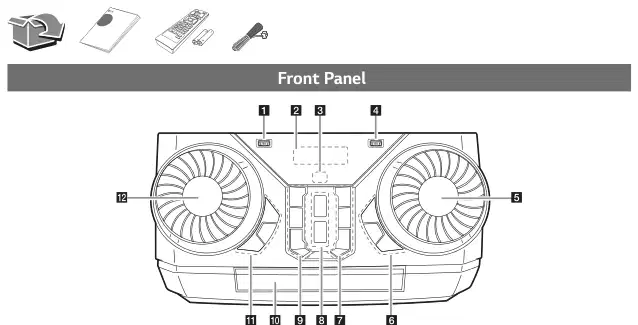
a USB 1 Port
You can play sound files by connecting the USB device.
Turns the power on or off.
- Skips backward. - Searches for a section within a track/file. - Selects the radio stations.
c (Remote sensor)
d USB 2 Port
You can play sound files by connecting the USB device.
Z (Stop) Stops playback or cancels DELETE function.
e MASTER VOL. (Volume)
Adjust speaker volume.
f BASS BLAST (or BASS BLAST+)
Chooses special equalizer.
Press to select BASS (or BASS+) effect directly.
SEARCH Moves to folder or file in selection mode.
- Records to USB. - To stop Recording, press and hold for 3 seconds. - In power off status, if you press USB REC / DEMO,
OK Selects a folder when searching a file.
show DEMO mode.
l EQUALIZER / SEARCH
3 WIRELESS LINK - Selects MAIN or OTHER on WIRELESS PARTY LINK mode. - Enable or disable WIRELESS PARTY LINK mode.
- Chooses sound impressions. - Searches a folder or a file.
Selects the function and input source.
- Skips forward. - Searches for a section within a track/file. - Selects the radio stations.
B (Open/Close) Opens and closes the disc tray.
Selects the AUTO DJ mode.
- Starts or pauses playback. - Selects stereo/mono.

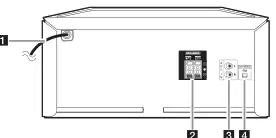
c AUX IN (L/R)
Connect an auxiliary device.
Download the Music Flow Bluetooth App to your device. (Android only)
For more information, download the online owner’s manual. http://www.lg.com

Replacement of battery
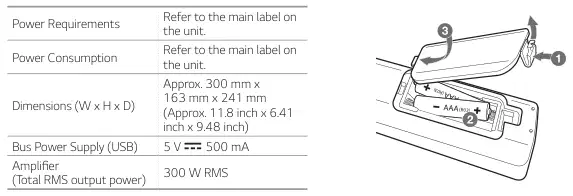
Power Requirements Refer to the main label on the unit.
Power Consumption Refer to the main label on the unit.
Approx. 300 mm x 163 mm x 241 mm (Approx. 11.8 inch x 6.41 inch x 9.48 inch) Bus Power Supply (USB) 5 V 0 500 mA Amplifier (Total RMS output power) 300 W RMS
Design and specifications are subject to change without notice.

1-800-243-0000 USA, Consumer 1-888-865-3026 USA, Commercial
www.lg.com
Printed in China
この取扱説明書で参照されているリンク(メーカー、サポート、ダウンロード等)。
ユーザーまたはスタッフが通常1日以内に回答します。あなたの質問が次の人の助けにもなります。
最初の質問を投稿しましょう。他のユーザーや当チームが回答します。

