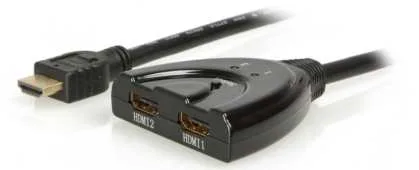


HDMI Switcher 3×1 Pigtail
HDMI UHD Switcher 2X1 Pigtail DEAR CUSTOMER Thank you for purchasing this product. For optimum performance and safety, please read these instructions carefully before connecting, operating or adjusting this product. Please keep this manual for future reference. 1.0 INTRODUCTION This is a kind of high performance HDMI Switcher. It can easily switch two sources to one display. It not only has the key-press-switching function, but also has intelligent function. With one fixed HDMI cable (pigtail) this adapter not only reduces cost but also saves time for consumers. This kind of HDMI Switcher routes high definition video (in multiple resolutions up to 4kx2k) and digital audio from any one of the three sources to display units. All inputs accommodate the connections of the high definition video sources simultaneously, compatible well for HD-DVD,SKY-STB, PS3, Xbox360 etc. The output sends the high definition audio/video signals to a high definition display. 1.1 FEATURES This HDMI Switcher has many features that enable it to perform in a superior manner. Among those features you will find: Multifunctional on switching : intelligent or mechanical Supports highest video resolution 4KX2K@60HZ Supports 600MHz/6Gbps per channel (18Gbps all channel) bandwidth. Supports 12bit per channel (36bit all channel) deep color. HDCP pass-through. Supports uncompressed audio such as LPCM. Supports compressed audio such as DTS Digital, Dolby Digital(including
DTS-HD and Dolby True HD) Support 3D all format

HDMI Switcher 3×1 Pigtail

5.0 CONNECTION AND OPERATION 1) Connect the HDMI input sources into the HDMI switcher. (Input cables are optional) *Please refer to connection diagram section. 2) Connect the fixed HDMI cable (pigtail) to display. 3) Press the “select” button to select input sources. Attention: Insert / Extract cable gently.
ユーザーまたはスタッフが通常1日以内に回答します。あなたの質問が次の人の助けにもなります。
最初の質問を投稿しましょう。他のユーザーや当チームが回答します。