JA
公式取扱説明書

MobilitySound Bluetooth PTT Zello

5 ページ·257 KB·コントローラー·PDF·EN
MobilitySound Bluetooth PTT Zello
目次 1セクション User Manual (Android) 表示非表示
Page 1 of the MobilitySound Bluetooth PTT Zello user manual
1ページ · クリックして拡大
1ページ
MobilitySound Bluetooth PTT Zello diagram (page 1)
図 1

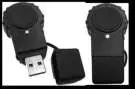
Bluetooth PTT for Zello

Bluetooth type PTT for connecting POC APPs
MobilitySound Bluetooth PTT Zello diagram (page 1)
図 2
Type:Bluetooth PTT Operating Temp:-20℃±2℃ ~ 50℃±2℃ Storage Temp:-40℃±2℃ ~ 80℃±2℃ Approx. Weight:14.5g

Fully Qualified Bluetooth v2.1

Chip setCSR BC5 + 16MB external Flash
Receiver Sensitivity-82 dBm (typ.)

Power class 2,10 meters

DisplayTwo color LED
SupportSPP Profile
DC Input5 VDC (std.)
DC Current16 mA (avg.)
DC Current20 mA (transient)
Battery240mAh
Use Time15 Hours (MAX)
Charging TypeUSB

Option Velcro belt type

Show 4 more labels / short text on this page
Specification · PTT function built-in · BT-PTT2 Option · Option Clip type
Page 2 of the MobilitySound Bluetooth PTT Zello user manual — User Manual (Android)
2ページ · クリックして拡大
2ページ

User Manual (Android)

1. Press the PTT button and then hold down the power button. When the LED of PTT-

220-VZ flashes 2 times every second, it is in the pairing mode now.

MobilitySound Bluetooth PTT Zello — User Manual (Android) diagram (page 2)
図 3 · User Manual (Android)

Flash 2 times every 1 second

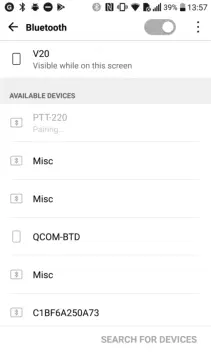
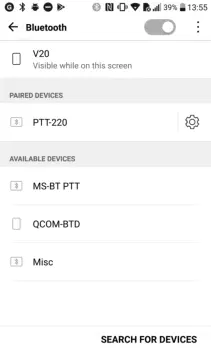
2. Get in “Settings – Bluetooth” on the smartphone (take LG smartphone for example)

and wait for the “PTT-220” to be found. Select “PTT-220”. Though the “PTT-220”

doesn’t show “connecting”, it is normal.

(NOTEif the PTT-220-VZ lost the link with “Zello”. Go to settings power off/on

Bluetooth again.)

MobilitySound Bluetooth PTT Zello — User Manual (Android) diagram (page 2)
図 4 · User Manual (Android)
MobilitySound Bluetooth PTT Zello — User Manual (Android) diagram (page 2)
図 5 · User Manual (Android)

Power button

Page 3 of the MobilitySound Bluetooth PTT Zello user manual — User Manual (Android)
3ページ · クリックして拡大
3ページ
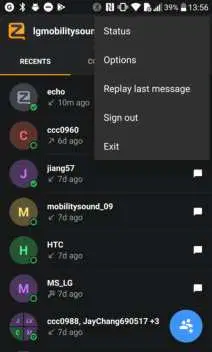
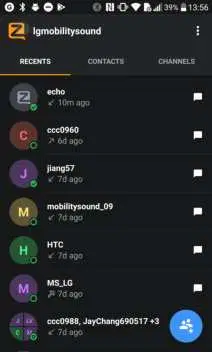
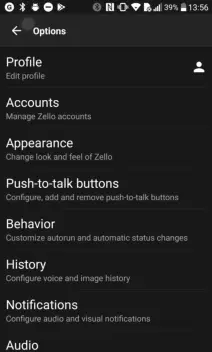
3. To set "Push-to-talk buttons" before using the PTT-220-VZ for "Zello" app:

a. First, open the “Zello” app, and click the three dots at the upper left.

b. Next, select the "Options".
MobilitySound Bluetooth PTT Zello — User Manual (Android) diagram (page 3)
図 6 · User Manual (Android)
MobilitySound Bluetooth PTT Zello — User Manual (Android) diagram (page 3)
図 7 · User Manual (Android)
Page 4 of the MobilitySound Bluetooth PTT Zello user manual — User Manual (Android)
4ページ · クリックして拡大
4ページ

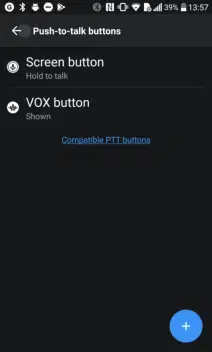
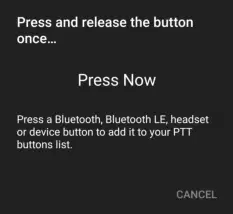
c. Third, select the "Push-to-talk buttons" and click the "Add" button. When the pop-

up window of "Press and release..." is displayed, press the PTT button on PTT-

220-VZ, and it will be connected with "Zello" app.
MobilitySound Bluetooth PTT Zello — User Manual (Android) diagram (page 4)
図 8 · User Manual (Android)
MobilitySound Bluetooth PTT Zello — User Manual (Android) diagram (page 4)
図 9 · User Manual (Android)
MobilitySound Bluetooth PTT Zello — User Manual (Android) diagram (page 4)
図 10 · User Manual (Android)
Page 5 of the MobilitySound Bluetooth PTT Zello user manual — User Manual (Android)
5ページ · クリックして拡大
5ページ

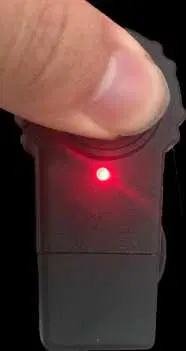
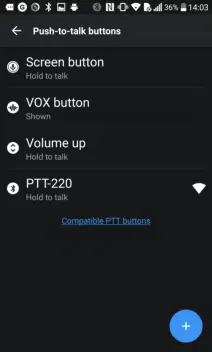
d. Last, the "PTT-220 (Hold to talk)" should display in the window. When you press

the PTT button on the PTT-220-VZ, the LED will be red. Now you can use the

PTT-220-VZ to work with "Zello" app.
MobilitySound Bluetooth PTT Zello — User Manual (Android) diagram (page 5)
図 11 · User Manual (Android)
MobilitySound Bluetooth PTT Zello — User Manual (Android) diagram (page 5)
図 12 · User Manual (Android)

MobilitySound Bluetooth PTT Zelloについて質問する

ユーザーまたはスタッフが通常1日以内に回答します。あなたの質問が次の人の助けにもなります。

Add your email to get notified when it’s answered — no spam, ever.

0 questions
MobilitySound Bluetooth PTT Zelloに関する質問はまだありません

最初の質問を投稿しましょう。他のユーザーや当チームが回答します。

原本

MobilitySound Bluetooth PTT Zello 取扱説明書(PDF)

5 ページ·257 KB·コントローラー·PDF
上のページをクリックするとここに表示されます
ページ 1 / …
100%
ページを読み込み中…