3ページ
EN 1 What’s in the box
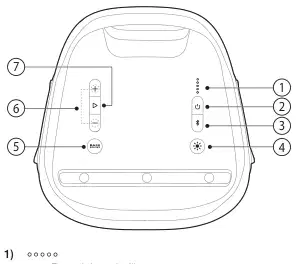
- 3)
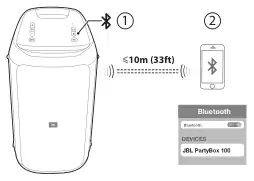
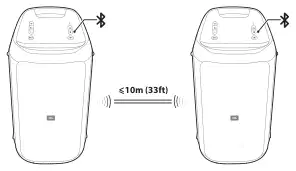
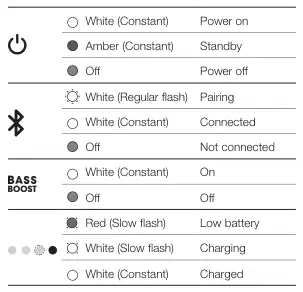
- Press to enter Bluetooth pairing mode.
- Press and hold for 20 seconds to forget all paired devices.
- 4)
- Press to toggle between different light patterns.
- Press and hold for 2 seconds to turn the strobe light on or off.
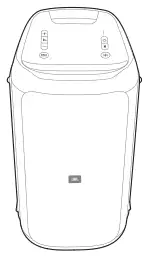 図 2 · EN 1 What’s in the box
5. • Press repeatedly to switch between bass boost level 1 and level 2 or turn off.
- 6) /
- Press to increase or decrease the volume level.
- Press both simultaneously to mute the audio output.
7. • Press to play or pause the music.
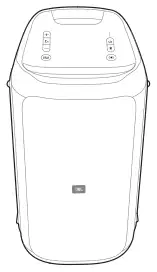
2.2 Back Panel
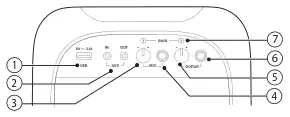 図 3 · 2.2 Back Panel
– For more information, please download the owner's manual from www.jbl.com
2 Overview
2.1 Top panel
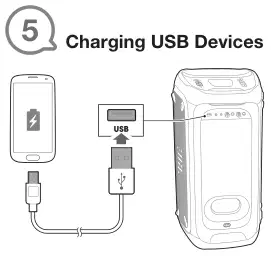
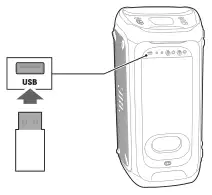
- 1) USB
- Charge an external USB device.
- Connect to a USB storage device
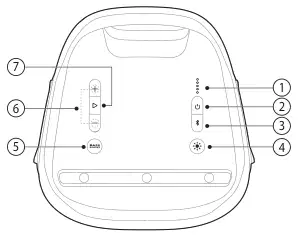 図 4 · 2.1 Top panel
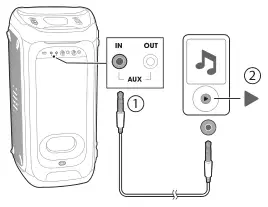
2. AUX • Connect to an external audio device through an audio cable.
3. VOLUME (MIC) • Rotate the knob to adjust the microphone volume.
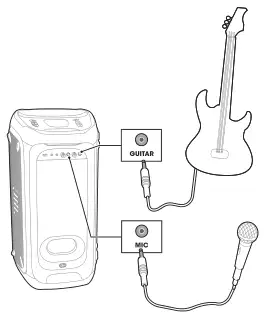
4. MIC • Connect to a microphone (not provided).
5. VOLUME (GUITAR) • Rotate the knob to adjust the guitar volume.
6. GUITAR • Connect to a guitar (not provided).
7. GAIN • Guitar and microphone gain control buttons to match different sensitivity of the mic and guitar.
1. • Battery level indicator.
2. • Press to power on or off.