
JA
Motorola logo
公式取扱説明書

Motorola Earpiece (PMLN7397)

52 ページ·666 KB·オーディオ·PDF·EN
Motorola Earpiece (PMLN7397)
目次 15セクション English · Foreword · RF Energy Exposure and Product Safety Guide for Portable Two-Way Radios · Acoustic Safety · … 表示非表示
Page 1 of the Motorola Earpiece (PMLN7397) user manual — ACCESSORIES
1ページ · クリックして拡大
1ページ

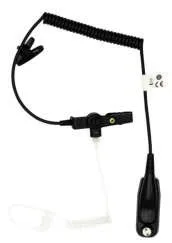
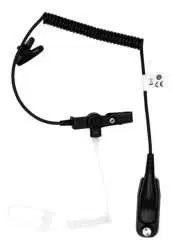
RECEIVE-ONLY EARPIECE PMLN7397

Motorola Earpiece (PMLN7397) — RECEIVE-ONLY EARPIECE PMLN7397 diagram (page 1)
図 1

ACCESSORIES

en-USde-DE it-ITQO1/
es-ESIU)5 pt-PTru-RU
Page 2 of the Motorola Earpiece (PMLN7397) user manual
2ページ · クリックして拡大
2ページ
Page 2 of the Motorola Earpiece (PMLN7397) user manual
Page 3 of the Motorola Earpiece (PMLN7397) user manual — Acoustic Safety
3ページ · クリックして拡大
3ページ

Foreword

RF Energy Exposure and Product Safety Guide for Portable Two-Way Radios

These Earpieces, when attached to the radio, are restricted to occupational use only to satisfy FCC/ICNIRP RF energy exposure requirements. Before using this product, read the RF Energy Exposure and Product Safety Guide that ships with the radio which contains instructions for safe usage and RF energy awareness and control for compliance with applicable standards and regulation.

Acoustic Safety

  • Exposure to loud noises from any source for extended periods of time may temporarily or permanently affect your hearing. The louder the volume, the less time is required before your hearing could be affected. Hearing damage from loud noise is sometimes undetectable at first and can have a cumulative effect. To protect your hearing:
  • Use the lowest volume necessary to do your job.
  • Turn up the volume only if you are in noisy surroundings.
  • Turn down the volume before connecting headset or earpiece.
  • Limit the amount of time you use headsets or earpieces at high volume.
  • When using the radio without a headset or earpiece, do not place the radio speaker directly against your ear.
Page 4 of the Motorola Earpiece (PMLN7397) user manual — Removing the Accessory
4ページ · クリックして拡大
4ページ
  • If you experience hearing discomfort, ringing in your ears, or speeches that are muffled, you should stop listening to your radio through your headset or earpiece, and have your hearing checked by your doctor.

Description

The PMLN7397 Earpiece comes with a 1 Cord Quick Disconnect adapter that allows the user to quickly disconnect the earpiece from the surveillance kit. This feature will enable multiple users to swap earpieces easily. This earpiece also consists of exchangeable rubber ear tip for low noise conditions and foam ear tube plug for extreme noise conditions.

Operation

Attaching the Accessory to the Radio

1. Turn the radio off. 2. Attach the kit connector to the radio, and secure the connector. 3. Turn the radio on and adjust the audio volume to a comfortable listening level.

Receiving

When the accessory is connected to the radio side connector, the radio speaker is muted, and the audio is only heard from the earpiece speaker.

Removing the Accessory

Turn the radio off before removing the accessory from the radio side connector.

Page 5 of the Motorola Earpiece (PMLN7397) user manual — Care and Maintenance
5ページ · クリックして拡大
5ページ
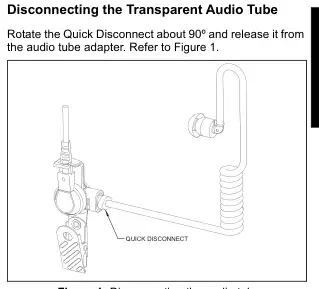
Motorola Earpiece (PMLN7397) — Disconnecting the Transparent Audio Tube diagram (page 5)
図 2 · Disconnecting the Transparent Audio Tube

Rotate the Quick Disconnect about 90º and release it from the audio tube adapter. Refer to Figure 1.

Figure 1Disconnecting the audio tube

Care and Maintenance

  • Clean the accessory, especially the ear tube and ear tip by:
  • washing periodically with a mild liquid soap and rinsing with water.
  • wiping off each used part that touched the ear with a tissue.
  • keeping canal free and clear of wax.

once the package seal is broken.

Page 6 of the Motorola Earpiece (PMLN7397) user manual — Attaching the foam ear tube plug
6ページ · クリックして拡大
6ページ

Service

The following replacement parts and alternate configurations are available for the kits.

Table 1Replacement Parts/Options
Part DescriptionQuantityPart Number Quick disconnect acoustic tube1RLN6242 _ Noise attenuating plugs255080384F72 Ear tip, clear255080370E97

Installation

Removing the rubber ear tip

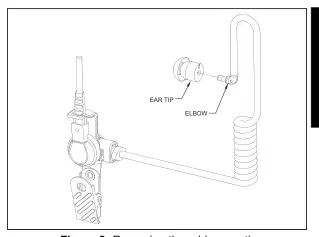
Remove the rubber ear tip by pulling it out and away from the elbow. Refer to Figure 2.

Attaching the foam ear tube plug

1. Slip the end of the black tube over the elbow. 2. Use your fingertips to squeeze the foam ear tube plug fairly tight around the center of the black tube.
Page 7 of the Motorola Earpiece (PMLN7397) user manual — Service
7ページ · クリックして拡大
7ページ
Motorola Earpiece (PMLN7397) — Service diagram (page 7)
図 3 · Service
Figure 2Removing the rubber ear tip

3. While the ear tube plug foam is compressed, insert it into your ear canal far enough to be worn comfortably. Within a few seconds after the ear tube insertion, the compressed foam will conform to the shape of your ear canal. 4. To further reduce the noise level, replace the ear tip to the noise attenuating foam earplug. While the foam earplug is compressed, insert it into the other (open) ear canal far enough to be worn comfortably. Within a few seconds after the earplug insertion, the compressed foam will conform to the shape of your ear canal.

Page 8 of the Motorola Earpiece (PMLN7397) user manual — Notes
8ページ · クリックして拡大
8ページ

Notes

Motorola Earpiece (PMLN7397)について質問する

ユーザーまたはスタッフが通常1日以内に回答します。あなたの質問が次の人の助けにもなります。

Add your email to get notified when it’s answered — no spam, ever.

0 questions
Motorola Earpiece (PMLN7397)に関する質問はまだありません

最初の質問を投稿しましょう。他のユーザーや当チームが回答します。

原本

Motorola Earpiece (PMLN7397) 取扱説明書(PDF)

52 ページ·666 KB·オーディオ·PDF
上のページをクリックするとここに表示されます
ページ 1 / …
100%
ページを読み込み中…