JA
ULINE logo
公式取扱説明書

ULINE Sit Stand Desktop Riser (H-7031)

6 ページ·3.3 MB·パソコン・周辺機器·PDF·ENFR
ULINE Sit Stand Desktop Riser (H-7031)
目次 7セクション H-6306, H-6307 H-7031 · 1-800-295-5510 uline.com SIT/STAND DESKTOP RISER · TOOL NEEDED · PARTS · … 表示非表示
Page 1 of the ULINE Sit Stand Desktop Riser (H-7031) user manual — ASSEMBLY
1ページ · クリックして拡大
1ページ

Para Español, vea páginas 3-4. Pour le français, consulter les pages 5-6.

H-6306, H-6307 H-7031

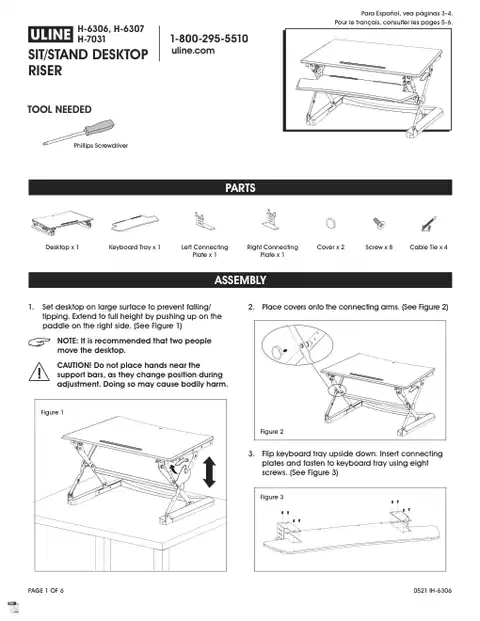
ULINE Sit Stand Desktop Riser (H-7031) — H-6306, H-6307 H-7031 diagram (page 1)
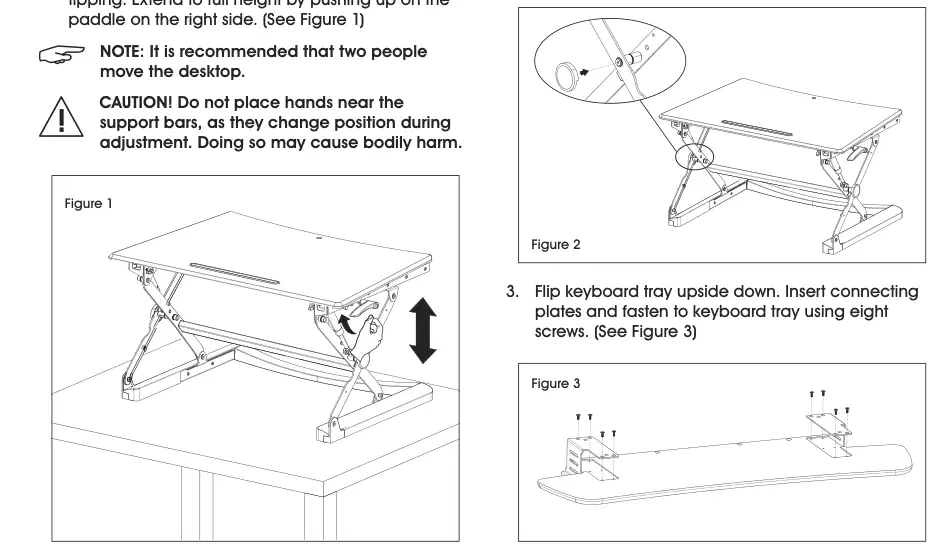
図 1

1-800-295-5510 uline.com SIT/STAND DESKTOP RISER

TOOL NEEDED

PARTS

Desktop x 1 Keyboard Tray x 1 Left Connecting

Cover x 2 Screw x 8 Cable Tie x 4

ASSEMBLY

1. Set desktop on large surface to prevent falling/ tipping. Extend to full height by pushing up on the paddle on the right side. (See Figure 1)
2. Place covers onto the connecting arms. (See Figure 2)
ULINE Sit Stand Desktop Riser (H-7031) — ASSEMBLY diagram (page 1)
図 2
3. Flip keyboard tray upside down. Insert connecting plates and fasten to keyboard tray using eight screws. (See Figure 3)
Show 4 more labels / short text on this page
Phillips Screwdriver · Right Connecting · Plate x 1 · Plate x 1
Page 2 of the ULINE Sit Stand Desktop Riser (H-7031) user manual — 1-800-295-5510 uline.com
2ページ · クリックして拡大
2ページ

ASSEMBLY CONTINUED

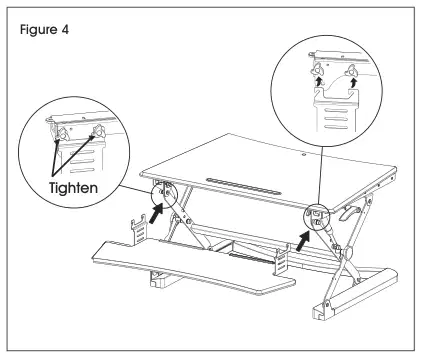
4. Hang connecting plates onto the four knobs located underneath desktop and turn knobs clockwise to fasten the keyboard tray. (See Figure 4)
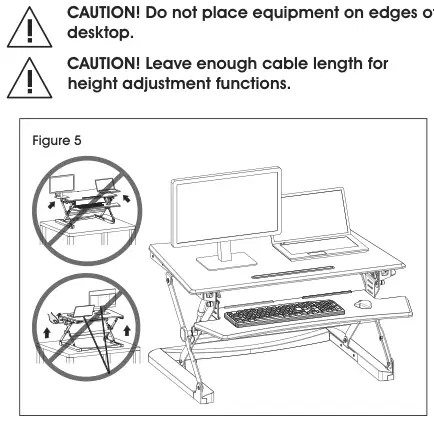
5. Place devices onto desktop. Use supplied cable ties to fasten cables. (See Figure 5)
ULINE Sit Stand Desktop Riser (H-7031) — ASSEMBLY CONTINUED diagram (page 2)
図 3
ULINE Sit Stand Desktop Riser (H-7031) — ASSEMBLY CONTINUED diagram (page 2)
図 4

1-800-295-5510 uline.com

ULINE Sit Stand Desktop Riser (H-7031)について質問する

ユーザーまたはスタッフが通常1日以内に回答します。あなたの質問が次の人の助けにもなります。

Add your email to get notified when it’s answered — no spam, ever.

0 questions
ULINE Sit Stand Desktop Riser (H-7031)に関する質問はまだありません

最初の質問を投稿しましょう。他のユーザーや当チームが回答します。

原本

ULINE Sit Stand Desktop Riser (H-7031) 取扱説明書(PDF)

6 ページ·3.3 MB·パソコン・周辺機器·PDF
上のページをクリックするとここに表示されます
ページ 1 / …
100%
ページを読み込み中…