

Hitachi Home Electronics Asia


Open the “App Store” (iOS 10.0 or later) Open the “Google Play” (Android) You can also download the application from Hitachi homepage
- URL https://www.homeappliances.hitachi.com/global/app/ref/series01/index.html

(Scan QR to download)
2. User Registration ( You must first register/create an account to use the app ) - Tap on App & ‘I Agree’ on Terms/Condition of Usage - Tap ‘Create your account’ (1st time registration, a 6-digit Code Verification is required – Upon register of ID & Password, please wait few seconds to receive code via your email. Key-in code to proceed) Key-in an ID (email address) You are asked to enter your LAN and your password to router password after the registration complete the registration is complete


Page 1 of 3

Hitachi Home Electronics Asia
You are asked to do the ‘Pairing’ or ‘later’ and click ‘Next’ (follow the instruction)

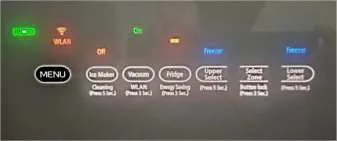
Set to wireless LAN - Touch ‘Menu (*1)’ button on the Control Panel to turn on the indicator - Touch to hold ‘Vacuum(*2)’ for 3 seconds or more until beep sounds to light the ‘WLAN(*3)’

Set to Pairing mode Open the door on ice-compartment. - Touch ‘Menu(*1)’ button on the Control Panel to turn on the indicator. - Touch to hold ‘Vacuum(*2)’ for 3 seconds or more until beep sounds to light the ‘WLAN(*3)’ to blink.
Page 2 of 3
*3 · *2 · *1

Hitachi Home Electronics Asia


- Pls refer to User Manual for details - App functions: 1. Control Panel – Remote control setting 2. My Lists - Food Management 3. Support – User Manual, Wireless LAN, Maintenance, Error Code, Contact Us


Page 3 of 3
この取扱説明書で参照されているリンク(メーカー、サポート、ダウンロード等)。
ユーザーまたはスタッフが通常1日以内に回答します。あなたの質問が次の人の助けにもなります。
最初の質問を投稿しましょう。他のユーザーや当チームが回答します。

