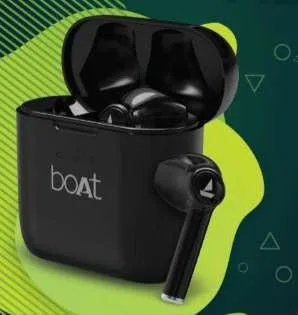
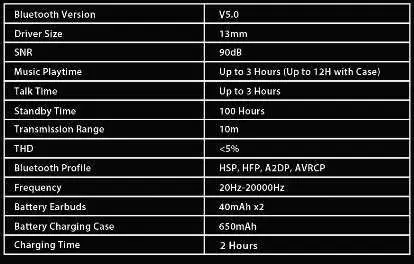
Get ready to immerse yourself in musical bliss with your very own boAt Airdopes 138. It offers an Immersive Audio experience with 13mm Dynamic Drivers. Have access to the instant Wireless Bluetooth Connectivity V5.
Its Easy Access, Integrated Controls allows for a fantastic listening experience, with an in-built mic to handle any incoming calls. Its powerful 650mah charging cum carry case offers 4x the charge for the earbuds with a total playtime of 12 hours and 3 hours with the earbuds (one single earbud)
Prepared for almost anything, it is sweat resistance.
It’s time to rock into your rhythm when you’re raising a storm with the boAt Airdopes 138
4ページ · クリックして拡大
4ページ
Overview
Wireless Bluetooth Bliss V5.0 – Tap into the instant true wireless connectivity with the latest Bluetooth V5.0
Premium Immersive Audio – The 6mm dynamic drivers pump out immersive audio for just the right vibe
650mAh Carry Case (x4 Charges) – Carry your music anywhere with the sleek & portable charging case that allows the music to come to life anytime, by offering a total playback time of 12 hours
Dynamic Industrial Design – The ergonomically designed TWS earbuds have the design to glide with, towards the shores of Nirvana
Sweat Resistance: It offers resistance against water and sweat scares for a carefree listening experience
Integrated Controls with Voice Assistant – The easy access, integrated controls with built-in mic and the voice assistant feature lets one delve deeper into the boAt audio bliss
5ページ · クリックして拡大
5ページ
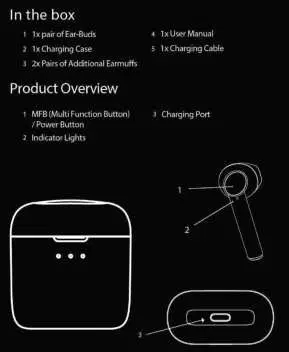
Buttons and Indicators
図 3 · Buttons and Indicators図 4 · Buttons and Indicators
6ページ · クリックして拡大
6ページ
Basic walkthrough
Power On
There are two ways to switch the ear buds on:
To automatically switch the earbuds on (Smart Power On) simply open the lid of the charging case
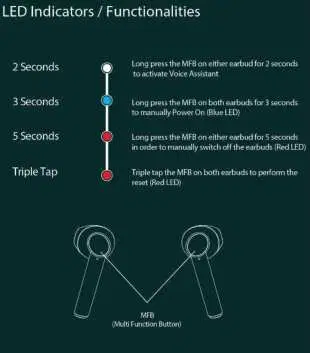
To manually switch the earbuds on (Manual Power On), long touch the multi function button for 3 seconds on both Left and Right earbuds for switching them on until the LED light begins to flash red and blue for 1 second
Power Off
There are two ways to switch the ear buds off:
You can simply place them ear buds back into the charging case
Long touch the MFB button on both the earbud for 5 seconds until the red indicator light blinks before earbuds getting turned off, in order to manually switch off the earbuds. Please note that this powers off both the earbuds.
7ページ · クリックして拡大
7ページ
Pairing
Mono Earbud Use
Step 1: Please note that both the earbuds can be used in mono mode. Use either of the two options; Smart Power On or Manual Power On for switching on the desired earbud
Step 2: The selected earbud will automatically enter the connection mode indicated by alternating red and blue LED flashes
Step 3: Turn on Bluetooth on your phone/media device and search for ‘Airdopes 138’ to connect
Stereo Earbud Use
Switch the earbuds on; a blue light will flash for 1 second to confirm that they have been switched on. Both earbud’s will pair with one another automatically.
Both the earbuds will automatically pair with each other. The earbuds will enter into the Connection Mode, indicated by alternating blue and red LED flashes
Turn on the Bluetooth functionality on your phone/media device and scan
Search for ‘Airdopes 138’ and pair accordingly. Enter ‘0000’ as the passkey if asked.
Congratulations! Your earbuds are now connected successfully via Bluetooth
8ページ · クリックして拡大
8ページ
Factory Reset
Perform the Factory Reset in case you face any difficulty while operating your Airdopes 138
Step 1: Please remove the pairing record of airdopes 138 from your phone or media device.
Step 2: Power off the earbuds, triple tap both the MFBs until the red led blinks for 1 second. (this indicates successful mid way reset)
Step 3:Keep the earbuds back inside the case in their correct orientation and Shut the lid of the charging case.
Step 4: Open the lid, and they automatically restart and enter connection mode.
Step 5: Congratulations! Your Airdopes 138 has been Reset
9ページ · クリックして拡大
9ページ
Charging
図 5 · Charging図 6 · Charging
10ページ · クリックして拡大
10ページ
Basic Functions
Voice Assistant: Long press the MFB on either earbud for 2 seconds to activate the voice assistant (google or siri)
Answer/Hang Up Call: Tap the MFB once on either earbud to answer an incoming call and once again to hang up an ongoing call
Reject Call: Long press the MFB on either earbud for 2 seconds to reject incoming calls
Play/Pause Music: Tap the left/right MFB once to play or pause a song
Next Track: When playing music, double tap the MFB on right earbud to skip to the next song
Previous Track: When playing music, double tap the MFB on left earbud to return to the previous song
11ページ · クリックして拡大
11ページ
F A Q . Q Device not connecting via Bluetooth
Check to see if the device is in pairing mode indicated by red and blue LED flashes on either earbud.
Check if the device is in the range of Bluetooth (usually 10m) and if there are any obstructions in between.
Check to see if the device being connected to supports Bluetooth connections
Check if it is a passcode issue and if so enter 0000
Check to see if the device being connected to does not have any software issues – Check to forget the device on Bluetooth, update the mobile software, if it still does not work try factory resetting the device.
Q. Charging case is not charging
Check to see if the wire connected to the case is not broken, use other wires and also ensure that the charger being used is not of 9v or 12v as that will damage the case, The LED lights located on the charging case indicate the battery status of the case. The indicator in the case blinks during charge and will remain steady for 60 seconds before turning off on full charge.
Q. Earbuds are not charging
Check to see if the earbuds have been put inside the case in the right orientation, a white light on the earbud’s will indicate they are still being charged. This light will go off once the earbud’s have been completely charged.
12ページ · クリックして拡大
12ページ
Q. Device not entering stereo mode/ stuck in mono
Check when both the earbuds are taken out of the charging case , the earbuds will enter into the Connection Mode, indicated by red and blue LED flashing.
If one of them fails to smart power on, to manually switch the earbuds on (Manual Power On), long touch the MFB (multi function button) for 3 seconds on both Left and Right earbuds for switching them on until the LED light begins to flash in red and blue
Place the earbuds in the charging case and then try using them again. Check if it connects automatically.
Check and see if hard resetting the device works as follows
Perform the Factory Reset in case you face any difficulty while operating your Airdopes 138
Step 1: Please remove the pairing record of airdopes 138 from your phone or media device.
Step 2: Power off the earbuds, triple tap both the MFBs until the red led blinks for 1 second. (this indicates successful mid way reset)
Step 3:Keep the earbuds back inside the case in their correct orientation and Shut the lid of the charging case.
Step 4: Open the lid, and they automatically restart and enter connection mode.
Step 5: Congratulations! Your Airdopes 138 has been Reset
13ページ · クリックして拡大
13ページ
Q. The sound is distorted/low volume/low bass/low qualit y
Check if connected device does not have any equalizer settings applied from your smartphone.
Check if the problem still occurs if the device is moved closer and all obstacles in the middle are removed.
Check if the distortion or quality lowers at all volumes or only at high volumes.
Check to Check different media players and different devices and if the distortion happens on all devices or only on specific ones.
Check if the problem occurs at all levels of charging or only at low charging levels.
Q. The device does not turn on
Check to see if the device has been properly charged first, A white light on the earbud’s will indicate they are still being charged. This light will turn off once the earbud’s have been completely charged.
Check if the voltage of the charger is correct for the charging case and if the lights on the bottom are glowing to indicate the charge level.
Check by switching on the earbud’ on manually, press and hold the multi function button for 3 seconds until the LED begins to flash in red and blue.
Check if the device was not subject to any mishandling, broken wires or exposed to direct sunlight or hazards like fire
14ページ · クリックして拡大
14ページ
Q. The in-built controls of the device are not working
Check if the controls do not work while connected to another device
Check if the media player being used supports such controls and if they controls do not function on call or other media players
Check if the controls have been physically damaged or exposed to any hazards
Q. Occasional disconnects/ The right earpod keeps disconnecting
Check if restarting the device resolves the issue.
Check if the same problem happens for different devices and media players.
Check if there are any obstructions between the earpods and the device and clear them, move the device at a closer range to the earpod and see if it still affects it.
Try factory-resetting the device.
Q. If there are other exceptions in use
Check if restarting the device resolves the issue.
Place the earbud’s in the charging case and then try using them again.
Try factory-resetting the device.
15ページ · クリックして拡大
15ページ
Q. The sound output is muffled
Check if dust has accumulated inside the earbuds or if there is any obstruction.
Check if ear wax has accumulated inside the earbuds.
Check if there is no damage to the tips of the earbuds and see if changing them helps.
Check if sweat or water has gone inside the earbuds.
Q. Voice is muffled during calls/ Microphone has muffled input
Check if restarting the device resolves the issue.
Check if dust or ear wax as accumulated near or inside the microphone port, there is no blockage on the microphone.
Check if swear or water has gone inside the microphone.
Check if there are any obstructions between the earpods and the device and clear them, move the device at a closer range to the earpod and see if it still affects it.
Q. Earbud not charging while inside the case even when the case is charged.
Check if the charging pins of the case are clear and there is no obstruction.
Check if the charging pin of the earbuds are clear and there is no obstruction.
Check if the orientation of the earbuds inside the case is correct and they have been properly inserted inside the case.
16ページ · クリックして拡大
16ページ
Q. Can I lower the volume of the voice prompts/turn them off?
No, the voice prompts are integrated inside the earbuds and as of now there is no feature to turn them off or lower their volume.
Q. Can I control the volume of the earbuds through integrated controls?
No, the earbuds do not have any integrated volume control on them, the volume has to be controlled using your connected Bluetooth device.
Ensure that in the Bluetooth settings of your media device, you have enabled syncing of Bluetooth and phone volume levels otherwise you may not be able to fully control the volume of the earbuds as intended.
Q. Can I submerge my earbuds in the water/swim with it?
While your earbuds do have a certain amount of water and sweat resistance (reply based on the IP level of the earbud) it is recommended that they are not submerged inside water directly or used for prolonged periods inside water like for swimming/showers as it may lead to damage.
boAt Airdopes (138)について質問する
ユーザーまたはスタッフが通常1日以内に回答します。あなたの質問が次の人の助けにもなります。
0 questions
boAt Airdopes (138)に関する質問はまだありません
最初の質問を投稿しましょう。他のユーザーや当チームが回答します。
原本
boAt Airdopes (138) 取扱説明書(PDF)
16ページ·236 KB·ヘッドホン·PDF
上のページをクリックするとここに表示されます
ページ 1 / …
100%
ページを読み込み中…
スクロールまたは+/−で拡大縮小 · ドラッグで移動 · Escで閉じる
Related manuals
More from this brand and category, plus related models worth a look.