© 2019-2021 CORSAIR MEMORY, Inc. 版权所有。
产地:越南 | 产品: 耳机 | 49-001920 AB
© 2019-2021 CORSAIR MEMORY, Inc. All rights reserved. 具有 7.1 声道环绕立体声的优质无线游戏耳机 Premium Wireless Gaming Headset with 7.1 Surround Sound

ENGLISH .......................................................... 5

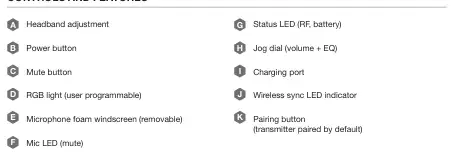
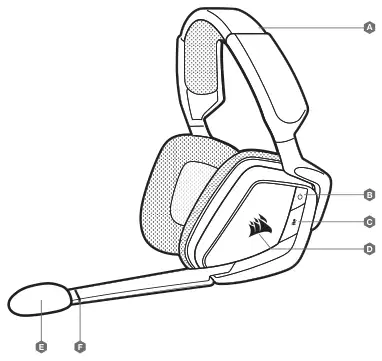
控件和功能
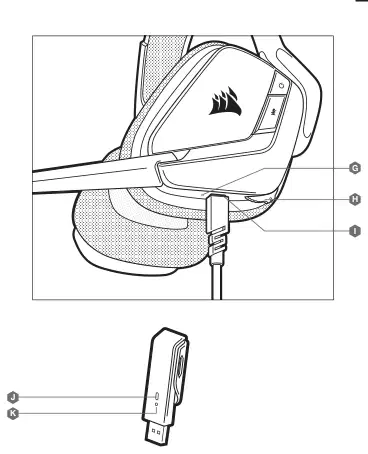
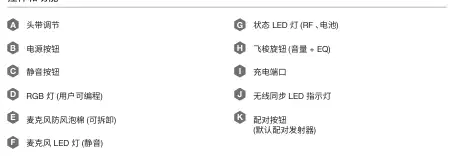
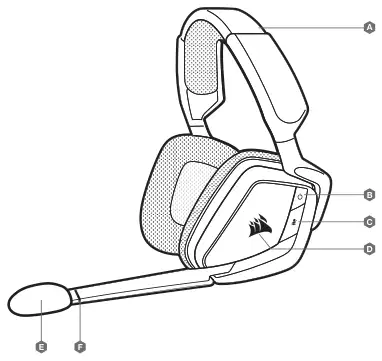

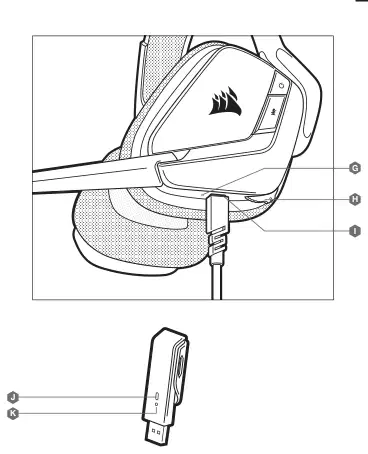

GETTING STARTED WITH YOUR VOID RGB ELITE WIRELESS HEADSET
Connect the wireless USB transmitter to any working USB port on your PC. The headset is designed to operate at a range of up to 40 feet (12m) from the wireless transmitter, but other wireless devices, electronics, and obstructions such as walls may reduce wireless range.
The CORSAIR VOID RGB ELITE WIRELESS Headset must be fully charged before its first use.
> Connect the USB charging cable to any working USB port on your PC.
> Connect the USB charging cable to the CORSAIR VOID RGB ELITE WIRELESS Headset.
IMPORTANT: The first time you use the CORSAIR VOID RGB ELITE WIRELESS Headset on a PC, the operating system will automatically install the device driver. After the device driver loads, we recommend you reboot your PC before use. Prolonged listening at high volumes may adversely affect your hearing. Take breaks between sessions and always begin with the volume at the lowest possible level before increasing.
The CORSAIR VOID RGB ELITE WIRELESS Headset battery has no “memory effect”, so there is no need to completely discharge it before recharging.
Remember that the USB charging cable requires a high power (USB 2.0 or better) port. Some USB ports found on older devices do not support USB 2.0.
Go to corsair.com/support/downloads to download the iCUE Software. Using the iCUE software will enable the full feature set of your headset.
Short key press (.1-.5 seconds) on JOG DIAL toggles EQ. Medium key press (.6-2 seconds) on JOG DIAL toggles 7.1 surround sound.
> Install the iCUE software on a PC running Windows 7, Windows 8.1, Windows 10 or later.
> After installation is complete, reboot your PC, and launch iCUE.
iCUE SOFTWARE CAN BE USED TO
> Choose your RGB color preference and light intensity.
Short key press (.1-.5 seconds) on mic mute button toggles mute on and off. Long key press (2-4 seconds) on mic mute button toggles sidetone on and off.
> Select and customize audio equalizer (EQ) settings.
> Adjust microphone input volume, and microphone sidetone.
> Set 7.1 surround sound on or off.
The software’s built-in documentation explains how to use the headset’s features in greater detail.
STATUS LED INDICATIONS
> Place the wireless USB transmitter in an open, unobstructed area.
> Make sure the battery is fully charged before initial use.
Single blink red = connected, battery low Single blink green = connected, battery normal Rapid blink red = disconnected, battery low Rapid blink green = disconnected, battery normal Solid amber = battery charging Solid green = battery charged Rapid blink amber = pairing mode
> Do not leave the battery fully discharged for long periods. Battery life is maximized by keeping the battery in a
partially charged state. > If RGB lighting effects are unimportant to you, they can be disabled with iCUE to extend battery life.
> Remove the USB charging cable promptly after the headset has been fully charged.
> Keep the headset at room temperature (20-30°C or 68-86°F).
iCUE
この取扱説明書で参照されているリンク(メーカー、サポート、ダウンロード等)。
ユーザーまたはスタッフが通常1日以内に回答します。あなたの質問が次の人の助けにもなります。
最初の質問を投稿しましょう。他のユーザーや当チームが回答します。