JA
Brinno logo
公式取扱説明書

Brinno Health Defender Kit (BBT2000)

76 ページ·4.9 MB·PDF·EN
Brinno Health Defender Kit (BBT2000)
目次 26セクション BBT2000 · HEALTH DEFENDER · Copyright © 2020 Brinno All Rights Reserved Quick Guide · Content · … 表示非表示
Page 1 of the Brinno Health Defender Kit (BBT2000) user manual — BBT2000
1ページ · クリックして拡大
1ページ

BBT2000

HEALTH DEFENDER

Copyright © 2020 Brinno All Rights Reserved Quick Guide

Page 2 of the Brinno Health Defender Kit (BBT2000) user manual — BBT2000
2ページ · クリックして拡大
2ページ
Page 2 of the Brinno Health Defender Kit (BBT2000) user manual — BBT2000
Page 3 of the Brinno Health Defender Kit (BBT2000) user manual — KR
3ページ · クリックして拡大
3ページ

Content

EN

  • Quick Guide

DE

  • Kurzanleitung

ES

  • Guía rápida

I T

  • Guida veloce

FR

  • Guide rapide
  • 快速指南

CH

  • 快速指南

CN

  • クイックガイド

JP

  • 빠른 가이드

KR

Page 4 of the Brinno Health Defender Kit (BBT2000) user manual — www.brinno.com/tlc2020
4ページ · クリックして拡大
4ページ

Thank you for using Brinno Team!

Register Online and get

www.brinno.com/support/registration

Register your camera for a free 6 month warranty extension

To learn more about the use of time-lapse photography during the

To learn more about your camera’s

features and applications go to:

COVID-19 epidemic, please go to :

www.brinno.com/tlc2020

www.brinno.com/covid19

Page 5 of the Brinno Health Defender Kit (BBT2000) user manual — 2. Part names
5ページ · クリックして拡大
5ページ

1. In the box

1. TLC2020 Time-lapse Camera x 1 2. Accessories box

a. Wall clip x 1 b. Camera adapter x 1 c. Viewfinder x 1

d. Cleaning pad x 2 e. Mounting tape x 1

2. Part names

Brinno Health Defender Kit (BBT2000) — 2. Part names diagram (page 5)
図 1 · 2. Part names
1. Power on/off button 2. Shutter/ return screen button 3. LED status indicator 4. Camera lens 5. Camera Mount 6. Mount adjuster 7. Quick release adapter 8. Wall clip
Page 6 of the Brinno Health Defender Kit (BBT2000) user manual — 3. Camera operation
6ページ · クリックして拡大
6ページ

3. Camera operation

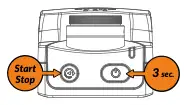
1. Power on/off. Power on: Press and hold the power button ( ) for 3 seconds Power off: Press and hold the power button ( ) for 3 seconds
2. Start/stop recording Start shooting: While on the preview screen, press the shutter ( ) button. Stop recording: While the screen is off, touch the shutter ( ) button to stop recording.
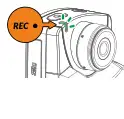
3. The preview screen turns off while you are recording. Check the LED light indicator, if it is Flashing green then it’s recording.
4. You can press the shutter button ( ) at any time to jump back to the preview screen.
Brinno Health Defender Kit (BBT2000) — 3. Camera operation diagram (page 6)
図 2 · 3. Camera operation
Brinno Health Defender Kit (BBT2000) — 3. Camera operation diagram (page 6)
図 3 · 3. Camera operation
Page 7 of the Brinno Health Defender Kit (BBT2000) user manual — 4. Camera settings
7ページ · クリックして拡大
7ページ

4. Camera settings

1. Install the memory card. ∆ Supports up to 128GB memory cards. The first time you use a 64GB or 128GB memory card, follow instructions on the LCD screen to format the card before using it the first time.
2. Open the battery cover and place the 4 AA batteries in the battery compartment. ∆ The use of zinc carbon batteries is not recommended. For more detailed battery operating instructions, refer to the camera manual (TLC2000 series manual) included in the package.
3. Set the date and time. Press the OK key ( ) and adjust the value using the ( ) and ( ) keys.
4. Camera parameter settings.
MenuOptionsRemarks Menu ModeFull MenuFull Menu Mode Interval10 MinTake a photo every 10 minutes EXPO modeDaytimeSuitable for daytime use HDROnHigh dynamic effects ScheduleDailyGenerates one AVI file per day (this setting is reccomended) 08:00-18:00Filming between 8am and 6pm (customizable) Mon-FriPictures taken from Monday to Friday (customizable) More Setting > Time StampYesThis setting will ensure all photos are time and date stamped More Setting > Playback FPS1FPSThis video will play one photo per second making it easy to review footage
Page 8 of the Brinno Health Defender Kit (BBT2000) user manual — 5. Installation steps
8ページ · クリックして拡大
8ページ

5. Installation steps

Brinno Health Defender Kit (BBT2000) — 5. Installation steps diagram (page 8)
図 4 · 5. Installation steps
Brinno Health Defender Kit (BBT2000) — 5. Installation steps diagram (page 8)
図 5 · 5. Installation steps

Glued to The wall

1. Attach the camera mount to the quick release adapter.
2. Remove the camera mount and quick release adapter. Lock the adapter into place using a coin.
3. Clean the back of the wall clip using one cleaning pad and glue on the backing.

Stand up on · A surface

Page 9 of the Brinno Health Defender Kit (BBT2000) user manual — 5. Installation steps
9ページ · クリックして拡大
9ページ
4. Select the area where you want to set up the camera, wipe it clean with the other cleaning pad, glue it on the wall and let it dry for 24 hours.
5. After 24 hours, install the camera to the camera mount set and then install the whole set into the wall clip.
6. Do not tighten the mount adjuster of the camera mount completely at this time, use the ball joint of the mount to find a suitable shooting angle.

∆ You can also use the included viewfinder to help you find a good view angle.

∆ If the screen turns off while you are setting up the shooting angle, press the OK button ( ) to reactivate the preview screen.

7. Turn on the camera and press the shutter button ( ) to start shooting!
Page 10 of the Brinno Health Defender Kit (BBT2000) user manual — 7. Save and view footage
10ページ · クリックして拡大
10ページ

6. Stop recording

1. Press the shutter button ( ) to stop recording.
2. "PROCESSING" message will appear on the screen as the video is saved to the camera. At the same time, a beep will sound to indicate that the recording is complete.
3. The screen returns to the preview screen to prepare for the next shooting session.

7. Save and view footage

1. After stopping recording, press the power button ( ) to turn off the camera.
2. Remove the MicroSD card or use the USB-C cable to save and view recorded footage. ∆ It is recommended that files are backed up regularly (e.g. every two weeks).

USB-C cable Micro SD card

Page 11 of the Brinno Health Defender Kit (BBT2000) user manual — BBT2000
11ページ · クリックして拡大
11ページ

BBT2000

BRINNO ANNSCHAFT HEALTH DEFENDER

DE

Copyright © 2020 Brinno All Rights Reserved Kurzanleitung

情報源

参考資料・リンク

この取扱説明書で参照されているリンク(メーカー、サポート、ダウンロード等)。

Brinno Health Defender Kit (BBT2000)について質問する

ユーザーまたはスタッフが通常1日以内に回答します。あなたの質問が次の人の助けにもなります。

Add your email to get notified when it’s answered — no spam, ever.

0 questions
Brinno Health Defender Kit (BBT2000)に関する質問はまだありません

最初の質問を投稿しましょう。他のユーザーや当チームが回答します。

原本

Brinno Health Defender Kit (BBT2000) 取扱説明書(PDF)

76 ページ·4.9 MB·PDF
上のページをクリックするとここに表示されます
ページ 1 / …
100%
ページを読み込み中…