JA
Kwikset logo
公式取扱説明書

kwikset How to Enable Google Assistant

2 ページ·134 KB·ソフトウェア·PDF·EN
kwikset How to Enable Google Assistant
目次 3セクション How to Enable Google Assistant · Tap the search icon on the upper right of the screen. 4 · How to Enable Google Assistant (Continued) 表示非表示
Page 1 of the kwikset How to Enable Google Assistant user manual — Tap the search icon on the upper right of the screen. 4
1ページ · クリックして拡大
1ページ

How to Enable Google Assistant

1 Select + Add. 2 Tap on Set up device. 3

On your Android or iOS device, open the Google Home app making sure you are logged in with the Google account associated with your Google Smart Speaker.

kwikset How to Enable Google Assistant — How to Enable Google Assistant diagram (page 1)
図 1 · How to Enable Google Assistant
kwikset How to Enable Google Assistant — How to Enable Google Assistant diagram (page 1)
図 2 · How to Enable Google Assistant
kwikset How to Enable Google Assistant — How to Enable Google Assistant diagram (page 1)
図 3 · How to Enable Google Assistant

Tap the search icon on the upper right of the screen. 4

Search for “Kwikset Smart Home” and tap on it.

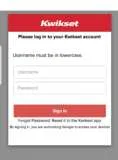
On the account linking page, enter your Kwikset App username and password, then click Sign In.

kwikset How to Enable Google Assistant — Tap the search icon on the upper right of the screen. 4 diagram (page 1)
図 4 · Tap the search icon on the upper right of the screen…
kwikset How to Enable Google Assistant — Tap the search icon on the upper right of the screen. 4 diagram (page 1)
図 5 · Tap the search icon on the upper right of the screen…
kwikset How to Enable Google Assistant — Tap the search icon on the upper right of the screen. 4 diagram (page 1)
図 6 · Tap the search icon on the upper right of the screen…

7 Tap your device, then tap Next.

Tap the home to which you would like to add the device, then tap Next.

Next, tap the location where this device is located.

kwikset How to Enable Google Assistant — Tap the search icon on the upper right of the screen. 4 diagram (page 1)
図 7 · Tap the search icon on the upper right of the screen…
kwikset How to Enable Google Assistant — Tap the search icon on the upper right of the screen. 4 diagram (page 1)
図 8 · Tap the search icon on the upper right of the screen…
kwikset How to Enable Google Assistant — Tap the search icon on the upper right of the screen. 4 diagram (page 1)
図 9 · Tap the search icon on the upper right of the screen…

Continue to the next page

for additional steps.

Page 2 of the kwikset How to Enable Google Assistant user manual — How to Enable Google Assistant (Continued)
2ページ · クリックして拡大
2ページ

How to Enable Google Assistant (Continued)

10 11 The home screen will show the newly discovered Halo devices and you can now control them using Google Smart Speaker.

You’re done! Now, you are able to use the following commands:

“Hey Google, is [Lock Name] unlocked?”

kwikset How to Enable Google Assistant — How to Enable Google Assistant (Continued) diagram (page 2)
図 10 · How to Enable Google Assistant (Continued)

“Hey Google, is [Lock Name] locked?”

“Hey Google, lock [Lock Name].”

kwikset How to Enable Google Assistantについて質問する

ユーザーまたはスタッフが通常1日以内に回答します。あなたの質問が次の人の助けにもなります。

Add your email to get notified when it’s answered — no spam, ever.

0 questions
kwikset How to Enable Google Assistantに関する質問はまだありません

最初の質問を投稿しましょう。他のユーザーや当チームが回答します。

原本

kwikset How to Enable Google Assistant 取扱説明書(PDF)

2 ページ·134 KB·ソフトウェア·PDF
上のページをクリックするとここに表示されます
ページ 1 / …
100%
ページを読み込み中…