


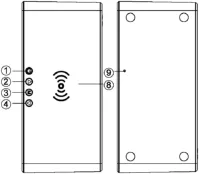

Digital alarm clock with wireless charging function Built-in wireless charging module for easy charging of your iPhone X/XS/XR, iPhone 8, Galaxy S8/S7/S6 and other devices with wireless charging function Large LCD display shows time, date and temperature Dual alarm function allows to set 2 separate wake-up alarms
Input power: 5V/1.5A Wireless Output: 5V/1A 5W
All brands and logos are registered trademarks of their respective owners


All brands and logos are registered trademarks of their respective owners

to power on. The LED display will show Time and Temperature.
to switch between different display modes (time/date/alarm1/2/3).
until the display shows the time.
until the time is blinking. The display panel will shows 12H mode or 24H mode.
to confirm the mode (if 12H mode is selected, then “PM/AM” will light up at the left corner of display).
to select 12H or 24H mode and press
to adjust the Hour first.
to confirm the Hour and minutes will blink.
to adjust the minutes.
to confirm the minutes.
until the display shows the date.
until the year is blinking.
to change the year.
All brands and logos are registered trademarks of their respective owners

to confirm the year and month will start blinking.
to change the month.
to confirm the month and day will start blinking.
to change the day.
to confirm the date.
This alarm clock has 3 separate alarm settings, A1, A2 and A3, which can be set individually.
until the display shows“--A1”,“--A2” or“--A3”.
until the alarm time is blinking.
to adjust the Hour first.
to confirm the Hour and minutes will blink.
to adjust the minutes.
to confirm the minutes.
to determine the clock.
ENABLE or DISABLE ALARM
All brands and logos are registered trademarks of their respective owners

until the display shows “--A1”,“--A2” or“--A3”. “--A1” means alarm 1is disabled. ”0NA1”means alarm 1 is enabled.
to enable or disable the selected alarm (1, 2, or 3).
When one of the alarm times is enables, the display will show the alarm icon
in the lower left corner of display. On the set alarm time(s), the alarm buzzer will start beeping and the alarm will be blinking. Press any button to stop the sound. If no button is pressed, the sound will stop after 60 seconds.
for 2 seconds to switch between Fahrenheit / Celsius.
When power-saving is enabled, the clock display will automatically turn off after 30 seconds. Press any button to turn it on again.
to turn on/off the power-saving (“ONSd” means the power saving mode is turned on and “— Sd” means it is turned off).
The display has 3 settings. Depending on the selected setting, the display will show either the time, the date or alternate between date and time.
button to select DP--1/DP--2/DP—3. DP-1: Display will alternate between time and date automatically every 4 seconds. DP-2: User can fix to show date or time.
to show date for 4 seconds.
All brands and logos are registered trademarks of their respective owners

All brands and logos are registered trademarks of their respective owners
ユーザーまたはスタッフが通常1日以内に回答します。あなたの質問が次の人の助けにもなります。
最初の質問を投稿しましょう。他のユーザーや当チームが回答します。