



Mobiles Kühlgerät Bedienungsanleitung 21
Aparelho de refrigeração móvel Manual de instruções 168
PT
Appareil de réfrigération mobile Notice d’utilisation 38
Мобильное охлаждающее устройство Инструкция по эксплуатации . .185
RU
ES
Aparato móvil de refrigeración Instrucciones de uso 55
Przenośne urządzenie chłodnicze Instrukcja obsługi 203
Apparecchio di refrigerazione mobile Istruzioni per l’uso 72
Mobilní chladicí spotřebič Návod k obsluze 220
Mobiel koelapparaat Gebruiksaanwijzing 89
Mobilný chladiaci spotrebič Návod na obsluhu 235
Transportabelt køle-/ fryseapparat Betjeningsvejledning 106
Mobil hűtőkészülék Használati utasítás 251
Mobil kyl-/frysprodukt Bruksanvisning 121
Mobil kjøleboks Bruksanvisning 136
© 2020 Dometic Group. The visual appearance of the contents of this manual is protected by copyright and design law. The underlying technical design and the products contained herein may be protected by design, patent or be patent pending. The trademarks mentioned in this manual belong to Dometic Sweden AB. All rights are reserved.


Please read these instructions carefully and follow all instructions, guidelines, and warnings included in this product manual in order to ensure that you install, use, and maintain the product properly at all times. These instructions MUST stay with this product. By using the product, you hereby confirm that you have read all instructions, guidelines, and warnings carefully and that you understand and agree to abide by the terms and conditions as set forth herein. You agree to use this product only for the intended purpose and application and in accordance with the instructions, guidelines, and warnings as set forth in this product manual as well as in accordance with all appli- cable laws and regulations. A failure to read and follow the instructions and warnings set forth herein may result in an injury to yourself and others, damage to your product or damage to other property in the vicinity. This product manual, including the instructions, guidelines, and warnings, and related documentation, may be subject to changes and updates. For up-to-date product information, please visit www.dometic.com
1 Explanation of symbols 6
2 Safety instructions 6
3 Scope of delivery 9
4 Intended use 9
5 Function description 10
5.1 Scope of functions 10
5.2 Operating and display elements 10
6 Operation 12
6.1 Before initial use 12
6.2 Saving energy 12
6.3 Connecting the cooling device 12
6.4 Using the battery monitor 13
6.5 Using the cooling device 14
6.6 Latching the cooling device lid 15
6.7 Setting the temperature 16
6.8 Switching off the cooling device 16
6.9 Using the interior light (only MCF60) 16
6.10 Defrosting the cooling device 16
6.11 Replacing the fuse 17
7 Cleaning and maintenance 17
8 Guarantee 17
9 Troubleshooting 18

Explanation of symbols MCF32, MCF40, MCF60, FR40 AC/DC
10 Disposal 18
11 Technical data 19
Do not operate the cooling device if it is visibly damaged.
If this cooling device's power cable is damaged, it must be
replaced to prevent safety hazards.
This cooling device may only be repaired by qualified personnel.
Improper repairs can lead to considerable hazards.
When positioning the device, ensure the supply cord is not
trapped or damaged.
Do not locate multiple portable socket-outlets or portable power
supplies at the rear of the device.
Electrocution hazard · Fire hazard

MCF32, MCF40, MCF60, FR40 AC/DC Safety instructions
This device can be used by children aged from 8 years and
above and persons with reduced physical, sensory or mental capabilities or lack of experience and knowledge if they have been given supervision or instruction concerning use of the device in a safe way and understand the hazards involved.
Children shall not play with the device.
Cleaning and user maintenance shall not be made by children
without supervision.
Children aged from 3 to 8 years are allowed to load and unload
cooling devices.
Do not store any explosive substances such as spray cans with
Before starting the cooling device, ensure that the power supply
line and the plug are dry.
Disconnect the cooling device from the power supply
– before each cleaning and maintenance – after every use
Please check if the cooling capacity of the device is suitable for
storing the food or medicine you wish to cool.
Food may only be stored in its original packaging or in suitable
containers.
Opening the cooling device for long periods can cause signifi-
cant increase of the temperature in the compartments of the device.
Clean regularly surfaces that can come in contact with food and
accessible drainage systems.

Safety instructions MCF32, MCF40, MCF60, FR40 AC/DC
If the device is left empty for long periods:
– Switch off the device. – Defrost the device. – Clean and dry the device. – Leave the lid open to prevent mould developing within the device. A
Check that the voltage specification on the type plate
corresponds to that of the energy supply.
Only connect the cooling device as follows:
– With the DC connection cable to a DC power supply in the vehicle – Or with the AC connection cable to an AC power supply
Never pull the plug out of the socket by the cable.
If the cooling device is connected to a DC outlet: Disconnect the
cooling device and other power consuming devices from the bat- tery before connecting a quick charging device.
If the cooling device is connected to a DC outlet: Disconnect the
cooling device or switch it off when you turn off the engine. Otherwise you may discharge the battery.
The cooling device is not suitable for transporting caustic
materials or materials containing solvents.
The insulation of the cooling device contains flammable cyclo-
pentane and requires special disposal procedures. Deliver the cooling device at the end of its life-cycle to an appropriate recycling center.
Do not use electrical devices inside the cooling device unless
they are recommended by the manufacturer for the purpose.
Do not place the cooling device near naked flames or other heat
sources (heaters, direct sunlight, gas ovens etc.).
Ensure at all times that there is a minimum of 50 mm ventilation on all four sides of the cooling device. Keep the ventilation area free of any objects that could restrict the air flow to the cooling components. Do not place the cooling device in closed compartments or areas with none or minimal air flow.
Ensure that the ventilation openings are not covered.
Do not fill the inner container with ice or fluids.
Risk of overheating!
MCF32, MCF40, MCF60, FR40 AC/DC Scope of delivery
Never immerse the cooling device in water.
Protect the cooling device and cables against heat and moisture.
The device shall not to be exposed to rain.
1 DC connection cable
1 AC connection cable
The cooling box is suitable for cooling food. The cooling box is also suitable for use on vehicles. The cooling box is designed to be operated from a DC power supply socket of a vehicle or from an AC power supply.
The cooling box is suitable for camping use.
The cooling box is not suitable for:
storage of corrosive, caustic or solvent-containing substances
This cooling box is not intended to be used as a built-in appliance.
This cooling box is only suitable for the intended purpose and application in accordance with these instructions.
This manual provides information that is necessary for proper installation and/ or operation of the cooling box. Poor installation and/or improper operating or maintenance will result in unsatisfactory performance and a possible failure.
The manufacturer accepts no liability for any injury or damage to the product resulting from:
Incorrect assembly or connection, including excess voltage
Incorrect maintenance or use of spare parts other than original spare parts
provided by the manufacturer

Function description MCF32, MCF40, MCF60, FR40 AC/DC
Alterations to the product without express permission from the manufac-
Use for purposes other than those described in this manual
Dometic reserves the right to change product appearance and product specifications.
The cooling device can chill products, keep them cool.
A low maintenance refrigerant circuit with compressor provides the cooling. The foamed in place insulation and compact compressor ensure optimum cooling.
The cooling device is portable.
When used on boats, the cooling device can withstand a constant heel (inclination) of 30°.
Three-level battery monitor to protect the vehicle battery switches off
automatically at low battery voltage
Display with temperature gauge
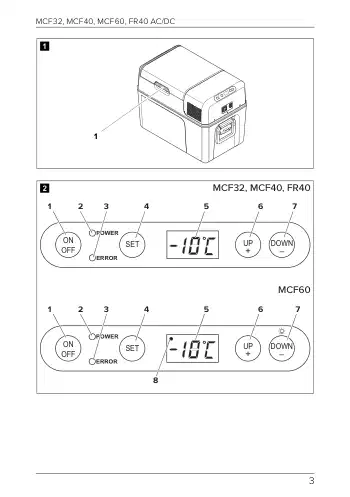
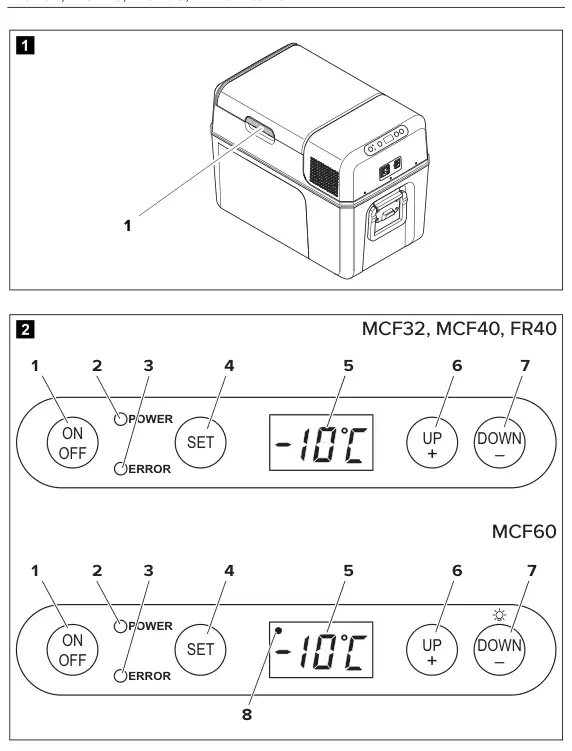
Operating panel (fig. 2, page 3)
Switches the cooling device on or off when the button is pressed for between one and two seconds
turer · Item Description Explanation

MCF32, MCF40, MCF60, FR40 AC/DC Function description
2 POWER Status indication
4 SET Selects the input mode – Temperature setting – Celsius or Fahrenheit display – Set battery monitor
6 “+” Press once to increase the value
7 “–” Press once to decrease the value
8 Only MCF60: If displayed, the interior light is switched on.
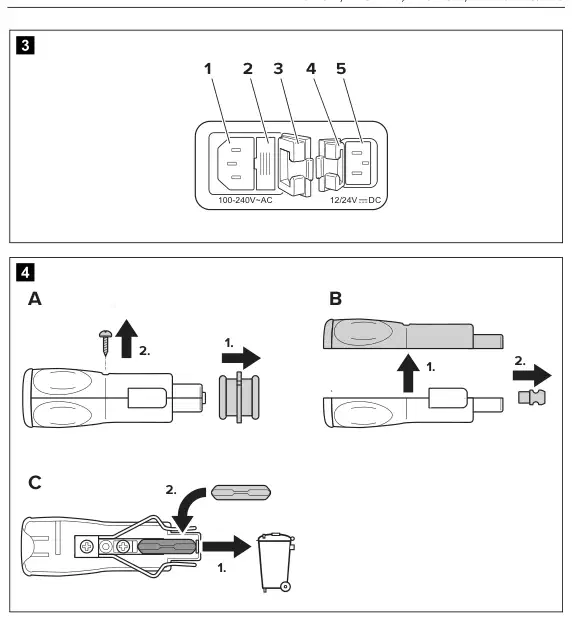
Connectors (fig. 3, page 4)
3 Cover AC socket
4 Cover DC socket

Operation MCF32, MCF40, MCF60, FR40 AC/DC
6.1 Before initial use I
Selecting the temperature units
You can switch the temperature display between Celsius and Fahrenheit. Proceed as follows:
➤Switch on the cooling device.
➤Press the “SET” button twice.
➤Use the “+” and “–” buttons to select Celsius or Fahrenheit.
✔The selected temperature units then appear in the display for a few
seconds. The display flashes several times before it returns to the current temperature.
Choose a well ventilated location which is protected from direct sunlight.
Allow warm food to cool down first before placing it in the cooling device
to keep cool.
Do not open the cooling device more often than necessary.
Do not leave the cooling device open for longer than necessary.
If the cooler has a basket: For optimal energy consumption, position the
basket according to its position on delivery.
On a regularly basis, make sure the lid seal still fits properly.
The cooling device can be operated with DC or AC voltage.

MCF32, MCF40, MCF60, FR40 AC/DC Operation
For safety reasons the cooling device is equipped with an electronic system to prevent the polarity reversal. This protects the cooling device against short- circuiting when connecting to a battery.
➤Plug the DC connection cable into the DC socket and connect it to a DC
power socket.
➤Plug the AC connection cable into the AC voltage socket and connect it to
an AC mains.
➤Close the covers of the sockets not in use to prevent accidentally touching
the sockets. This also prevents dust, water and dirt from entering the socket.
The cooling device is equipped with a multi-level battery monitor that protects your vehicle battery against excessive discharging when the cooling device is connected to the DC power supply.
If the cooling device is operated when the vehicle ignition is switched off, the cooling device switches off automatically as soon as the supply voltage falls below a set level. The cooling device will switch back on once the vehicle battery has been recharged to the restart voltage level. A

Operation MCF32, MCF40, MCF60, FR40 AC/DC
In “HIGH” mode, the battery monitor responds faster than at the levels “LOW” and “MED” (see the following table).
Battery monitor mode LOW MED HIGH
Switch-off voltage at 12 V 10.1 V 11.4 V 11.8 V
Restart voltage at 12 V 11.1 V 12.2 V 12.6 V
Switch-off voltage at 24 V 21.5 V 24.1 V 24.6 V
Restart voltage at 24 V 23.0 V 25.3 V 26.2 V
Proceed as follows to select the battery monitor mode:
➤Switch on the cooling device.
➤Press the “SET” button three times.
➤Use the “+” and “–” buttons to select the battery monitor mode.
✔The selected mode then appears in the display for a few seconds. The dis-

MCF32, MCF40, MCF60, FR40 AC/DC Operation
➤Connect the cooling device, see chapter “Connecting the cooling device”
➤Press the “ON/OFF” button for between one and two seconds.
✔The “POWER” LED lights up.
To avoid food waste, note the following:
Keep temperature fluctuation as low as possible. Only open the cooling
box as often and for as long as necessary. Store the foodstuff in such a way that the air can still circulate well.
Adjust the temperature to the quantity and type of the foodstuff.
Foodstuff can easily absorb or release odor or taste. Always store food-
stuff covered or in closed containers/bottles.
➤Lift the latch (fig. 1 1, page 3) and close the lid.
➤Release the latch.
✔The latch audibly clicks in place and secures the cooling device lid.

Operation MCF32, MCF40, MCF60, FR40 AC/DC
➤Press the “SET” button once.
➤Use the “+” and “–” buttons to select the cooling temperature.
✔The cooling temperature appears in the display for a few seconds. The
display flashes several times and then the current temperature is displayed again.
➤Empty the cooling device.
➤Switch the cooling device off.
➤Pull out the connection cable.
If you do not want to use the cooling device for a longer period of time:
➤Leave the lid slightly open. This prevents odour build-up.
➤Ensure the display shows the actual temperature.
➤Press the “–” button to switch the interior light on.
➤Press the “–” button again to switch the interior light off.
✔The black dot (fig. 2 8, page 3) in the upper left corner of the display indi-
Humidity can form frost in the interior of the cooling device or on the evapora- tor. This reduces the cooling capacity. Defrost the cooling device in good time to avoid this. A

MCF32, MCF40, MCF60, FR40 AC/DC Cleaning and maintenance
To defrost the cooling device, proceed as follows:
➤Take out the contents of the cooling device.
➤If necessary, place them in another cooling device to keep them cool.
➤Switch off the cooling device.
➤Leave the lid open.
➤Wipe off the defrosted water.
➤Replace the fuse (8 A 32 V) as shown (fig. 4, page 4).
cleaning as these can damage the cooler.
➤Occasionally clean the device interior and exterior with a damp cloth.
➤Make sure that the air inlet and outlet vents on the device are free of any
dust and dirt, so that heat can be released and the device is not damaged.
The statutory warranty period applies. If the product is defective, please contact the manufacturer's branch in your country (see dometic.com/dealer) or your retailer.
For repair and warranty processing, please include the following documents when you send in the device:
A copy of the receipt with purchasing date
A reason for the claim or description of the fault

Troubleshooting MCF32, MCF40, MCF60, FR40 AC/DC
Fault Possible cause Suggested remedy
The cooling device does not function, “POWER” LED does not glow.
There is no voltage present in the DC power socket in your vehicle.
The ignition must be switched on in most vehicles to apply current to the DC power socket.
The cooling device does not cool (plug is inserted, “POWER” LED is lit).
Defective compressor. This can only be repaired by an authorised customer services unit.
The cooling device does not cool (plug is inserted, “POWER” LED flashes orange, dis- play is switched off).
Voltage of the vehicle battery is too low.
Test the vehicle battery and charge it as needed.
When operating from the DC power socket:
The DC power socket is dirty. This results in a poor electrical contact.
If the plug of your cooling device becomes very warm in the DC power socket, either the DC power socket must be cleaned or the plug has not been assembled correctly.
The ignition is on and the cooling device is not working and the “POWER” LED is not lit.
The fuse of the DC plug has blown.
Replace the fuse (8 A) in the DC plug, see chapter “Replacing the fuse” on page 17.
The vehicle fuse has blown.
Replace the vehicle’s DC power socket fuse (usually 15 A). Please refer to your vehicle’s operating manual.
The display shows an error message (e.g. “Err1”) and the cooling device does not cool.
The cooling device has switched off due to an internal fault.
This can only be repaired by an authorised repair centre.
➤Place the packaging material in the appropriate recycling waste bins
If you wish to finally dispose of the product, ask your local recycling centre or specialist dealer for details about how to do this in accordance with the applicable disposal regulations.

MCF32, MCF40, MCF60, FR40 AC/DC Technical data
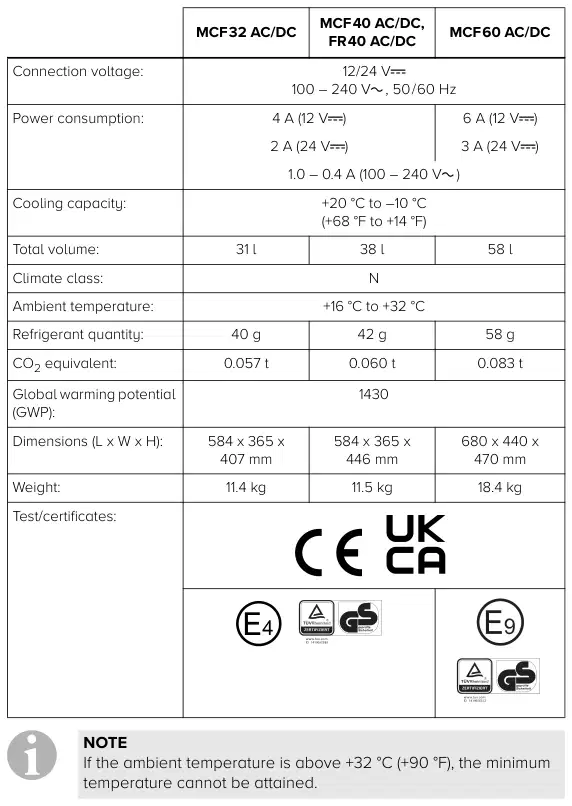
2 A (24 Vg) 3 A (24 Vg)
1.0 – 0.4 A (100 – 240 Vw)
Dimensions (L x W x H): 584 x 365 x 407 mm 584 x 365 x 446 mm 680 x 440 x 470 mm

Technical data MCF32, MCF40, MCF60, FR40 AC/DC
The refrigerant circuit contains R134a.
Contains fluorinated greenhouse gases
Hermetically sealed equipment
この取扱説明書で参照されているリンク(メーカー、サポート、ダウンロード等)。
ユーザーまたはスタッフが通常1日以内に回答します。あなたの質問が次の人の助けにもなります。
最初の質問を投稿しましょう。他のユーザーや当チームが回答します。