JA
BDE logo
公式取扱説明書

BDE Low Power Long Range Sub-1 GHz Module (RFM216)

24 ページ·748 KB·通信機器·PDF·EN
BDE Low Power Long Range Sub-1 GHz Module (RFM216)
目次 6セクション Introduction · Get Ready · Build Your First Application · Other Resources · … 表示非表示
Page 1 of the BDE Low Power Long Range Sub-1 GHz Module (RFM216) user manual — Build Your First Application
1ページ · クリックして拡大
1ページ

Introduction

This user guide is for BDE-RFM216-IN, a Wireless Module based on TI CC1312R. It is a quick start guide for how to connect the module with the evaluation board BDE-EVB07 or with the TI launchpad, and how to build the first application. It also shows a demo for how BDE- RFM216-IN receives a data packet that is sent from another BDE-RFM216-IN.

Get Ready

The following tools are recommended to develop with BDE-RFM216-IN.

Hardware tools:

  • Two modules of BDE-RFM216-IN ( BDE-RFM216-IN-BDE Technology Inc. (<a href="http://bdecomm.com" rel="nofollow noopener" target="_blank">bdecomm.com</a>) )
  • Two BDE-ADP05 V1.0 (adaptor board)
  • PC or Laptop
  • Two BDE-EVB07 ( BDE-EVB07-BDE Technology Inc. (<a href="http://bdecomm.com" rel="nofollow noopener" target="_blank">bdecomm.com</a>) )
  • Two TI Launchpad ( LAUNCHXL-CC13X2R1 Evaluation board | <a href="http://TI.com" rel="nofollow noopener" target="_blank">TI.com</a> )
  • USB cable for power supply and debugging

Software tools:

  • Terminal software such as CCS, IAR.
  • CCS download
  • Software Development Kit (SDK)

Build Your First Application

Once have the Hardware and Software tools in place, please following the following steps:

A. Connect the Hardware

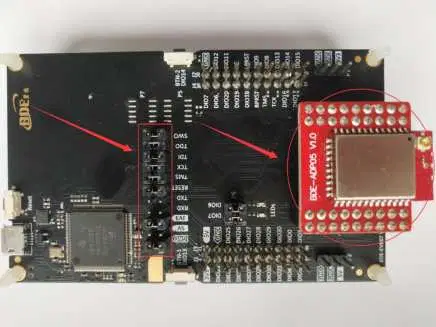
If chose EVB07: Use USB cable to connect EVB07 and PC or laptop. Plug BDE-RFM216-IN with the adaptor board into the dev board and connect all the pins with Jumpers as the following picture shows.

or · 1 / 24

Page 2 of the BDE Low Power Long Range Sub-1 GHz Module (RFM216) user manual — Introduction
2ページ · クリックして拡大
2ページ
BDE Low Power Long Range Sub-1 GHz Module (RFM216) — Introduction diagram (page 2)
図 1 · Introduction

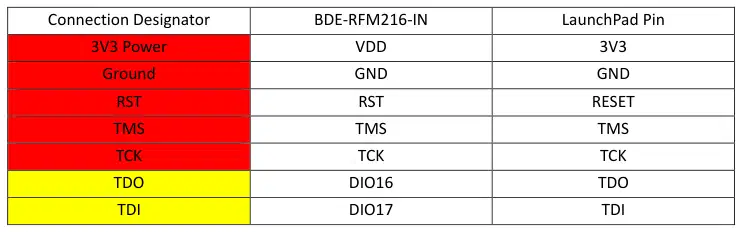
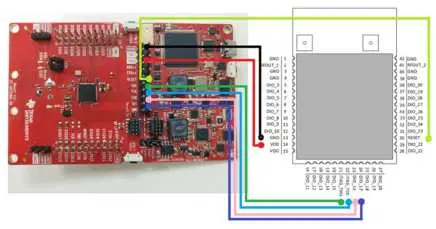
If chose TI Launchpad: The connection is as following.
BDE Low Power Long Range Sub-1 GHz Module (RFM216) — Introduction diagram (page 2)
図 2 · Introduction

2 / 24

Page 3 of the BDE Low Power Long Range Sub-1 GHz Module (RFM216) user manual — Introduction
3ページ · クリックして拡大
3ページ
BDE Low Power Long Range Sub-1 GHz Module (RFM216) — Introduction diagram (page 3)
図 3 · Introduction
Connection DesignatorBDE-RFM216-INLaunchPad Pin 3V3 PowerVDD3V3 GroundGNDGND RSTRSTRESET TMSTMSTMS TCKTCKTCK TDODIO16TDO TDIDIO17TDI

B. Build the Application

◼ Download and install the CCS and SDK

From the above links, follow the instructions in the following steps to download and install the CCS and SDK.
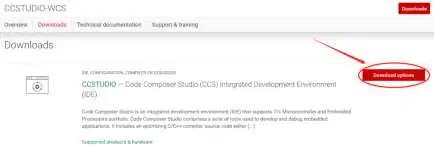
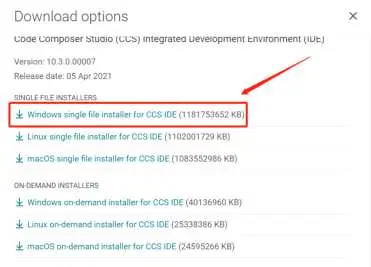
1. Click on this option
BDE Low Power Long Range Sub-1 GHz Module (RFM216) — Introduction diagram (page 3)
図 4 · Introduction
2. Select an option to download CCS

◼ CCS Installation · 3 / 24

Page 4 of the BDE Low Power Long Range Sub-1 GHz Module (RFM216) user manual — Introduction
4ページ · クリックして拡大
4ページ
BDE Low Power Long Range Sub-1 GHz Module (RFM216) — Introduction diagram (page 4)
図 5 · Introduction
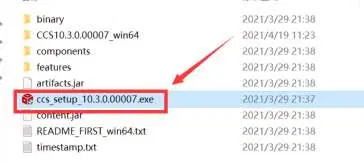
3. Unzip the package to a local disc
BDE Low Power Long Range Sub-1 GHz Module (RFM216) — Introduction diagram (page 4)
図 6 · Introduction
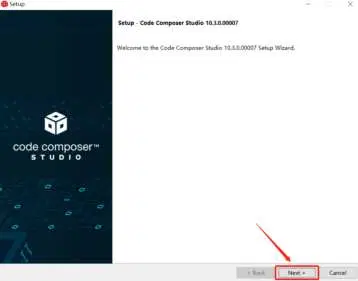
4. Click the setup of CCS
BDE Low Power Long Range Sub-1 GHz Module (RFM216) — Introduction diagram (page 4)
図 7 · Introduction
5. Click “Next”

4 / 24

Page 5 of the BDE Low Power Long Range Sub-1 GHz Module (RFM216) user manual — Introduction
5ページ · クリックして拡大
5ページ
BDE Low Power Long Range Sub-1 GHz Module (RFM216) — Introduction diagram (page 5)
図 8 · Introduction
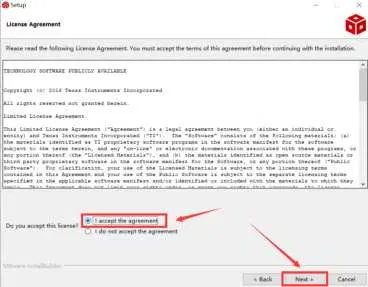
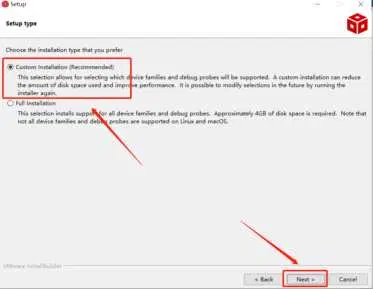
6. Select the default option
BDE Low Power Long Range Sub-1 GHz Module (RFM216) — Introduction diagram (page 5)
図 9 · Introduction

5 / 24

Page 6 of the BDE Low Power Long Range Sub-1 GHz Module (RFM216) user manual — Introduction
6ページ · クリックして拡大
6ページ
7. Click “Next”
BDE Low Power Long Range Sub-1 GHz Module (RFM216) — Introduction diagram (page 6)
図 10 · Introduction
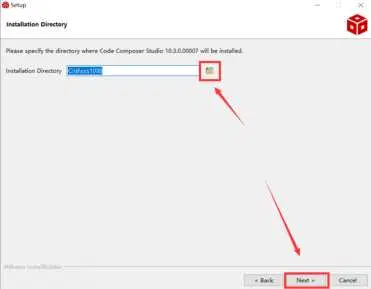
8. Select the Installation Directory
BDE Low Power Long Range Sub-1 GHz Module (RFM216) — Introduction diagram (page 6)
図 11 · Introduction

6 / 24

Page 7 of the BDE Low Power Long Range Sub-1 GHz Module (RFM216) user manual — Introduction
7ページ · クリックして拡大
7ページ
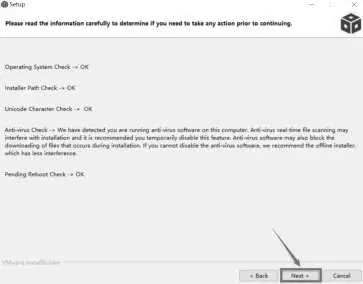
9. Select the default option
BDE Low Power Long Range Sub-1 GHz Module (RFM216) — Introduction diagram (page 7)
図 12 · Introduction
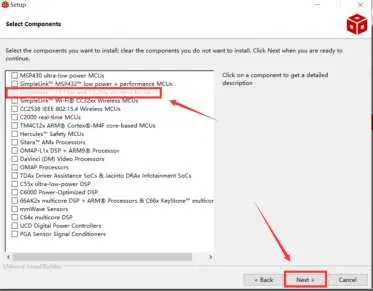
10. Select the component
BDE Low Power Long Range Sub-1 GHz Module (RFM216) — Introduction diagram (page 7)
図 13 · Introduction

7 / 24

Page 8 of the BDE Low Power Long Range Sub-1 GHz Module (RFM216) user manual — Introduction
8ページ · クリックして拡大
8ページ
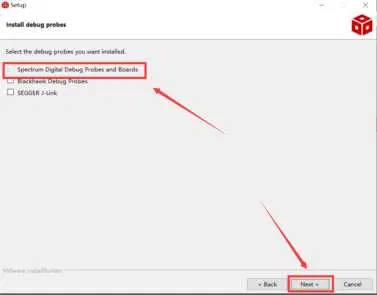
11. Select the default option
BDE Low Power Long Range Sub-1 GHz Module (RFM216) — Introduction diagram (page 8)
図 14 · Introduction
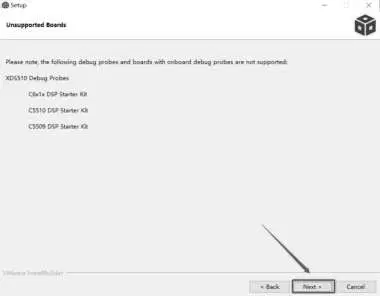
12. Click “Next”
BDE Low Power Long Range Sub-1 GHz Module (RFM216) — Introduction diagram (page 8)
図 15 · Introduction

8 / 24

Page 9 of the BDE Low Power Long Range Sub-1 GHz Module (RFM216) user manual — Introduction
9ページ · クリックして拡大
9ページ
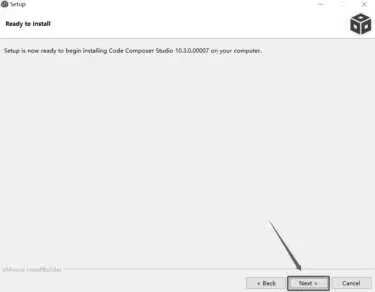
13. Click “Next”
BDE Low Power Long Range Sub-1 GHz Module (RFM216) — Introduction diagram (page 9)
図 16 · Introduction
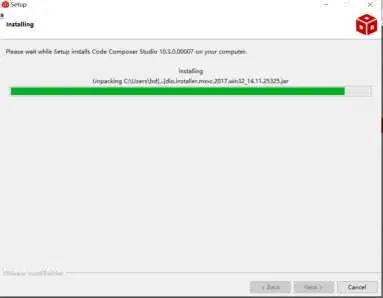
14. Waiting for installation to complete
BDE Low Power Long Range Sub-1 GHz Module (RFM216) — Introduction diagram (page 9)
図 17 · Introduction

9 / 24

Page 10 of the BDE Low Power Long Range Sub-1 GHz Module (RFM216) user manual — Introduction
10ページ · クリックして拡大
10ページ

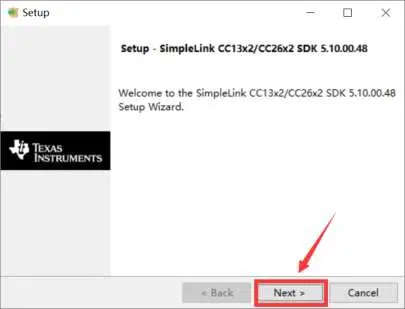
◼ Software Development Kit (SDK) installation
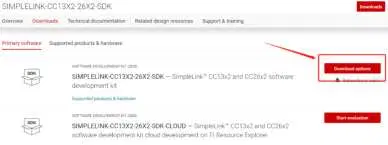
1. Click on this option
BDE Low Power Long Range Sub-1 GHz Module (RFM216) — Introduction diagram (page 10)
図 18 · Introduction
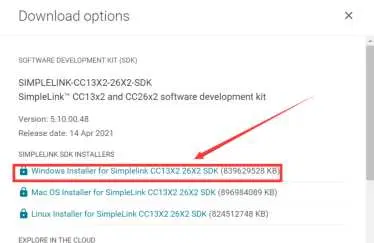
2. Select an option you need to download SDK
BDE Low Power Long Range Sub-1 GHz Module (RFM216) — Introduction diagram (page 10)
図 19 · Introduction
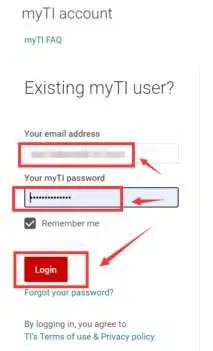
3. Log in to your TI account, if you are a new user, register a TI account first

10 / 24

Page 11 of the BDE Low Power Long Range Sub-1 GHz Module (RFM216) user manual — Introduction
11ページ · クリックして拡大
11ページ
BDE Low Power Long Range Sub-1 GHz Module (RFM216) — Introduction diagram (page 11)
図 20 · Introduction
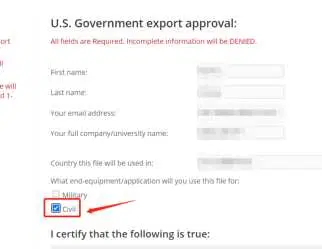
4. Select “civil” if your application is for civil use
BDE Low Power Long Range Sub-1 GHz Module (RFM216) — Introduction diagram (page 11)
図 21 · Introduction

11 / 24

Page 12 of the BDE Low Power Long Range Sub-1 GHz Module (RFM216) user manual — Introduction
12ページ · クリックして拡大
12ページ
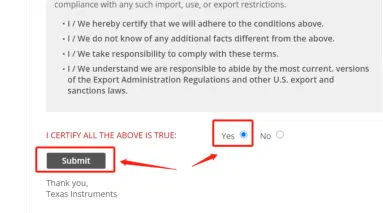
5. Select “Yes” and submit
BDE Low Power Long Range Sub-1 GHz Module (RFM216) — Introduction diagram (page 12)
図 22 · Introduction
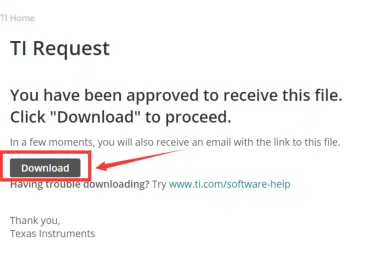
6. Download SDK
BDE Low Power Long Range Sub-1 GHz Module (RFM216) — Introduction diagram (page 12)
図 23 · Introduction
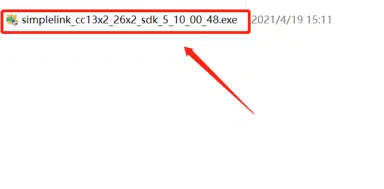
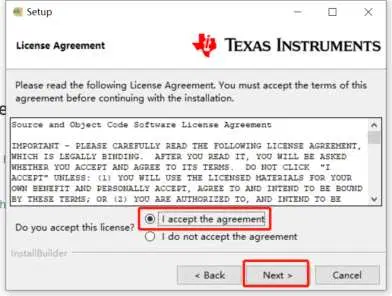
7. Installation

12 / 24

Page 13 of the BDE Low Power Long Range Sub-1 GHz Module (RFM216) user manual — Introduction
13ページ · クリックして拡大
13ページ
BDE Low Power Long Range Sub-1 GHz Module (RFM216) — Introduction diagram (page 13)
図 24 · Introduction
8. Click “Next”
BDE Low Power Long Range Sub-1 GHz Module (RFM216) — Introduction diagram (page 13)
図 25 · Introduction
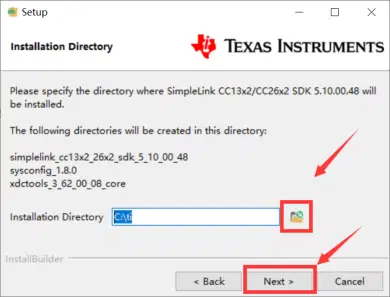
9. Select the default option

13 / 24

Page 14 of the BDE Low Power Long Range Sub-1 GHz Module (RFM216) user manual — Introduction
14ページ · クリックして拡大
14ページ
BDE Low Power Long Range Sub-1 GHz Module (RFM216) — Introduction diagram (page 14)
図 26 · Introduction
10. Select the Installation directory
BDE Low Power Long Range Sub-1 GHz Module (RFM216) — Introduction diagram (page 14)
図 27 · Introduction

14 / 24

Page 15 of the BDE Low Power Long Range Sub-1 GHz Module (RFM216) user manual — Introduction
15ページ · クリックして拡大
15ページ
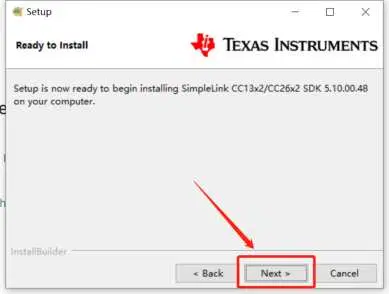
11. Click “Next”
BDE Low Power Long Range Sub-1 GHz Module (RFM216) — Introduction diagram (page 15)
図 28 · Introduction
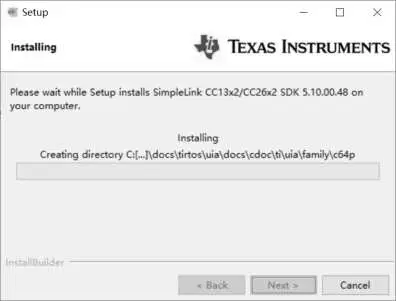
12. Waiting for installation to complete
BDE Low Power Long Range Sub-1 GHz Module (RFM216) — Introduction diagram (page 15)
図 29 · Introduction

15 / 24

Page 16 of the BDE Low Power Long Range Sub-1 GHz Module (RFM216) user manual — Introduction
16ページ · クリックして拡大
16ページ

◼ Run an example/demo code

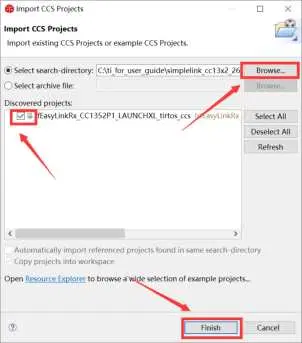
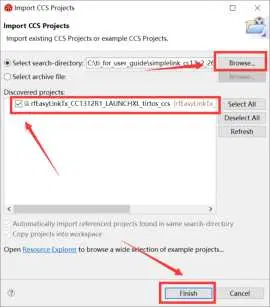
1. For the first module, find the option named “Import CCS project…”
BDE Low Power Long Range Sub-1 GHz Module (RFM216) — Introduction diagram (page 16)
図 30 · Introduction
2. According to the following path to find the sending end project: ti\simplelink_cc13x2_26x2_sdk_5_10_00_48\examples\rtos\CC1312R1_L AUNCHXL\ easylink\ rfEasyLinkRx\tirtos\ccs

16 / 24

Page 17 of the BDE Low Power Long Range Sub-1 GHz Module (RFM216) user manual — Introduction
17ページ · クリックして拡大
17ページ
BDE Low Power Long Range Sub-1 GHz Module (RFM216) — Introduction diagram (page 17)
図 31 · Introduction
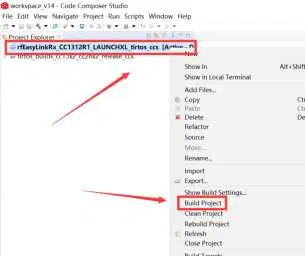
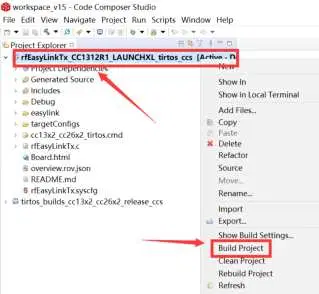
3. Right Click the project to build the receiving end project
BDE Low Power Long Range Sub-1 GHz Module (RFM216) — Introduction diagram (page 17)
図 32 · Introduction

17 / 24

Page 18 of the BDE Low Power Long Range Sub-1 GHz Module (RFM216) user manual — Introduction
18ページ · クリックして拡大
18ページ
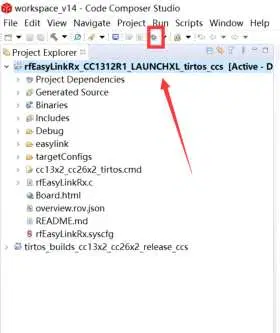
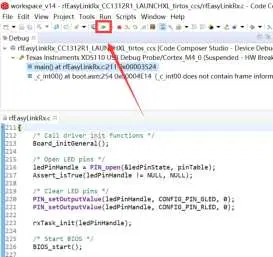
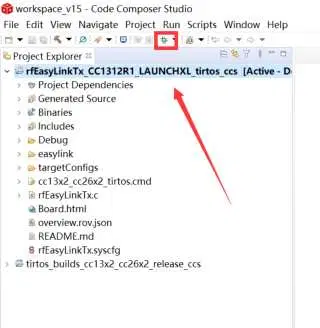
4. Click this bug icon (means download and debugging)
BDE Low Power Long Range Sub-1 GHz Module (RFM216) — Introduction diagram (page 18)
図 33 · Introduction
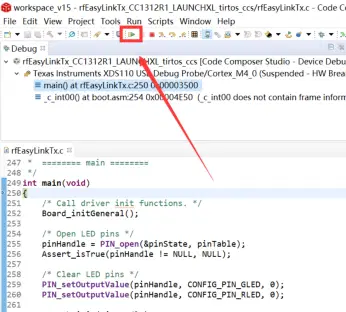
5. C lick on this option to start debugging
BDE Low Power Long Range Sub-1 GHz Module (RFM216) — Introduction diagram (page 18)
図 34 · Introduction

18 / 24

Page 19 of the BDE Low Power Long Range Sub-1 GHz Module (RFM216) user manual — Introduction
19ページ · クリックして拡大
19ページ
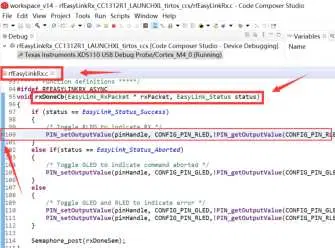
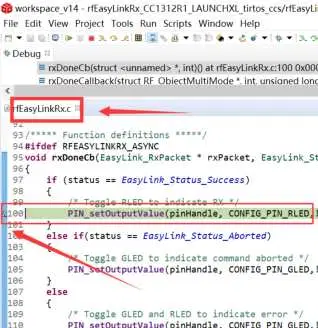
6. Find the file which is named “rfEasyLinkRx.c” and the function which is named “rxDoneCb”, and set a breakpoint at the line as the arrows shows
BDE Low Power Long Range Sub-1 GHz Module (RFM216) — Introduction diagram (page 19)
図 35 · Introduction
7. For another module, according to the following path to find the sending end project: ti\simplelink_cc13x2_26x2_sdk_5_10_00_48\examples\rtos\ CC1312R1_LAUNCHXL\ easylink\ rfEasyLinkTx\tirtos\ccs

19 / 24

Page 20 of the BDE Low Power Long Range Sub-1 GHz Module (RFM216) user manual — Introduction
20ページ · クリックして拡大
20ページ
BDE Low Power Long Range Sub-1 GHz Module (RFM216) — Introduction diagram (page 20)
図 36 · Introduction
8. Right Click the project to build the sending end project
BDE Low Power Long Range Sub-1 GHz Module (RFM216) — Introduction diagram (page 20)
図 37 · Introduction

20 / 24

Page 21 of the BDE Low Power Long Range Sub-1 GHz Module (RFM216) user manual — Introduction
21ページ · クリックして拡大
21ページ
9. Click this bug icon (means download and debugging)
BDE Low Power Long Range Sub-1 GHz Module (RFM216) — Introduction diagram (page 21)
図 38 · Introduction
10. C lick on this option to start debugging

21 / 24

Page 22 of the BDE Low Power Long Range Sub-1 GHz Module (RFM216) user manual — Introduction
22ページ · クリックして拡大
22ページ
BDE Low Power Long Range Sub-1 GHz Module (RFM216) — Introduction diagram (page 22)
図 39 · Introduction
11. You can see the lights flashing (means sending a data uninterruptedly)
BDE Low Power Long Range Sub-1 GHz Module (RFM216) — Introduction diagram (page 22)
図 40 · Introduction

22 / 24

Page 23 of the BDE Low Power Long Range Sub-1 GHz Module (RFM216) user manual — Other Resources
23ページ · クリックして拡大
23ページ
12. The program stops at the breakpoint
BDE Low Power Long Range Sub-1 GHz Module (RFM216) — Other Resources diagram (page 23)
図 41 · Other Resources

By far you should’ve built your first application successfully. For further development, please check out the CC1312R data sheet, product information and support | TI.com page and download the User guide (https://www.ti.com/lit/pdf/swcu185)

Other Resources

Mac OS Installer for SimpleLink CC13X2 26X2 SDK Linux Installer for SimpleLink CC13X2 26X2 SDK Mac OS Installer for Code Composer Studio IDE Linux Installer for Code Composer Studio IDE CC1312R SimpleLink™ High-Performance Sub-1 GHz Wireless MCU Windows Installer for SmartRF Flash Programmer 2

23 / 24

Page 24 of the BDE Low Power Long Range Sub-1 GHz Module (RFM216) user manual — More Questions:
24ページ · クリックして拡大
24ページ

Revision History

Revision Date Description V1.0 15-Apr-2019 Initial Release V2.0 14-Apr-2021 Changed template

More Questions:

Please search existing answers on TI E2E support forums Contact your local TI sales representative. Or Contact BDE Technology, Inc. China: B2-403, 162 Science Ave, Huangpu District, Guangzhou, 510663 Tel: +86-020-28065335 Website: http://www.bdecomm.com/cn/ Email: shu@bdecomm.com USA: 67 E Madison St, #1603A, Chicago, IL 60603 Tel: +1-312-379-9589 Website: http://www.bdecomm.com/ Email: info@bdecomm.com

24 / 24

情報源

参考資料・リンク

この取扱説明書で参照されているリンク(メーカー、サポート、ダウンロード等)。

BDE Low Power Long Range Sub-1 GHz Module (RFM216)について質問する

ユーザーまたはスタッフが通常1日以内に回答します。あなたの質問が次の人の助けにもなります。

Add your email to get notified when it’s answered — no spam, ever.

0 questions
BDE Low Power Long Range Sub-1 GHz Module (RFM216)に関する質問はまだありません

最初の質問を投稿しましょう。他のユーザーや当チームが回答します。

原本

BDE Low Power Long Range Sub-1 GHz Module (RFM216) 取扱説明書(PDF)

24 ページ·748 KB·通信機器·PDF
上のページをクリックするとここに表示されます
ページ 1 / …
100%
ページを読み込み中…