1ページ
SET UP WEBMAIL through the Apple iPhone
1. Tap Settings, then Passwords and Accounts.
 図 1 · SET UP WEBMAIL through the Apple iPhone
2. Select Add Account.
3. Choose Other, then Add Mail Account.
4. Enter your Name, Email (full address), Password and Description (recommended if you have multiple emails), then tap Next.
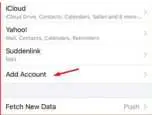 図 2 · SET UP WEBMAIL through the Apple iPhone
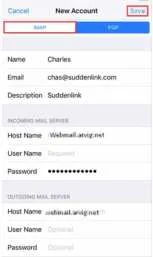
5. Select IMAP at the top of the screen.
6. Enter the following under Incoming Mail Server:
A. Host Namewebmail. arvig.net
B. Usernamefull email address
C. Passwordyour email password
7. Enter the following under Outgoing Mail Server:
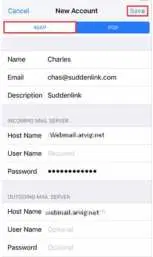 図 3 · SET UP WEBMAIL through the Apple iPhone
D. Host Namewebmail. arvig.net
E. Usernamefull email address
F. Passwordyour email password
8. Tap Next, then close Settings.
9. Open the Mail app and pull/swipe down on the screen to refresh and check for mail.
A
webmail.arvig.net
B
D
webmail.arvig.net
888.99.ARVIG | arvig.net
E
F
Based on Arvig service area; some restrictions apply. ©Arvig 2021