



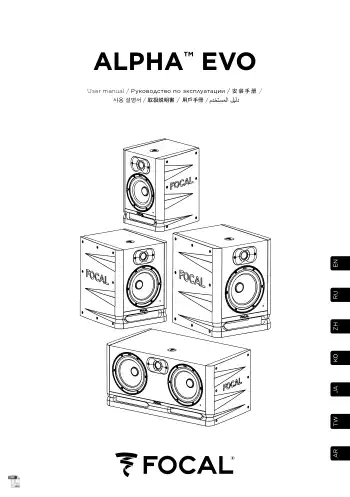
User manual / Руководство по эксплуатации / 安装手册 /

Canada : Industry Canada Statement: This device complies with ISED’s licence-exempt RSSs. Operation is subject to the following two conditions: (1) This device may not cause harmful interference, and (2) this device must accept any interference received, including interference that may cause undesired operation. Le présent appareil est conforme aux CNR d’ ISED applicables aux appareils radio exempts de licence. L’exploitation est autorisée aux deux conditions suivantes : (1) le dispositif ne doit pas produire de brouillage préjudiciable, et (2) ce dispositif doit accepter tout brouillage reçu, y compris un brouillage susceptible de provoquer un fonctionnement indésirable.
USA : Federal Communication Commission Interference Statement This device complies with Part 15 of the FCC Rules. Operation is subject to the following two conditions: (1) This device may not cause harmful interference, and (2) this device must accept any interference received, including interference that may cause undesired operation. This equipment has been tested and found to comply with the limits for a Class B digital device, pursuant to Part 15 of the FCC Rules. These limits are designed to provide reasonable protection against harmful interference in a residential installation. However, there is no guarantee that interference will not occur in a particular installation.
English
4 ALPHA EVO U s e r m a n u a l
Please validate your Focal-JMlab warranty, it is now possible to register your product online: www.focal.com/warranty
Thank you for purchasing a Focal product. Welcome to our High-Fidelity world. Innovation, tradition, excellence and pleasure are our values; our one and only aim is to bring you a sound that is rich, pure and true. To get the most out of your product, we recommend that you read the instructions in this booklet, then store it in a safe place to refer to in the future.
Check that nothing is missing and remove all the accessories from the box. In order not to damage your products while unpacking them, please follow these steps: open the flaps of the cardboard box completely. Fold them back down the sides. Remove the top protective packaging. Lift out the loudspeaker carefully. Check that the packaging does not show any signs of damage. If the packaging has been damaged, let the carrier and the supplier know. It is important to keep the packaging in good condition for any future use.
We would like to point out that our products can generate high sound pressure, particularly in the 5.1 configuration. As the distortion level is low and user fatigue is minimal, it is not always easy to realise how high the sound pressure actually is. Remember that exposure to high volumes beyond a certain amount of time can lead to irreversible hearing loss.
Warranty terms and conditions
All Focal loudspeakers are covered by warranty drawn up by the official Focal distributor in your country. Your distributor can provide all details concerning the conditions of warranty. Warranty cover extends at least to that granted by the legal warranty in force in the country where the original purchase invoice was issued.
Our policy of continual product improvement means that Focal-JMlab reserves the right to modify the technical specifications
of its products without notice. Product may vary from images.
Package contents · Recommendations
5 ALPHA EVO U s e r m a n u a l
1. Before you do anything, check that the loudspeakers and audio source (console, etc.) are in the Off position and that all settings at the back of the loudspeakers are in the 0 position. 2. Connect the audio signal from the source to the loudspeakers, using the XLR, RCA or TRS inputs. You can connect up to three sources to each loudspeaker via the three inputs available. However, the TRS input takes priority over the XLR input. The RCA input is used in addition to the TRS or XLR input. For more information, see page 9. 3. Use the power cable supplied to connect the loudspeaker to the mains. 4. Power on the audio source and check that the output level of the audio source connected to loudspeaker is set to - ∞ or a very low level. 5. Switch on the loudspeakers. The loudspeakers are now in “Stand-by” mode. 6. Increase the level of the audio source until the signal is detected by the loudspeakers, so that they automatically switch into “On” mode.
After the loudspeakers are powered on, and after the automatic stand-by mode is enabled (see page 9 for more information on this function), the audio signal detection circuit in the loudspeaker will automatically switch from “Stand-by” mode to “On” mode after a few seconds.
Quick start guide
6 ALPHA EVO U s e r m a n u a l
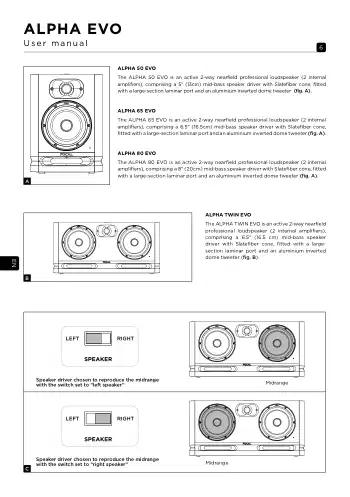
The ALPHA 50 EVO is an active 2-way nearfield professional loudspeaker (2 internal amplifiers), comprising a 5" (13cm) mid-bass speaker driver with Slatefiber cone, fitted with a large-section laminar port and an aluminium inverted dome tweeter (fig. A).
The ALPHA 65 EVO is an active 2-way nearfield professional loudspeaker (2 internal amplifiers), comprising a 6.5" (16.5cm) mid-bass speaker driver with Slatefiber cone, fitted with a large-section laminar port and an aluminium inverted dome tweeter (fig. A).
The ALPHA 80 EVO is an active 2-way nearfield professional loudspeaker (2 internal amplifiers), comprising a 8" (20cm) mid-bass speaker driver with Slatefiber cone, fitted with a large-section laminar port and an aluminium inverted dome tweeter (fig. A).
ALPHA TWIN EVO
The ALPHA TWIN EVO is an active 2-way nearfield professional loudspeaker (2 internal amplifiers), comprising a 6.5" (16.5 cm) mid-bass speaker driver with Slatefiber cone, fitted with a large- section laminar port and an aluminium inverted dome tweeter (fig. B).
Midrange Speaker driver chosen to reproduce the midrange with the switch set to “left speaker”
Speaker driver chosen to reproduce the midrange with the switch set to “right speaker” Midrange
7 ALPHA EVO U s e r m a n u a l
Your products must be earthed using the power cable.
You can connect up to three sources to each loudspeaker via the three inputs available. The three inputs (XLR, RCA and TRS) are activated simultaneously. To get the maximum benefit out of this feature, we recommend that you power on just one of the three sources to avoid any unwanted sound interference.
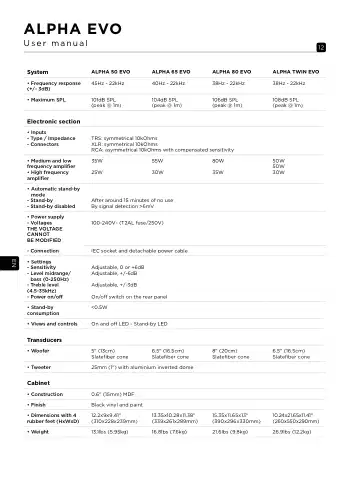
The ALPHA EVO monitors are equipped with a “Stand-by” mode. When you switch on the monitors, the “Stand-by” mode is enabled. To disable it, send an audio signal to the monitor by gradually increasing the volume of the audio source. After around 15 minutes without receiving an audio signal, the monitors automatically switch to “Stand-by” mode. In “Stand-by” mode, the power consumption is lower than 0.5W. This “Stand-by” function can be disabled using the Auto Stand-by switch (page 10).
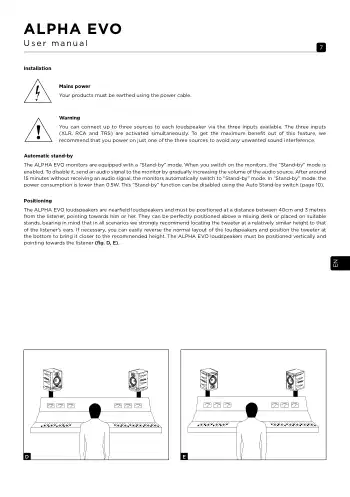
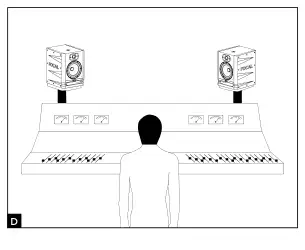
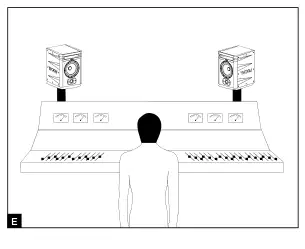
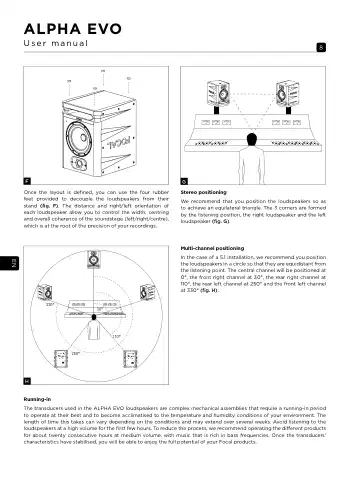
The ALPHA EVO loudspeakers are nearfield loudspeakers and must be positioned at a distance between 40cm and 3 metres from the listener, pointing towards him or her. They can be perfectly positioned above a mixing desk or placed on suitable stands, bearing in mind that in all scenarios we strongly recommend locating the tweeter at a relatively similar height to that of the listener's ears. If necessary, you can easily reverse the normal layout of the loudspeakers and position the tweeter at the bottom to bring it closer to the recommended height. The ALPHA EVO loudspeakers must be positioned vertically and pointing towards the listener (fig. D, E).
8 ALPHA EVO U s e r m a n u a l
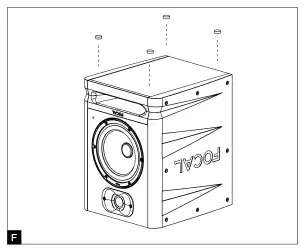
Once the layout is defined, you can use the four rubber feet provided to decouple the loudspeakers from their stand (fig. F). The distance and right/left orientation of each loudspeaker allow you to control the width, centring and overall coherence of the soundstage (left/right/centre), which is at the root of the precision of your recordings.
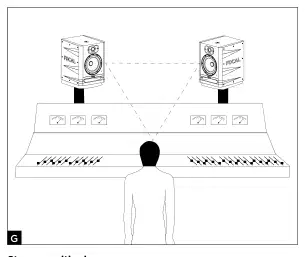
We recommend that you position the loudspeakers so as to achieve an equilateral triangle. The 3 corners are formed by the listening position, the right loudspeaker and the left loudspeaker (fig. G).
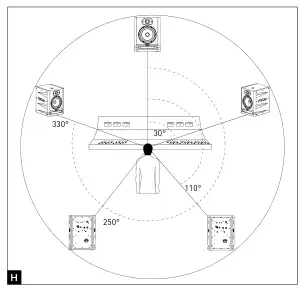
In the case of a 5.1 installation, we recommend you position the loudspeakers in a circle so that they are equidistant from the listening point. The central channel will be positioned at 0°, the front right channel at 30°, the rear right channel at 110°, the rear left channel at 250° and the front left channel at 330° (fig. H).
The transducers used in the ALPHA EVO loudspeakers are complex mechanical assemblies that require a running-in period to operate at their best and to become acclimatised to the temperature and humidity conditions of your environment. The length of time this takes can vary depending on the conditions and may extend over several weeks. Avoid listening to the loudspeakers at a high volume for the first few hours. To reduce the process, we recommend operating the different products for about twenty consecutive hours at medium volume, with music that is rich in bass frequencies. Once the transducers’ characteristics have stabilised, you will be able to enjoy the full potential of your Focal products.
Stereo positioning · Multi-channel positioning · Running-in
9 ALPHA EVO U s e r m a n u a l
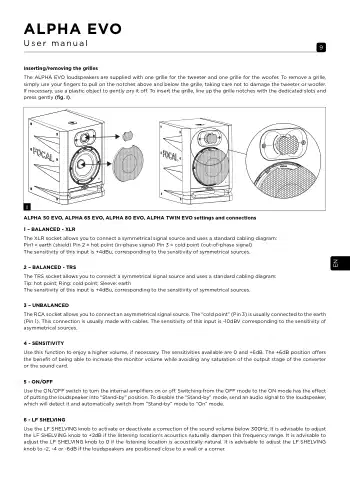
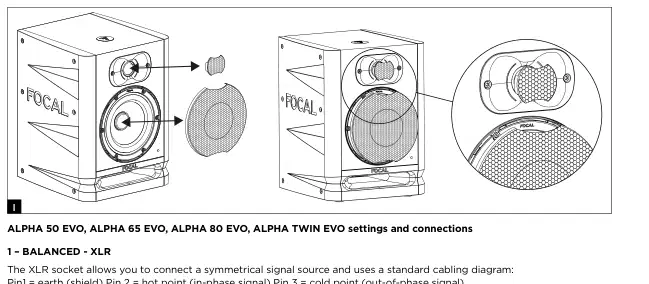
The ALPHA EVO loudspeakers are supplied with one grille for the tweeter and one grille for the woofer. To remove a grille, simply use your fingers to pull on the notches above and below the grille, taking care not to damage the tweeter or woofer. If necessary, use a plastic object to gently pry it off. To insert the grille, line up the grille notches with the dedicated slots and press gently (fig. I).
ALPHA 50 EVO, ALPHA 65 EVO, ALPHA 80 EVO, ALPHA TWIN EVO settings and connections
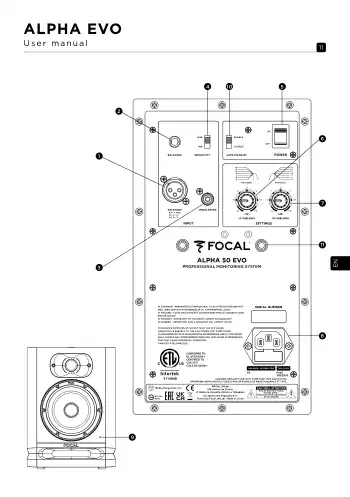
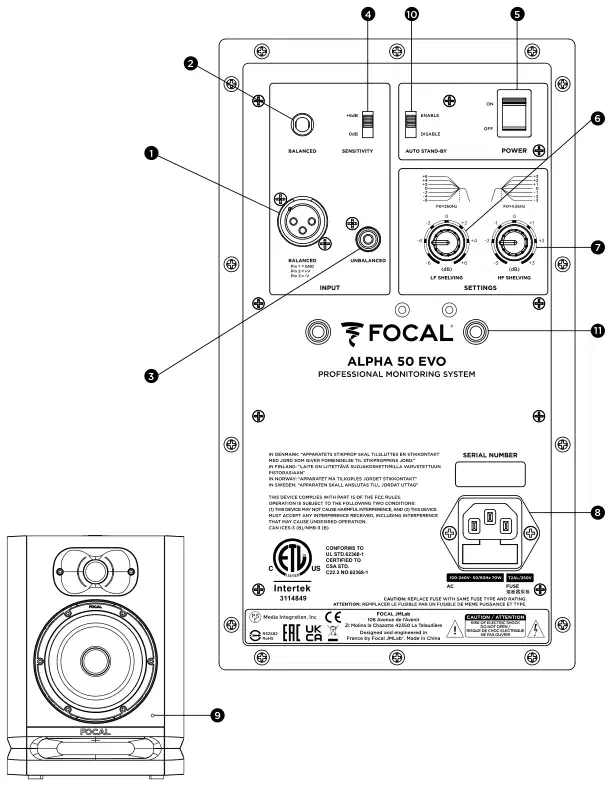
The XLR socket allows you to connect a symmetrical signal source and uses a standard cabling diagram: Pin1 = earth (shield) Pin 2 = hot point (in-phase signal) Pin 3 = cold point (out-of-phase signal) The sensitivity of this input is +4dBu, corresponding to the sensitivity of symmetrical sources.
The TRS socket allows you to connect a symmetrical signal source and uses a standard cabling diagram: Tip: hot point; Ring: cold point; Sleeve: earth The sensitivity of this input is +4dBu, corresponding to the sensitivity of symmetrical sources.
The RCA socket allows you to connect an asymmetrical signal source. The “cold point” (Pin 3) is usually connected to the earth (Pin 1). This connection is usually made with cables. The sensitivity of this input is -10dBV corresponding to the sensitivity of asymmetrical sources.
Use this function to enjoy a higher volume, if necessary. The sensitivities available are 0 and +6dB. The +6dB position offers the benefit of being able to increase the monitor volume while avoiding any saturation of the output stage of the converter or the sound card.
Use the ON/OFF switch to turn the internal amplifiers on or off. Switching from the OFF mode to the ON mode has the effect of putting the loudspeaker into “Stand-by” position. To disable the “Stand-by” mode, send an audio signal to the loudspeaker, which will detect it and automatically switch from “Stand-by” mode to “On” mode.
Use the LF SHELVING knob to activate or deactivate a correction of the sound volume below 300Hz. It is advisable to adjust the LF SHELVING knob to +2dB if the listening location's acoustics naturally dampen this frequency range. It is advisable to adjust the LF SHELVING knob to 0 if the listening location is acoustically natural. It is advisable to adjust the LF SHELVING knob to -2, -4 or -6dB if the loudspeakers are positioned close to a wall or a corner.
Inserting/removing the grilles
10 ALPHA EVO U s e r m a n u a l
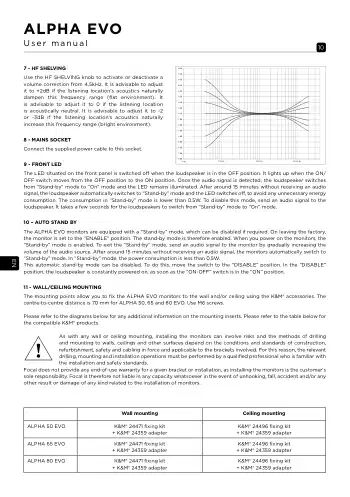
Use the HF SHELVING knob to activate or deactivate a volume correction from 4.5kHz. It is advisable to adjust it to +2dB if the listening location's acoustics naturally dampen this frequency range (flat environment). It is advisable to adjust it to 0 if the listening location is acoustically neutral. It is advisable to adjust it to -2 or -3dB if the listening location's acoustics naturally increase this frequency range (bright environment).
Connect the supplied power cable to this socket.
10 Hz 100 Hz 1000 Hz 10000 Hz
The LED situated on the front panel is switched off when the loudspeaker is in the OFF position. It lights up when the ON/ OFF switch moves from the OFF position to the ON position. Once the audio signal is detected, the loudspeaker switches from “Stand-by” mode to “On” mode and the LED remains illuminated. After around 15 minutes without receiving an audio signal, the loudspeaker automatically switches to “Stand-by” mode and the LED switches off, to avoid any unnecessary energy consumption. The consumption in “Stand-by” mode is lower than 0.5W. To disable this mode, send an audio signal to the loudspeaker. It takes a few seconds for the loudspeakers to switch from “Stand-by” mode to “On” mode.
The ALPHA EVO monitors are equipped with a “Stand-by” mode, which can be disabled if required. On leaving the factory, the monitor is set to the “ENABLE” position. The stand-by mode is therefore enabled. When you power on the monitors, the “Stand-by” mode is enabled. To exit the “Stand-by” mode, send an audio signal to the monitor by gradually increasing the volume of the audio source. After around 15 minutes without receiving an audio signal, the monitors automatically switch to “Stand-by” mode. In “Stand-by” mode, the power consumption is less than 0.5W. This automatic stand-by mode can be disabled. To do this, move the switch to the “DISABLE” position. In the “DISABLE” position, the loudspeaker is constantly powered on, as soon as the “ON-OFF” switch is in the “ON” position.
The mounting points allow you to fix the ALPHA EVO monitors to the wall and/or ceiling using the K&M® accessories. The centre-to-centre distance is 70 mm for ALPHA 50, 65 and 80 EVO. Use M6 screws.
Please refer to the diagrams below for any additional information on the mounting inserts. Please refer to the table below for the compatible K&M® products.
As with any wall or ceiling mounting, installing the monitors can involve risks and the methods of drilling and mounting to walls, ceilings and other surfaces depend on the conditions and standards of construction, refurbishment, safety and cabling in force and applicable to the brackets involved. For this reason, the relevant drilling, mounting and installation operations must be performed by a qualified professional who is familiar with the installation and safety standards. Focal does not provide any end-of-use warranty for a given bracket or installation, as installing the monitors is the customer's sole responsibility. Focal is therefore not liable in any capacity whatsoever in the event of unhooking, fall, accident and/or any other result or damage of any kind related to the installation of monitors.
11 ALPHA EVO U s e r m a n u a l
12 ALPHA EVO U s e r m a n u a l
この取扱説明書で参照されているリンク(メーカー、サポート、ダウンロード等)。
ユーザーまたはスタッフが通常1日以内に回答します。あなたの質問が次の人の助けにもなります。
最初の質問を投稿しましょう。他のユーザーや当チームが回答します。