


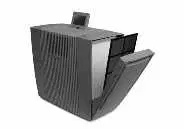
1 Venta Air Purifier AP902 2 HEPA filters (integrated in the appliance) 2 Coarse dust filters (pre-installed) 1 remote control 1 operating manual
If any parts are missing or damaged, please contact
DE service@venta-air.com
CH service-ch@venta-air.com
!
Please read the Safety Instructions carefully. Follow the instructions to prevent
injuries or damage to property.
INTENDED USE
The Venta Air Purifier is a domestic appliance for purifying air in homes, offices and leisure facilities. The appliance is not suitable for outdoor areas.
Any other use or modification of the appliance is considered to be improper use. Venta is not liable for damage or injuries resulting from improper use.
Using the appliance for something other than the intended purpose can endanger health and lives. This includes use under the following conditions:

For room sizes* ≤ 75 m²
Interactive touch display Standard
App control Standard WiFi
Measuring sensors Air quality + humidity + temperature
Coarse dust filter Standard, double
HEPA filter Standard, double
Power levels 5 + Automatic + Turbo Boost
Noise emission (speeds 1–5) 19/ 29/ 40/ 46/ 51 dB(A)
Power consumption (speeds 1–5) approx. 7/ 8/ 14/ 21/ 33 W
Turbo boost 60 dB(A) & 60 W
Mains voltage 220–240 V 50 / 60 Hz
Dimensions (L x W x H) 61 × 30 × 52 cm
Weight approx. 13 kg
WLAN frequency range 2.4 GHz
WLAN transmission power maximum 19 dBm
* based on a max. ceiling height of 2.5 m,
Suitable room size depending on room air contamination:
Subject to modifications and errors
Model Venta AP902 · Colours grey

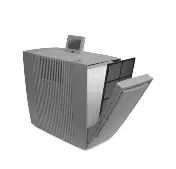
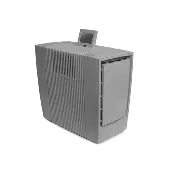
1 Display 2 On/off switch 3 Filter compartment 4 Coarse dust filter 5 HEPA filter 6 Filter compartment 7 Coarse dust filter 8 HEPA filter 9 Cable compartment 10 Remote control
!
switching power supply is disconnected from the outlet!
1 Unpack and set up the appliance. Remove battery protection and protective foil from remote control 10.
2 Open filter compartments 3+6 and remove coarse dust filters 4+7.
3 Remove HEPA filters 5+8 and open them.
4 Re-insert opened HEPA filters 5+8 and coarse dust filters 4+7 and close filter compartments 3+6.
5 Adjust display 1 to the position you want (3 positions possible).
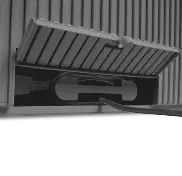
6 Adjust cable connector to the length you want by winding/unwinding in cable compartment 9. Note: Make sure the cable connector is firmly fitted into the appliance!
Connect power plug to mains and switch appliance on using on/off switch 2 or remote control 10.

Adjusting the fan stage

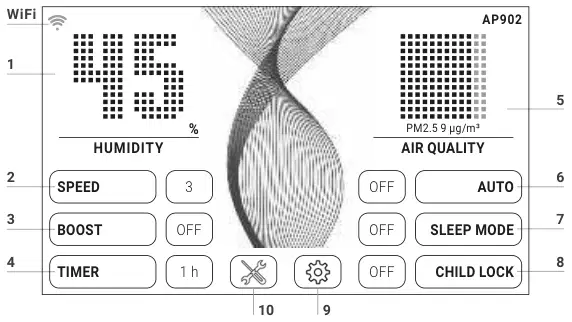
Select or change the setting by tapping the function.
Display humidity or temperature. Hold for 3 sec. to switch back and forth between °C and °F.
2 Speed Fan stage 1 (low) – 5 (high).
3 Boost OFF / ON For max. purifying performance
4 Timer OFF / 1 / 3 / 5 / 7 / 9 h (hours). The appliance shuts off automatically after the preset hours have expired.
5 Air quality (EPA) PM2.5 µg/m³ AQI US 0–12 0–50 Good Green 13–35 51–100 Moderate Yellow 36–55 101–150 Unhealthy for sensitive people
56–150 151–200 Unhealthy Red 151–250 201–300 Very unhealthy Violet 251–500 301–500 Dangerous Brown
Function Setting · 1 Humidity/ temperature · Orange

6 Auto OFF Appliance operates at preset fan stage 1 – 5. ON The appliance automatically regulates the fan stages 1 – 5 depending on the air quality in the room (Boost is not activated).
7 Sleep mode OFF / ON The appliance reduces the fan stage to 1 and dims the display. You can change the air flow rate manually in sleep mode at any time. The air quality is not displayed.
8 Child lock OFF / ON Hold for 3 sec. to activate/deactivate the key lock.
. button to open the Settings menu.
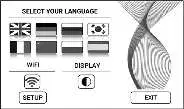
Tap the national flag to select language.
Tap the button to select black or white display back- ground colour.
Display WiFi connection. Enable or disable WiFi by tapping the button. grey: WiFi disabled. blue: WiFi connection to Venta server enabled (full access). green: WiFi connection to the local network established (local access). red: No WiFi connection. Set up the WiFi function. For a precise description, see sections “Configure WiFi” and “Venta App”.
button for instructions and maintenance information. white: No instruction. red: Observe instruction. For a precise description, see section “Cleaning & Maintenance”.

To access WiFi configuration, first tap button 9,
then the SETUP button.
Select Network:
LOGIN CREDENTIALS
Security type:
PSK:
INTERNET ACCESS
Access:
Select “Select network”, then your network in the dropdown list. The “Security type” is automatically set as soon as you select the network. In the “PSK” box, please enter your WLAN password/key (ASCII entry mode) and confirm with ENTER. If your password contains special characters or umlauts which are not shown on the keypad, you can generate your full password as a HEX code on our website: www.venta-air.com Now enter your generated HEX code into the “PSK” box (HEX entry mode) and confirm with ENTER. Under “Access”, select the internet access type you require.
full access: access to all the comfort features of the app. local access: local access to use the app.
Tap CONNECT to create the WiFi connection.
WiFi symbol green: WiFi connection established (local access). WiFi symbol blue: WiFi connection established (full access). WiFi symbol red: No WiFi connection. Check your network and WLAN password. WiFi symbol grey: WiFi disabled.
If problems occur during the setup process, read the information in the section
“What to do if WiFi connection is not possible?”
Tap the EXIT button to return to the previous menu.
*********** · full access

You can use the Venta app to expand and control the appliance functions. The app is available for smartphones and tablets. Please download the Venta app at: www.venta-air.com or use the QR code.
Please log in to the menu or register as soon as you have downloaded and opened the Venta app.
You must register so that you can control and check your Venta appliance
when you’re on the go.
You can use the search function + to automatically find all local Venta appliances. Please select your appliance.
The appliance emits an audio signal while the app is connecting to it. Please confirm connection to your smartphone/tablet on the appliance.
ALLOW ACCESS?
YES NO
If WiFi connection is disabled,
the appliance does not connect to the Venta app.
on the display to see information about maintenance. Red light indicates that this type of maintenance is due.
CHANGE FILTER: 0 DAYS RESET
EXIT
Tap button 10

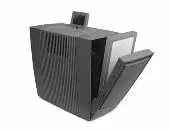
power plug is disconnected from the power supply!
A CHANGE FILTER When changing the HEPA filter, use suitable protective equipment (e.g. mask and gloves). Place used HEPA filters in a bag and dispose of them in household waste.
Open filter compartment, remove coarse dust filter. Re- move and replace HEPA filter. Re-assemble the appliance and switch it on. Tap
button on the display to access the maintenance menu. Then tap the RESET button and hold for 3 seconds until the time is reset.
After one year, the maintenance button
lights up in red and indicates that this action is necessary.
The filter service life is approx. 1 year (of continuous 24- hour operation). The lifetime of the filter depends on the hours of operation and the air quality in the room.
You can carry out this maintenance step if required, even if the SERVICE message is not shown. When you are finished, simply tap the relevant RESET button in the maintenance menu
and hold for 3 seconds until the time is reset. The next filter-change reminder will appear after one year.
B Recommended every 1–2 months or as required
Open filter compartment, remove coarse dust filter and vacuum or rinse it off. Please note: The coarse dust filter must be completely dry before you install it. Re-assemble the device.
Reminder/Interval Actions

You can order accessories by phone or online at www.venta-air.com
RECYCLING & DISPOSAL The packaging material is recyclable. Please dispose of the packaging in an
eco-friendly way using the recycling scheme at your location.
The “crossed-out bin” symbol indicates that you must dispose of waste electrical and electronic equipment (WEEE) and waste batteries separately. Such equipment may contain dangerous and environmentally hazardous substances. These products should be disposed of at an appropriate collecting point for recycling electrical and electronic equipment and may not be disposed of in unsorted household waste. Do not dispose of used batteries in household waste. Hand them in to collection points or retailers. This way you can help to protect resources and the environment. For more information, please contact your local authorities.
Children must not be allowed to play with plastic bags and packaging material as there is a danger of injury or suffocation. Store such materials safely or dispose of them in an environmentally friendly way. Please put used HEPA filters in a bag and dispose of them in household waste.
Due to the high quality of our products, Venta-Luftwäscher GmbH guarantees that this product will remain defect-free for two years as from the purchase date, provid- ed it is used correctly. If a material or processing error should occur anyway, please contact the Venta Service Team or your dealer. Venta‘s general guarantee conditions also apply: www.venta-air.com/en_de/Service/Warranty/
Venta Luftwäscher GmbH treats your data confidentially. You can find more informa- tion about data protection in our Privacy Policy at www.venta-air.com

Do you need additional information about your Venta appliance, do you want advice or to order accessories? Our Service Team is there for you! Call us directly, or visit the Venta website: www.venta-air.com
AT +43 5572 202 539
CH +41 41 781 15 15
WHAT TO DO IF …
!
switched off and disconnected from the power supply!
… the appliance won’t switch on? Please check whether the appliance is plugged in to the mains.
… the appliance won’t switch on even though it is plugged in to the mains?
mains power cable is correctly plugged into the appliance. Then switch the appliance on again.
… WiFi connection is not possible Please check that: • you are using a 2.4-GHz or a combined 2.4/5-GHz network. This is important be- cause the WiFi/WLAN module in the appliance does not support 5-GHz networks.
If necessary, update the operating system of your phone or tablet.

如要进入WiFi配置,请首先短暂触摸按键9
WIRELESS NETWORK
Select Network:
LOGIN CREDENTIALS
Security type:
PSK:
INTERNET ACCESS
Access:
在“Select network”步骤中,请在下拉列表中选择您的网络。一旦网络选择完毕,“Security Type”将会自动设置。请在“PSK”字段(ASCII输入模式)中输入您的WLAN密码/WLAN 密钥,然后用回车键确认。如果您的密码包含键盘上未显示的特殊字符或变音符号,则 可以在以下网站上将整个密码生成为十六进制代码:www.venta-air.cn。现在请在“PSK” 字段(HEX输入模式)中输入您生成的十六进制代码,然后用回车键确认。在“Access”下 选择您所需的互联网访问权限。
full access:访问App的所有舒适功能。 local access:本地访问以使用App。
触摸CONNECT按键,即可建立WiFi连接。
WiFi 显示为绿色:已建立WiFi连接 (local access)。 WiFi 显示为蓝色:已建立WiFi连接 (full access)。 WiFi 显示为红色:无WiFi连接。请检查您的网络和WLAN密码。 WiFi 显示为灰色:WiFi已停用。
276 CN
*********** · full access · 如果在WiFI设置过程中出现问题,请阅读段落“如果无法建立WiFi连接怎么办?”

! 注意! 确保在执行所有措施时,设备均已关闭并且电源插头已从插座拔出!
A CHANGE FILTER 在更换HEPA过滤器的过程中,请使用合适的防护装备(例如 防护面罩和手套)自我保护。请将废旧HEPA过滤器装袋,随生 活垃圾废弃处理。
按键,以进入维 护菜单。然后触摸RESET按键,按住 3 秒钟,直至流程时间重 置。
一年过后,按键
将显示为红色,提示须执行此措施。
过滤器的使用寿命约为 1 年(在 24 小时连续运行的情况下) 。过滤器使用寿命取决于运行小时数和室内空气质量。
此保养措施随时都可依据需要执行。然后只需在维护菜单
中触摸RESET按键,按住 3 秒钟,直至流程时间重置。下一次过滤器更换提示将在一年后重新发出。
B 建议每 1 – 2 个月或 依据需要进行
打开过滤器盒,取下粗粉尘过滤器并进行抽吸或冲洗。 请注意: 粗粉尘过滤器必须在安装前完全干燥!重新安装设备。
278 CN
この取扱説明書で参照されているリンク(メーカー、サポート、ダウンロード等)。
ユーザーまたはスタッフが通常1日以内に回答します。あなたの質問が次の人の助けにもなります。
最初の質問を投稿しましょう。他のユーザーや当チームが回答します。