JA
公式取扱説明書

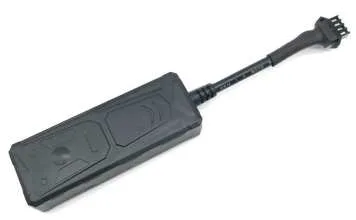
VJOY Vehicle GPS Tracker (C30)

5 ページ·135 KB·GPSトラッカー·PDF·EN
VJOY Vehicle GPS Tracker (C30)
目次 7セクション GSM/GPRS/GPS Tracker · Quick Installation Guide · 1. Features · 2. Install SIM Card · … 表示非表示
Page 1 of the VJOY Vehicle GPS Tracker (C30) user manual — GSM/GPRS/GPS Tracker
1ページ · クリックして拡大
1ページ

GSM/GPRS/GPS Tracker

Quick Installation Guide

VJOY Vehicle GPS Tracker (C30) — GSM/GPRS/GPS Tracker diagram (page 1)
図 1 · GSM/GPRS/GPS Tracker
VJOY Vehicle GPS Tracker (C30) — GSM/GPRS/GPS Tracker diagram (page 1)
図 2 · GSM/GPRS/GPS Tracker

Car/Motorcycle/Scooter GPS Tracking Device

Page 2 of the VJOY Vehicle GPS Tracker (C30) user manual — 2. Install SIM Card
2ページ · クリックして拡大
2ページ

1. Features

◇ 9-36V Vehicle/scooter/motorcycle tracking ◇ Real-time tracking by SMS/Platform/APP ◇ Speeding/Geo-fence alarm ◇ Vibration alarm ◇ Power-saving mode during parking ◇ History trace playback ◇ Disable fuel or electricity (Optional) ◇ Power Cut alarm with built-in battery(Optional)

2. Specs.

Content Specs.

Dim. 77*28*15mm Network GSM/GPRS Frequency 850/900/1800/1900 MHz GPS chipset MTK high sensitivity chip Location accuracy

Time To First Fix(open sky) Cold status

2. Install SIM Card

Insert 2G GSM SIM card with activated GPRS data; Make sure SIM

card with full balance; If SIM card with PIN code, must remove it advance.

Insert SIM to power on device, Take off SIM to power off device.

VJOY Vehicle GPS Tracker (C30) — 2. Install SIM Card diagram (page 2)
図 3 · 2. Install SIM Card
VJOY Vehicle GPS Tracker (C30) — 2. Install SIM Card diagram (page 2)
図 4 · 2. Install SIM Card
Page 3 of the VJOY Vehicle GPS Tracker (C30) user manual — 4. Wires connection
3ページ · クリックして拡大
3ページ

3. Device light description

LightSignalNormal statusAbnormal status YellowGSM signalStable light onFlashing: No SIM card BlueGPS signalStable light onFlashing: searching GPS signal

minutes.

4. Wires connection

RedBattery positive Black: Battery negative
GreenIgnition wire Yellow: Relay for cut fuel (optional)
VJOY Vehicle GPS Tracker (C30) — 4. Wires connection diagram (page 3)
図 5 · 4. Wires connection
Page 4 of the VJOY Vehicle GPS Tracker (C30) user manual — SMS Commands
4ページ · クリックして拡大
4ページ

SMS Commands

VJOY Vehicle GPS Tracker (C30) — SMS Commands diagram (page 4)
図 6 · SMS Commands
Page 5 of the VJOY Vehicle GPS Tracker (C30) user manual — SMS Commands
5ページ · クリックして拡大
5ページ
Set Time IntervalITV123456+space+upload time interval(s) Activate angle upload locationANGLE123456 1 Cancel angle upload locationANGLE123456 0 function Set APP alarm (default)KC123456(space)1 Set APP+SMS alarmKC123456(space)2 Set APP+SMS+PhoneCall alarmKC123456(space)3 Set vibration levelvibrate123456(space)1 Cancel vibration alarmvibrate123456(space)0 Initialize factory settingbegin123456

◆ Web platform GPS tracking software Scan to download APP

VJOY Vehicle GPS Tracker (C30) — SMS Commands diagram (page 5)
図 7 · SMS Commands
Websitewww.gps2828.com APP name: secumore

Default IMEI as user name, password 123456.

If failed to login, please contact supplier to register IMEI.

情報源

参考資料・リンク

この取扱説明書で参照されているリンク(メーカー、サポート、ダウンロード等)。

VJOY Vehicle GPS Tracker (C30)について質問する

ユーザーまたはスタッフが通常1日以内に回答します。あなたの質問が次の人の助けにもなります。

Add your email to get notified when it’s answered — no spam, ever.

0 questions
VJOY Vehicle GPS Tracker (C30)に関する質問はまだありません

最初の質問を投稿しましょう。他のユーザーや当チームが回答します。

原本

VJOY Vehicle GPS Tracker (C30) 取扱説明書(PDF)

5 ページ·135 KB·GPSトラッカー·PDF
上のページをクリックするとここに表示されます
ページ 1 / …
100%
ページを読み込み中…