


en-US fr-CA pt-BR zh-CN
zh-TW
ja-JP ko-KR ru-RU uk-UA
ar-OM
*MN006538A01* MN006538A01-AE NOVEMBER 2021

MN006538A01-AE Safety and Legal
This section provides the safety and legal information for this product.
007-AJ0033 Complies with IMDA Standards
Intellectual Property and Regulatory Notices
Copyrights
The Motorola Solutions products described in this document may include copyrighted Motorola Solutions computer programs. Laws in the United States and other countries preserve for Motorola Solutions certain exclusive rights for copyrighted computer programs. Accordingly, any copyrighted Motorola Solutions computer programs contained in the Motorola Solutions products described in this document may not be copied or reproduced in any manner without the express written permission of Motorola Solutions.
No part of this document may be reproduced, transmitted, stored in a retrieval system, or translated into any language or computer language, in any form or by any means, without the prior written permission of Motorola Solutions, Inc.
MOTOROLA, MOTO, MOTOROLA SOLUTIONS, and the Stylized M Logo are trademarks or registered trademarks of Motorola Trademark Holdings, LLC and are used under license. All other trademarks are the property of their respective owners.
The purchase of Motorola Solutions products shall not be deemed to grant either directly or by implication, estoppel or otherwise, any license under the copyrights, patents or patent applications of Motorola Solutions, except for the normal non-exclusive, royalty-free license to use that arises by operation of law in the sale of a product.
This product may contain Open Source software used under license. Refer to the product installation media for full Open Source Legal Notices and Attribution content.
European Union (EU) and United Kingdom (UK) Waste of Electrical and Electronic Equipment (WEEE) Directive
The European Union's WEEE directive and the UK's WEEE regulation require that products sold into EU countries and the UK must have the crossed-out wheelie bin label on the product (or the package in some cases). As defined by the WEEE directive, this crossed-out wheelie bin label means

that customers and end-users in EU and UK countries should not dispose of electronic and electrical equipment or accessories in household waste.
Customers or end-users in EU and UK countries should contact their local equipment supplier representative or service centre for information about the waste collection system in their country.
Please note that certain features, facilities, and capabilities described in this document may not be applicable to or licensed for use on a specific system, or may be dependent upon the characteristics of a specific mobile subscriber unit or configuration of certain parameters. Please refer to your Motorola Solutions contact for further information.
© 2021 Motorola Solutions, Inc. All Rights Reserved
This device complies with Part 15 of the FCC rules and Industry Canada's license-exempt RSS's per the following conditions:
Per FCC CFR 47 Part 2 Section 2.1077(a)

Name: Motorola Solutions, Inc.
Address: 2000 Progress Pkwy, Schaumburg, Il. 60196, U.S.A.
Hereby declares that the product:
conforms to the following regulations:
FCC Part 15, subpart B, section 15.107(a), 15.107(d) and section 15.109(a)
Class B Digital Device As a personal computer peripheral, this device complies with Part 15 of the FCC Rules. Operation is subject to the following two conditions:
1 This device may not cause harmful interference.
Responsible Party

MN006538A01-AE Safety and Legal
2 This device must accept any interference received, including interference that may cause unde- sired operation.
NOTE: This equipment has been tested and found to comply with the limits for a Class B digital device, pursuant to part 15 of the FCC Rules. These limits are designed to pro- vide reasonable protection against harmful interference in a residential installation. This equipment generates, uses, and can radiate radio frequency energy and, if not installed and used in accordance with the instructions, may cause harmful interference to radio communications. However, there is no guarantee that interference will not occur in a particular installation.
If this equipment does cause harmful interference to radio or television reception, which can be determined by turning the equipment off and on, the user is encouraged to try to correct the interference by one or more of the following measures:
To ensure continued compliances with applicable RF exposure limits, use only Motorola Solutions approved, supplied or replacement antennas, batteries, and accessories.
For more information on what RF energy exposure is, and how to control your exposure to ensure compliance with established RF exposure limits, consult the following websites:
For additional user training information on exposure requirements, consult the following websites:

Exposure to loud noises from any source for extended periods of time may temporarily or permanently affect your hearing. The louder the radio volume, the less time is required before your hearing could be affected. Hearing damage from loud noise is sometimes undetectable at first and can have a cumulative effect. To protect your hearing:
This product contains Open Source Software. For more information regarding licenses, acknowledgment, required copyright notices, and other usage terms, visit http:// businessonline.motorolasolutions.com
Go to Resource Center→Product Information→Manual→Accessories→Remote Speaker→Microphone

MN006538A01-AE Service and Warranty
Other than the clip, the Remote Speaker Microphone (RSM) is not repairable. The RSM is covered under the standard Motorola Solutions one-year limited warranty.
Motorola Solutions does not warrant the installation, maintenance or service of the Product, accessories, batteries, or parts.
Motorola Solutions is not responsible in any way for problems or damage caused by any ancillary equipment or peripherals (specific examples include, but are not limited to: batteries, chargers, adapters, and power supplies) not furnished or manufactured by Motorola Solutions which is attached to or used with the Product. When the Product is used with ancillary or peripheral equipment not supplied by Motorola Solutions, Motorola Solutions does not warrant the operation of the Product/ peripheral combination. Motorola Solutions will not honor any warranty claim where the Product is used in such a combination and it is determined by Motorola Solutions that there is no fault with the Product. Upon open or dismantle the Product, the warranty is immediately voided. Motorola Solutions specifically disclaim any responsibility for any damage in any way caused by improper installation by unauthorized personnel.


RSM Overview

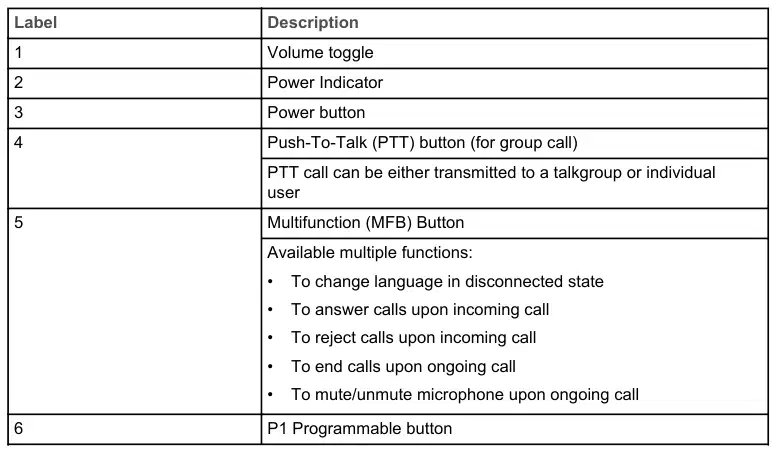

Answer, reject, end call, and microphone mute functionality is not applicable for the radios.
More programmable functions may be added on the WAVE application in the future. Refer to Kodiak User Guide for more information.
Button State Short Press Long Press (> 1.5 s) Very Long Press (> 3s)
Power Off N/A Power On Enter Pairing
On Sign Of Line N/A Power Off
PTT Connected PTT for Kodiak Group Call
Not Connected Kodiak Pairing N/A N/A
Power + PTT Off N/A N/A Power On and Clear PDL
Power + Call Button
On N/A N/A Enter/Exit Dark Mode
Call Button Not Connected Switches Lan- guage

Button State Short Press Long Press (> 1.5 s) Very Long Press (> 3s)
Incoming Call Answer Call Reject Call N/A
On Call Mic Mute End Call N/A
Volume + Connected Volume increase by one step
Volume – Connected Decrease vol- ume by one step
List of radios or devices that are compatible to PMMN4127:
PMLN7560_ Receive-only earpiece with translucent tube
CB000756A01 USB-C Cable (1 m)
These accessories can be paired with a Kodiak Broadband PTT enabled device. Currently, the supported Kodiak feature is Operational Status Messaging (the additional features will be added in the futures), refer to your Kodiak User Guide for setup instructions.
To support new radios and functionality, ensure that the WM500 firmware is upgraded to the latest version. Refer to WM500 online manual for the full list of compatible radios.

Getting Started
Familiarize yourself with basic information on how to use your Remote Speaker Microphone (RSM).
Procedure:
1 Connect the USB charging cable to the Remote Speaker Microphone (RSM).
2 Plug the charging cable to USB power source.
Refer to the following tables to understand your Remote Speaker Microphone (RSM) status indication.
To determine the details status of your RSM, press the Power button.
Getting Started

Prerequisites: Make sure that your RSM is turned off.
Procedure:
1 Press and hold the Power button until the "Power On" voice prompt follow by "Searching for Host" voice prompt and the blue LED blinks.
2 From the Bluetooth compatible device list, search and select WM500_xxxx.
xxxx denotes the alphanumeric MAC address of your WM500 RSM.
If pairing is successful, your device sounds "Pairing Successful" and a voice prompt from the RSM indicating the device is connected.
The WM500 supports various pairing methods depending on the compatible device. Refer to the user guide of the respective compatible device for pairing details.
Procedure:
1 Press and hold the Power button until the "Power On" voice prompt follow by "Searching for Host" voice prompt and the blue LED blinks.
2 Align the NFC locations on both the RSM and the compatible devices.
3 Check the compatible device for indication of successful pairing.
Procedure:
Press and hold the Power and PTT buttons simultaneously.
The blue LED blinks and a voice prompt from the RSM indicating that the paired device is "Cleared".

*MN006538A01* MN006538A01-AE NOVEMBRE 2021
この取扱説明書で参照されているリンク(メーカー、サポート、ダウンロード等)。
ユーザーまたはスタッフが通常1日以内に回答します。あなたの質問が次の人の助けにもなります。
最初の質問を投稿しましょう。他のユーザーや当チームが回答します。