Quick Start Guide




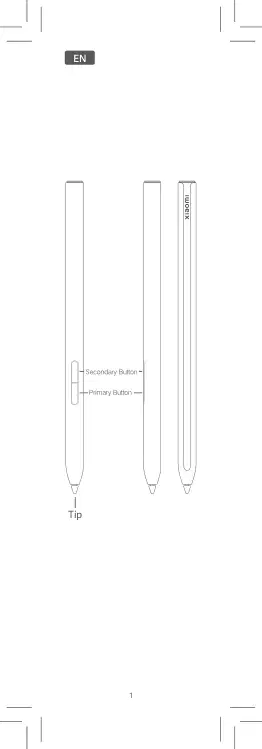

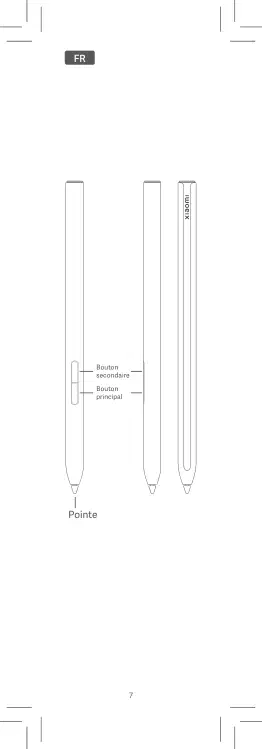
This product is only compatible with Xiaomi Pad 5
Pairing and Charging
Please attach the stylus body horizontally to the centre of the long side of the tablet (as shown in the figure), perform Bluetooth pairing and start charging. Note: Please turn on the Bluetooth function on your tablet beforehand
For more information, visit our official website: www.mi.com/global/service/userguide
Special precautions must be taken to safely dispose of this product. This marking indicates that this product may not be discarded with other household waste in the EU. To prevent harm to the environment or human health from inappropriate waste disposal, and to promote sustainable reuse of material resources, please recycle responsibly. To safely recycle your device, please use return and collection systems or contact the retailer where the device was originally purchased.

To view our Environmental Declaration, please refer to the following link: www.mi.com/en/about/environment
RISK OF EXPLOSION IF BATTERY IS REPLACED BY AN INCORRECT TYPE. DISPOSE OF USED BATTERIES ACCORDING TO INSTRUCTIONS.
Additional safety information and precautions can be accessed at the following link: www.mi.com/en/ certification
- Do not short circuit the battery,
as this may cause overheating, burns, or other injury. - Do not place the battery in a high-
temperature environment. - Overheating may cause
explosion. - Do not disassemble, hit, or crush
the battery, as this may cause the battery to leak, overheat, or explode.

- Do not burn the battery, as this
may cause fire or explosion. - If the battery appears deformed

Xiaomi Communications Co., Ltd. hereby declares that this product M2107K81PC is in compliance with the essential requirements and other relevant provisions of the RE Directive 2014/53/EU and RoHS Directive 2011/65/EU. The full text of the EU declaration of conformity is available at the following internet address: www.mi.com/en/certification
This device may be operated in all member states of the EU. Observe national and local regulations where the device is used.
Restrictions in the 2.4 GHz band: Norway: This subsection does not apply for the geographical area within a radius of 20 km from the centre of Ny-Ålesund.
This device offers the following frequency bands in EU areas only and maximum radio-frequency power: 2.4GHz Bluetooth: 20 dBm Wireless charging: 145 KHz < 42 dBuA/m at 10m Distance
Federal Communications Commission (FCC) notice: This device complies with part 15 of the FCC Rules. Operation is subject to the following two conditions: (1) This device may not cause harmful interference, and (2) this device must accept any interference received, including interference that may cause undesired operation. This equipment has been tested and found to comply with the limits for a Class B digital device, pursuant to part 15 of the FCC Rules. These limits are designed to provide reasonable protection against harmful interference in a residential installation. This equipment generates,

uses and can radiate radio frequency energy and, if not installed and used in accordance with the instructions, may cause harmful interference to radio communications. However, there is no guarantee that interference will not occur in a particular installation. If this equipment does cause harmful interference to radio or television reception, which can be determined by turning the equipment off and on, the user is encouraged to try to correct the interference by one or more of the following measures:
- Reorient or relocate the receiving
antenna. - Increase the separation between the
equipment and receiver. - Connect the equipment into an
outlet on a circuit different from that to which the receiver is connected. - Consult the dealer or an experienced
radio/TV technician for help.
This equipment complies with FCC radiation exposure limits set forth for an uncontrolled environment and meets the FCC radio frequency (RF) Exposure Guidelines. This equipment has very low levels of RF energy that are deemed to comply without testing of specific absorption ratio (SAR). Changes or modifications not expressly approved by the party responsible for compliance could void the user’s authority to operate the equipment.
This quick start guide is published by Xiaomi or its local affiliated company. Improvements and changes to this guide necessitated by typographical errors, inaccuracies of current information, or improvements to programs and/or equipment, may be made by Xiaomi at any time and without notice. Such changes will, however, be incorporated into new online editions of the quick start guide (please see details at www. mi.com/global/service/userguide). All illustrations are for illustration purposes only and may not accurately depict the actual device.

ユーザーまたはスタッフが通常1日以内に回答します。あなたの質問が次の人の助けにもなります。
最初の質問を投稿しましょう。他のユーザーや当チームが回答します。