JA
KINGSLIM logo
公式取扱説明書

KINGSLIM Dual Dash Camera (D1)

88 ページ·2.6 MB·ドライブレコーダー·PDF·ENNL
KINGSLIM Dual Dash Camera (D1)
目次 2セクション KingSlim_D1_UM_V1_EN · KingSlim_D1_UM_V1_DE 表示非表示
Page 1 of the KINGSLIM Dual Dash Camera (D1) user manual — USER MANUAL
1ページ · クリックして拡大
1ページ

USER MANUAL

KINGSLIM D1 Dual Dash Cam

Page 2 of the KINGSLIM Dual Dash Camera (D1) user manual — 01 - 14 English
2ページ · クリックして拡大
2ページ

01 - 14 English

15 - 29 Deutsch

30 - 43 Español

44 - 58 Français

59 - 72 Italiano

73 - 86 日本語

Page 3 of the KINGSLIM Dual Dash Camera (D1) user manual — CONTENTS
3ページ · クリックして拡大
3ページ

CONTENTS

What’s in the Box

Formatting the microSD Card

Download the GPS Player

Show 8 more labels / short text on this page
Camera Overview · Product Operation · Installation · Recording · Icon Introduction · Setup Menu · Troubleshooting · Contact Us
Page 4 of the KINGSLIM Dual Dash Camera (D1) user manual — KingSlim_D1_UM_V1_EN
4ページ · クリックして拡大
4ページ
KINGSLIM Dual Dash Camera (D1) — KingSlim_D1_UM_V1_EN diagram (page 4)
図 1 · KingSlim_D1_UM_V1_EN

D1 Dual Dash Cam * 1 Waterproof Rear Camera * 1

Car Charger with External GPS * 1 23ft Rear Camera Extension Cable * 1

32GB microSD Card * 1

Screws * 2 Pry Tool * 1

for Rear Camera * 1

KingSlim D1 Dash Cam

Cable Clips * 5 Quick Start Guide * 1

Bracket * 1 · Double-Sided Adhesive Tape · Quick Start Guide

Page 5 of the KINGSLIM Dual Dash Camera (D1) user manual — KingSlim_D1_UM_V1_EN
5ページ · クリックして拡大
5ページ
KINGSLIM Dual Dash Camera (D1) — KingSlim_D1_UM_V1_EN diagram (page 5)
図 2 · KingSlim_D1_UM_V1_EN

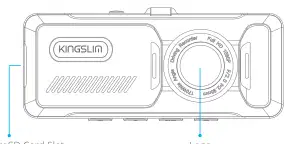
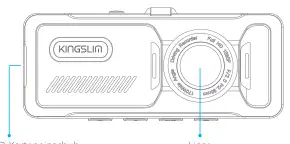
Mini USB Power Port

KINGSLIM Dual Dash Camera (D1) — KingSlim_D1_UM_V1_EN diagram (page 5)
図 3 · KingSlim_D1_UM_V1_EN
KINGSLIM Dual Dash Camera (D1) — KingSlim_D1_UM_V1_EN diagram (page 5)
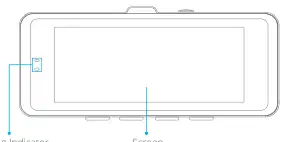
図 4 · KingSlim_D1_UM_V1_EN
Show 4 more labels / short text on this page
Power Button · microSD Card Slot · Lens · Screen Working Indicator
Page 6 of the KINGSLIM Dual Dash Camera (D1) user manual — PRODUCT OPERATION
6ページ · クリックして拡大
6ページ
KINGSLIM Dual Dash Camera (D1) — KingSlim_D1_UM_V1_EN diagram (page 6)
図 5 · KingSlim_D1_UM_V1_EN

PRODUCT OPERATION

1. Power Button Function 1: Press to wake up/turn off the screen. Function 2: Long press to turn the camera on/off.
2. Menu Button Function 1: Long press to enter the set-up menu. Function 2: Press to switch the shooting mode/playback mode/recording mode. Function 3: Press the menu button to lock the video during recording. Press the menu button again to unlock. Function 4: Press to exit the set-up menu.
3. OK Button Function 1: Press to start/stop recording. Function 2: In the shooting mode, press the OK button to shoot a photo. Function 3: In the playback mode, press the OK button to start/stop videos.

Up Button · Down Button · Reset

Page 7 of the KINGSLIM Dual Dash Camera (D1) user manual — KingSlim_D1_UM_V1_EN
7ページ · クリックして拡大
7ページ
4. Up Button Function 1: In the set-up menu, press the up button to view the setting options. Function 2: In the recording mode, press the up button to view the display modes. Function 3: After pause recording, long press the up button to display the GPS information.
5. Down Button Function 1: In the set-up menu, press the down button to view the setting options. Function 2: When recording, press the down button to turn audio on/off.
6. Working Indicator Standby: The red and blue lights are on. Recording during charging: The red light is on and the blue light is flashing. Recording when fully charged: The blue light is flashing and the red light is off.

INSTALLATION 1. Insert the microSD card. Tip: A Class 10 or higher microSD card is highly recommended for the dash cam. The dash cam supports a microSD card up to 64GB. Please format your card in the camera before using it in the dash cam.

KINGSLIM Dual Dash Camera (D1) — KingSlim_D1_UM_V1_EN diagram (page 7)
図 6 · KingSlim_D1_UM_V1_EN

microSD

Page 8 of the KINGSLIM Dual Dash Camera (D1) user manual — KingSlim_D1_UM_V1_EN
8ページ · クリックして拡大
8ページ
2. Insert the bracket into the bracket slot.
KINGSLIM Dual Dash Camera (D1) — KingSlim_D1_UM_V1_EN diagram (page 8)
図 7 · KingSlim_D1_UM_V1_EN
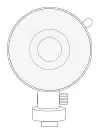
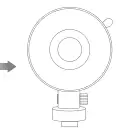
3. Install the dash cam on the windshield. First, clean the windshield with a dry cloth. Second, take the film off the suction cup and press the suction cup onto the windshield to make sure there is no air inside the suction cup, and then rotate to secure the bracket.
KINGSLIM Dual Dash Camera (D1) — KingSlim_D1_UM_V1_EN diagram (page 8)
図 8 · KingSlim_D1_UM_V1_EN
KINGSLIM Dual Dash Camera (D1) — KingSlim_D1_UM_V1_EN diagram (page 8)
図 9 · KingSlim_D1_UM_V1_EN
KINGSLIM Dual Dash Camera (D1) — KingSlim_D1_UM_V1_EN diagram (page 8)
図 10 · KingSlim_D1_UM_V1_EN
4. Adjust the view angle of the dash cam to ensure a good view.
Page 9 of the KINGSLIM Dual Dash Camera (D1) user manual — KingSlim_D1_UM_V1_EN
9ページ · クリックして拡大
9ページ
5. Connect the USB power cable into the USB power port of the dash cam, then

plug the car charger into the cigarette lighter socket.

KINGSLIM Dual Dash Camera (D1) — KingSlim_D1_UM_V1_EN diagram (page 9)
図 11 · KingSlim_D1_UM_V1_EN
6. Connect the rear camera to the dash cam with the extension cable to check that the rear camera works well.
7. Install the rear camera. Position 1: Install the rear camera on the rear windshield. This installation is easier.
KINGSLIM Dual Dash Camera (D1) — KingSlim_D1_UM_V1_EN diagram (page 9)
図 12 · KingSlim_D1_UM_V1_EN
Page 10 of the KINGSLIM Dual Dash Camera (D1) user manual — KingSlim_D1_UM_V1_EN
10ページ · クリックして拡大
10ページ

Position 2: Install the rear camera near the license plate. Position 2 is highly recommended. The rear image is crisp and clear for both rear viewing and as a back-up camera.

KINGSLIM Dual Dash Camera (D1) — KingSlim_D1_UM_V1_EN diagram (page 10)
図 13 · KingSlim_D1_UM_V1_EN

② Clean the area to ensure the optimum adhesion before installing the rear camera. ③ If you choose position 1, clean the rear windshield regularly to ensure the image quality. ④ If you choose position 2, install the rear camera with the included adhesive stickers or screws.

8. Use the pry tool to hide the cables.
Page 11 of the KINGSLIM Dual Dash Camera (D1) user manual — GPS
11ページ · クリックして拡大
11ページ

FORMATTING THE MICROSD CARD

Use a high-speed microSD card of Class10 or higher. Format your microSD card in the camera before putting it into the dash cam. 1. Long press the menu button to access the set-up menu. 2. Press the down button to view "format", then press the OK button. 3. Select "Confirm" and then press the OK button.

RECORDING 1. After finishing formatting, connect a car charger and start the car engine. The device will automatically turn on and begin recording. 2. Press the power button to turn on the device. Press the OK button to start recording. 3. Every time you exit from the setting menu or playback menu, press the OK button to start recording.

ICON INTRODUCTION The Main Interface

2 3 4 6 7

70KM/H 1

KINGSLIM Dual Dash Camera (D1) — 70KM/H 1 diagram (page 11)
図 14

1080FHD

0. 00 : 32 2021/ 01/ 20 08 : 02 : 30

GPS

Show 10 more labels / short text on this page
① · Recording Resolution · microSD Card Indicator · Power Status · Motion Detection · Speed · Gravity Sensor Indicator · Video Time · Microphone Indicator · Date/Time
Page 12 of the KINGSLIM Dual Dash Camera (D1) user manual — SETUP MENU
12ページ · クリックして拡大
12ページ

SETUP MENU

  • Long press the menu button to enter the dash camera set-up menu.
  • Press the up/down button to view the setting options. Select a setting option by using the OK button.
  • Press the menu button again to exit the set-up menu.
1. Resolution Select "Resolution" and press the OK button to select the front camera recording resolution of "1080FHD 1920×1080" or "720P 1280×720". The default setting is "1080FHD 1920×1080". The rear camera recording resolution is "720P".
2. Loop Recording When the microSD card is full, the new files will cover the old one if loop recording is on. If it is off, the camera will not record anymore when the card is full. You will then need to format the microSD card or change to a new one. Options: Off/1 minute/3 minutes/5 minutes Default Setting: 3 minutes
3. Photo Resolution Set the photo resolution. Options: 2M 1920×1080/5M 2592×1944/8M 3264×2448/12M 4032×3024 Default Setting: 2M 1920×1080
4. Video Audio Sound will be recorded simultaneously with video. Options: On and Off Default Setting: On
5. Key Tone Options: On and Off Default Setting: On
Page 13 of the KINGSLIM Dual Dash Camera (D1) user manual — KingSlim_D1_UM_V1_EN
13ページ · クリックして拡大
13ページ
6. Date/Time Set the date and time manually.
7. Date Stamp Turn on the date stamp; recorded videos will show the time stamp. Options: On and Off Default Setting: On
8. Language Settings Options: English/ 繁體中文/简体中文/日本語 /Français/Deutsch/Polskie/ ไทย / Tiếng Việt/русский/Español/Italiana Default Setting: English
9. Gravity Sensor When the mode is turned on, it will automatically start recording and save content if an impact or sudden braking is detected. The videos will be locked and will never be overwritten by new files. The higher the sensitivity level, the easier it is to trigger the emergency recording. Options: Off/Low/Medium/High Default Setting: Medium
10. Parking Monitoring The camera will automatically turn on, begin the 22s recording, and lock if there is an impact to the car during parking. Options: On and Off Default Setting: Off
11. UTC Choose the time zone manually. The device will then display the time in the selected time zone. Default Setting: UTC-5 After changing the time zone, restart your dash cam and make sure the time and date are now correct.
Page 14 of the KINGSLIM Dual Dash Camera (D1) user manual — KingSlim_D1_UM_V1_EN
14ページ · クリックして拡大
14ページ
12. Speed Unit You can set the speed unit that you prefer. Options: KM/H and MP/H Default Setting: KM/H
13. Motion Detection In standby mode, it will automatically start recording when motion is detected. Options: On and Off Default Setting: Off
14. License Plate Setting Enter your license plate number. Options: On and Off Default Setting: Off
15. Screen Saver The display screen will turn off automatically after the set duration of inactivity. Options: On and Off Default Setting: On
16. Auto Power Off The dash cam will be turned off automatically after the time you set. Options: Off/1 minute/3 minutes/5 minutes Default Setting: Off
17. Source Frequency Choose the right frequency to avoid flickering. This should be based on your local AC parameters. Options: 60Hz/50Hz Default Setting: 50Hz
Page 15 of the KINGSLIM Dual Dash Camera (D1) user manual — DOWNLOAD THE GPS PLAYER
15ページ · クリックして拡大
15ページ
18. Format Format the microSD card. Note: ① All data will be deleted. Before formatting your microSD card, please remember to back up your important data on another device. ② Before the microSD card is inserted for the first time, please format it in the camera to ensure that the card is compatible with the camera.
19. Reset The dash cam will be reset to factory settings.
20. Version Number Use this to check the version of the dash camera.

DOWNLOAD THE GPS PLAYER

Download the GPS playerwww.kingslim.net/player
  • TROUBLESHOOTING 1. The dash cam is not recording.
  • Check whether your microSD card has enough space. Back up any important data to another device first, and then format the microSD card.
  • Check if the loop recording in the settings menu is set to OFF. Set "Loop Record" to 3 minutes.
2. The dash cam stops during recording. During recording, a large amount of high-definition video data is processed. Please use a high-speed microSD card of Class 10 or higher.
3. A "File Error" prompt appears when playing back pictures and videos. Use a genuine microSD card, and be sure to format it.
Page 16 of the KINGSLIM Dual Dash Camera (D1) user manual — CAUTION!
16ページ · クリックして拡大
16ページ
4. The image is misty. Ensure there are no fingerprints or other marks on the camera lens. Use a soft, dry cloth to clean the lens. Clean the front windshield.
5. Crashing If your device crashes, use a sharp object to press the reset button to restart the device.
6. No sound on the video. Ensure the audio recording mode is on.
7. The camera keeps turning on and off automatically. Charge the camera with the included car charger. Do not charge the battery via the USB data cable with other adapters.

CAUTION!

1. Please place your device in a secure location and protect the lens from scratches and dirt. 2. Do not expose the device to rain, moisture, or water under any circumstances. 3. Avoid leaving the device in direct sunlight for extended periods of time. 4. Do not remove or expose the internal battery.

CONTACT US For any inquiries with KingSlim products, please feel free to contact us, we will respond within 24 hours.

Emailcs@ kingslim.net Tel: 888-811-1140 (US) Mon-Fri (except holidays) 9am-5pm (EST) Official website: www.kingslim.net

The microSD, microSDHC, microSDXC and SD marks and logos are trademarks of SD-3C, LLC.

Page 17 of the KINGSLIM Dual Dash Camera (D1) user manual — DE
17ページ · クリックして拡大
17ページ

DE

INHALT

Formatieren Sie die MikroSD-Karte

Show 10 more labels / short text on this page
Verpackungsinhalt · Kameraübersicht · Produktbetrieb · Installation · Aufzeichnung · Symboleinführung · Einstellmenü · Gps-abspielprogramm Herunterladen · Fehlersuche · Uns Kontaktieren
Page 18 of the KINGSLIM Dual Dash Camera (D1) user manual — DE
18ページ · クリックして拡大
18ページ

DE

KINGSLIM Dual Dash Camera (D1) — DE diagram (page 18)
図 15

D1 Duale Dashcam * 1 Wasserfeste Heckkamera * 1

Autoladegerät mit externem GPS * 1 7m Verlängerungskabel für Heckkamera * 1

Hebelwerkzeug * 1 Kabelschellen * 5

für Heckkamera * 1

KingSlim D1 Dash Cam

Show 5 more labels / short text on this page
Klammer * 1 · Schrauben * 2 · Doppelseitiges Klebeband · Quick Start Guide · Schnellstartanleitung * 1
Page 19 of the KINGSLIM Dual Dash Camera (D1) user manual — DE
19ページ · クリックして拡大
19ページ

DE

KINGSLIM Dual Dash Camera (D1) — DE diagram (page 19)
図 16
KINGSLIM Dual Dash Camera (D1) — DE diagram (page 19)
図 17
KINGSLIM Dual Dash Camera (D1) — DE diagram (page 19)
図 18
Show 5 more labels / short text on this page
Mini-USB-Stromanschluss · Hauptschalter · MikroSD-Karteneinschub · Linse · Bildschirm Betriebsanzeige
情報源

参考資料・リンク

この取扱説明書で参照されているリンク(メーカー、サポート、ダウンロード等)。

KINGSLIM Dual Dash Camera (D1)について質問する

ユーザーまたはスタッフが通常1日以内に回答します。あなたの質問が次の人の助けにもなります。

Add your email to get notified when it’s answered — no spam, ever.

0 questions
KINGSLIM Dual Dash Camera (D1)に関する質問はまだありません

最初の質問を投稿しましょう。他のユーザーや当チームが回答します。

原本

KINGSLIM Dual Dash Camera (D1) 取扱説明書(PDF)

88 ページ·2.6 MB·ドライブレコーダー·PDF
上のページをクリックするとここに表示されます
ページ 1 / …
100%
ページを読み込み中…