


O P E R AT I N G I N S T R U C T I O N S | D I G I TA L-T O - A N A L O G C O N V E R T E R
O N L I N E B Y P H O N E B Y M A I L
C O N TA C T @ J D S L A B S . C O M
3 1 4 - 2 5 2 - 0 9 3 6
9 0 9 N B L U F F R D
C O L L I N S V I L L E , I L 6 2 2 3 4
J D S L A B S . C O M / S U P P O R T
U N I T E D S T A T E S
M O N D AY T H R O U G H F R I D A Y


S E C T I O N 1 Q U I C K S E T U P
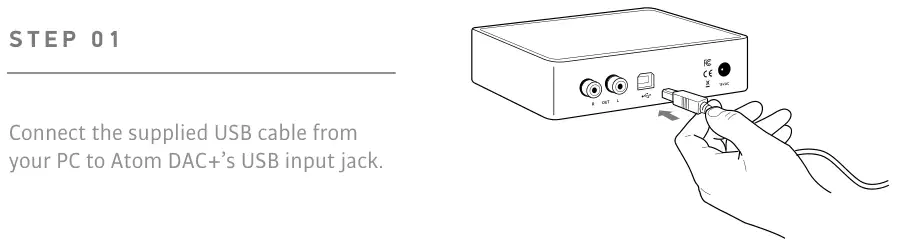
Connect the supplied USB cable from your PC to Atom DAC+’s USB input jack.
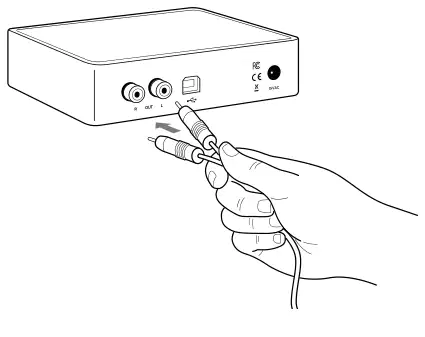
Connect an RCA Cable from Atom DAC+ to your amplifier’s RCA Input jacks.
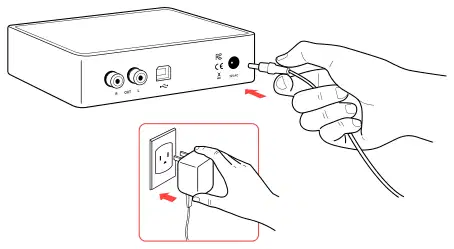
Connect the supplied AC power adapter to the barrel power jack, then connect the adapter to your wall outlet.

S E C T I O N 2 C O N F I G U R AT I O N
Atom DAC+ accepts USB and TOSLINK inputs:
Atom DAC+ connects as a USB Audio Class 2 device (UAC2) by default. Standard Win10 drivers provide 32-bit support; please install optional XMOS drivers from jdslabs.com/drivers to enable 16- and 24-bitrates.
* You may use any USB 1.1 hub or isolator to establish a UAC1 connection. Please refer to blog.jdslabs.com for more details.
** Many optical sources are unable to reliably transmit at 192kHz.

For maximum signal fidelity in Windows, set the DAC to at least 24-bit audio and adjust digital volume slightly below 100% at your computer. Only control volume from your amplifier. This tip only applies to WDM audio, and is inapplicable when operating as an ASIO device.
Set sampling rate to the highest integer multiple of your music collection. For example, use 176.4kHz for a collection of 44.1k or 88.2k or 176.4kHz files. Use 192kHz for a collection of 48k or 96k or 192k audio files. Alternatively, you may install the optional XMOS drivers in Win10 and use an ASIO capable app to achieve bitperfect sampling rate changes.
Listen safely to conserve your hearing: www.hearingloss.org
To ensure an optimal noise floor, always position audio equipment as far away as possible from wireless devices.
Use gentle force when inserting or removing cables.

S E C T I O N 3 S E T U P
Atom DAC+ requires no drivers in Windows 10, macOS, Linux, and modern versions of iOS and Android. You may download drivers for Win7/8 from jdslabs.com/drivers These drivers may optionally be installed in Win10 to enable ASIO playback. Be sure to select your new DAC as the default playback device:
Windows 7/8/10 Right click the volume icon in your taskbar and choose Sound → Playback. Click the XMOS or JDS Labs audio device, then choose “Set Default”. For best experience, also configure Properties:

macOS Ensure JDS Labs audio device is selected from Audio Devices.

No USB device or “Failed to Play Audio” Cause: USB device is not initialized. Solution: Disconnect and reconnect power cable to reset the USB device.
No sound in one channel Cause: Bad cable, or incorrect computer settings. Solution: Check balance settings; try another headphone or RCA cable. Some macOS systems will pan audio to the left channel upon initial connection of a DAC. User must restore balance to center.
Audio is muted after resuming from sleep or hibernate in Windows 10 Cause: Microsoft USB Audio 2.0 driver bug. Solution: Install XMOS drivers, as per page 5.
Light is off, but USB device is present Cause: Atom DAC+ is designed to enter standby mode after 15 minutes of inactivity. Solution: Atom DAC+ will wake up when audio is played.
Light is off and no USB device is detected Cause: Rapid power cycling, or loss of power. Solution: Disconnect power cable or use Rocker Switch to power off for at least 5 seconds. If behavior persists, please see jdslabs.com/troubleshooting
P O W E R A D A P T E R S

This equipment has been tested and found to comply with the limits for a Class B digital device, pursuant to part 15 of the FCC Rules.
Application for Council Directives 2004/108/EC, 2006/95/EC, 2002/95/ EC. Conformity declared for EN55022:2011, EN611000-3-2, EN61000-3- 3, EN55024-2
この取扱説明書で参照されているリンク(メーカー、サポート、ダウンロード等)。
ユーザーまたはスタッフが通常1日以内に回答します。あなたの質問が次の人の助けにもなります。
最初の質問を投稿しましょう。他のユーザーや当チームが回答します。