JA
公式取扱説明書

Micro Star Wireless Earbuds (GH62)

22 ページ·2.1 MB·完全ワイヤレスイヤホン·PDF·ENDEFRITNL
Micro Star Wireless Earbuds (GH62)
目次 55セクション IMMERSE · WIRELESS EARBUDS GH62 · 01 English · Introduction · … 表示非表示
IMMERSEp.1WIRELESS EARBUDS GH62p.101 Englishp.3Introductionp.3Overviewp.3To Charge Your Devicep.4Charging Stepsp.4Battery Indicator While Chargingp.4To Pair with Devicep.4Active Noise Canceling Modep.45 ANC Modesp.5Game Modep.5Touch Control Instructionp.5Troubleshootingp.6One of Earbuds without Soundp.6Device Connection Failurep.602 繁體中文p.7簡介p.7外觀檢視p.7進行充電p.8第一次使用MSI GH62,或是閒置本產品兩週以上,建議先將其完全充滿電再使用。p.8充電步驟p.81. 充電時,請將耳機放入充電盒中。p.82. 使用充電線連接充電盒與外部USB充電插座。p.8充電指示燈p.8„ 耳機p.8„ 充電盒p.8與裝置配對p.8配對前,請先確認您的裝置有提供藍芽 ® 功能,並將之與本產品保持一公尺內的距離。請參照以 下步驟進行連結。p.81. 開啟裝置的藍芽 ® 功能。p.82. 打開充電盒,將耳機取出。p.83. 若裝置為第一次配對,請在藍芽 ® 裝置列表上搜尋並選擇「MSI GH62」。p.84. 若連線成功,您會看到一耳機藍紅燈閃爍;另一耳的藍光每五秒閃一次。p.86. 當耳機燈光熄滅後,MSI GH62已完成配對可供使用。p.8主動降噪模式p.8ANC(主動降噪)模式指的是耳機會感應到背景的噪音,並產生反向音波去抵銷噪音。請留 意,在通話時開啟ANC模式,將會掛掉您的通話。p.8錯誤排除p.10若您遇到下述的情況,您可能需要自行重置您的耳機。p.10單支耳機沒聲音p.101. 將耳機放回充電盒。p.102. 長壓位於充電盒背面的藍芽 ® 配對按鈕5秒鐘,耳機將會與裝置重新配對。p.103. 重新連線成功的話,雙耳耳機指示燈每5秒閃一次紅光。p.104. 再重新取出耳機,放到耳朵。p.105. 再次確認耳機聲音。p.106. 若仍然沒有聲音,請您參考「裝置連線失敗」單元,重置您的耳機。p.10裝置連線失敗p.102. 長壓藍芽 ® 配對按鈕10秒鐘,將可重製耳機設定。p.103. 重置成功的話,雙耳耳機指示燈會閃爍紅光四次。p.104. 將耳機從原本配對裝置的配對列表上移除。p.105. 重新操作配對流程。p.1003 简体中文p.11简介p.11感谢选择 MSI IMMERSE GH62 蓝牙无线耳机,此款精心设计制作的产品将带给您愉悦的听觉 体验。p.11本指南提供耳机的使用说明与图示,帮助您认识产品并快速上手,建议您在使用产品前先阅读 本指南并妥善保管。p.11外观检视p.11
Page 1 of the Micro Star Wireless Earbuds (GH62) user manual — IMMERSE
1ページ · クリックして拡大
1ページ

IMMERSE

WIRELESS EARBUDS GH62
Page 2 of the Micro Star Wireless Earbuds (GH62) user manual — IMMERSE
2ページ · クリックして拡大
2ページ
Page 2 of the Micro Star Wireless Earbuds (GH62) user manual — IMMERSE
Page 3 of the Micro Star Wireless Earbuds (GH62) user manual — Overview
3ページ · クリックして拡大
3ページ

01 English

Introduction

Thank you for choosing MSI IMMERSE GH62 to be your companion. This exquisite wireless earbuds will surely give you a delightful and professional multimedia experience. This guide provides instructions and illustrations to help you get the most from the product, and it is recommended to read this guide before using it.
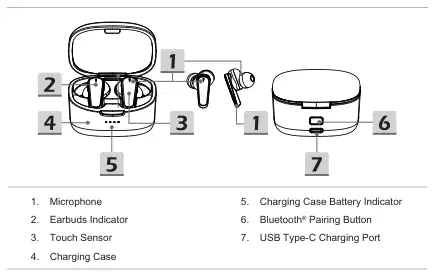
Overview

Micro Star Wireless Earbuds (GH62) — Overview diagram (page 3)
図 1 · Overview
Page 4 of the Micro Star Wireless Earbuds (GH62) user manual — Active Noise Canceling Mode
4ページ · クリックして拡大
4ページ

To Charge Your Device

It is recommended to have MSI GH62 fully charged before using them for the first time or left aside for more than 2 weeks.

Charging Steps

1. Put the Earbuds in the case while charging
2. Connect case and external powered USB port with the charging cable

Battery Indicator While Charging

  • Red Light ON: Charging
  • Red Light OFF: Fully Charged
  • Red Light Flashes: Low Battery (voice prompt, “Battery Low”)
  • : 1-25%
  • : 26-50%
  • : 51-75%
  • : 76-100%

To Pair with Device

Please make sure your device provides Bluetooth® function and keep it near within 1 meter while paring. Follow the steps for the connection.

1. Turn on Bluetooth ® on devices
2. Open case, take out the earbuds
3. For the first time paring, search and select “MSI GH62” on Bluetooth ® devices list
4. If connected successfully, you will see one earbuds’ blue and red light flash alternately; another one blue light flashes every 5 seconds
5. Place earbuds in ears and hear voice prompt: “Connected”
6. After both earbuds’ lights go off, and your MSI GH62 are ready to use

Active Noise Canceling Mode

The ANC (Active Noise Canceling) Mode is aimed to sense ambient noise, and make opposite sound to cancel the noise. Please be noticed that activating ANC mode during a call may disconnect your on-going call.

5 ANC modes are provided. You may quick tap the left earbud for a recurrent selection among these 5 ANC modes. You may also adjust the ANC modes on your mobile app.

„ Earbuds · „ Charging Case

Page 5 of the Micro Star Wireless Earbuds (GH62) user manual — Touch Control Instruction
5ページ · クリックして拡大
5ページ

5 ANC Modes

„ ANC Mode OFFTurn off the ANC mode

„ ANC Level ONE: Canceling small background noise, such as people talking in the background.

„ ANC Level TWO: Balance noise canceling, which fitting for most of background noise situation in daily life.

„ ANC Level THREE: Most actively canceling background noise, such as air-conditioning or engine noise on airplane.

„ Ambient Mode: To hear the environment sound around clearly.

Game Mode

To reduce the lower latency to 40ms and achieve real-time audio sync in Gaming, simply activating the Game Mode.

Once the Game Mode is activated, both earbuds’ blue light glow for 2 seconds. While using the Game Mode, you will hear voice prompt telling “Gaming Mode on” when it is turned on, or “Gaming Mode off” when it is turned off.

Touch Control Instruction

The touch control instruction is only available when MSI GH62 are paired.
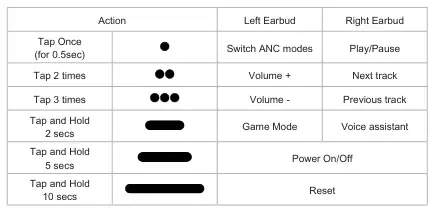
ActionLeft EarbudRight Earbud Tap Once (for 0.5sec)Switch ANC modesPlay/Pause Tap 2 timesVolume +Next track Tap 3 timesVolume -Previous track Tap and Hold 2 secsGame ModeVoice assistant Tap and Hold 5 secsPower On/Off Tap and Hold 10 secsReset
Micro Star Wireless Earbuds (GH62) — Touch Control Instruction diagram (page 5)
図 2 · Touch Control Instruction
Page 6 of the Micro Star Wireless Earbuds (GH62) user manual — Device Connection Failure
6ページ · クリックして拡大
6ページ

Troubleshooting

You may need to reset the earbuds if you encountered the situations as below.

One of Earbuds without Sound

1. Place earbuds in charging case.
2. Long press the Bluetooth ® Pairing Button, located on the rear side of the charging case, for 5 seconds to re-pair Bluetooth ® with device.
3. Once reconnected successfully, you will see the earbuds’ red light flash every 5 seconds.
4. Take out the earbuds again, and re-put into ears.
5. Check the sound again.
6. If there’s still no sound, please follow the “Device Connection Failure” instruction to reset the device connection.

Device Connection Failure

1. Place earbuds in changing case .
2. Long Press the Bluetooth ® Pairing Button for 10 seconds to reset the earbuds .
3. Once reset successfully, you will see the earbuds’ red light flash 4 times .
4. Remove pairing connection from the device .
5. Follow pairing instruction again .
Page 7 of the Micro Star Wireless Earbuds (GH62) user manual — 感謝選用MSI IMMERSE GH62藍芽無線耳機,精心製作的本產品將帶給你專業、愉快的聽覺體 驗。本說明書提供使用說明及圖示,幫助您認識產品並快速上手,建議您在使用產品前先行閱 讀本說明書。
7ページ · クリックして拡大
7ページ

02 繁體中文

簡介

感謝選用MSI IMMERSE GH62藍芽無線耳機,精心製作的本產品將帶給你專業、愉快的聽覺體 驗。本說明書提供使用說明及圖示,幫助您認識產品並快速上手,建議您在使用產品前先行閱 讀本說明書。

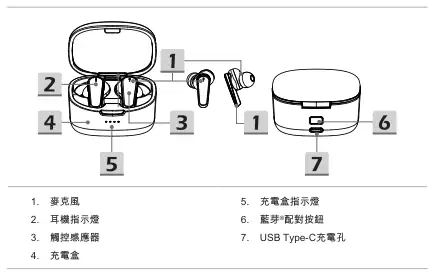
外觀檢視

Micro Star Wireless Earbuds (GH62) — 感謝選用MSI IMMERSE GH62藍芽無線耳機,精心製作的本產品將帶給你專業、愉快的聽覺體 驗。本說明書提供使用說明及圖示,幫助您認識產品並快速上手,建議您在使用產品前先行閱 讀本說明書。 diagram (page 7)
図 3
Page 8 of the Micro Star Wireless Earbuds (GH62) user manual — 6. 當耳機燈光熄滅後,MSI GH62已完成配對可供使用。
8ページ · クリックして拡大
8ページ

進行充電

第一次使用MSI GH62,或是閒置本產品兩週以上,建議先將其完全充滿電再使用。

充電步驟

1. 充電時,請將耳機放入充電盒中。

2. 使用充電線連接充電盒與外部USB充電插座。

充電指示燈

„ 耳機

  • 紅色光亮:充電中
  • 紅色光滅:已充滿電
  • 紅色光閃爍:低電量狀態(提示音「Battery Low 」)

„ 充電盒

  • : 1-25%
  • : 26-50%
  • : 51-75%
  • : 76-100%

與裝置配對

配對前,請先確認您的裝置有提供藍芽 ® 功能,並將之與本產品保持一公尺內的距離。請參照以 下步驟進行連結。

1. 開啟裝置的藍芽 ® 功能。

2. 打開充電盒,將耳機取出。

3. 若裝置為第一次配對,請在藍芽 ® 裝置列表上搜尋並選擇「MSI GH62」。

4. 若連線成功,您會看到一耳機藍紅燈閃爍;另一耳的藍光每五秒閃一次。

5. 將耳機放到耳朵,此時會聽到提示音「Connected」。

6. 當耳機燈光熄滅後,MSI GH62已完成配對可供使用。

主動降噪模式

ANC(主動降噪)模式指的是耳機會感應到背景的噪音,並產生反向音波去抵銷噪音。請留 意,在通話時開啟ANC模式,將會掛掉您的通話。

MSI GH62提供五種ANC模式,快速點擊左耳觸控感應區來循環切換ANC模式。您也可以在手機 app上進行ANC模式的切換。

Page 10 of the Micro Star Wireless Earbuds (GH62) user manual — 若您遇到下述的情況,您可能需要自行重置您的耳機。
10ページ · クリックして拡大
10ページ

錯誤排除

若您遇到下述的情況,您可能需要自行重置您的耳機。

單支耳機沒聲音

1. 將耳機放回充電盒。

2. 長壓位於充電盒背面的藍芽 ® 配對按鈕5秒鐘,耳機將會與裝置重新配對。

3. 重新連線成功的話,雙耳耳機指示燈每5秒閃一次紅光。

4. 再重新取出耳機,放到耳朵。

5. 再次確認耳機聲音。

6. 若仍然沒有聲音,請您參考「裝置連線失敗」單元,重置您的耳機。

裝置連線失敗

1. 將耳機放回充電盒。

2. 長壓藍芽 ® 配對按鈕10秒鐘,將可重製耳機設定。

3. 重置成功的話,雙耳耳機指示燈會閃爍紅光四次。

4. 將耳機從原本配對裝置的配對列表上移除。

5. 重新操作配對流程。

Page 11 of the Micro Star Wireless Earbuds (GH62) user manual — 感谢选择 MSI IMMERSE GH62 蓝牙无线耳机,此款精心设计制作的产品将带给您愉悦的听觉 体验。
11ページ · クリックして拡大
11ページ

03 简体中文

简介

感谢选择 MSI IMMERSE GH62 蓝牙无线耳机,此款精心设计制作的产品将带给您愉悦的听觉 体验。

本指南提供耳机的使用说明与图示,帮助您认识产品并快速上手,建议您在使用产品前先阅读 本指南并妥善保管。

外观检视

Micro Star Wireless Earbuds (GH62) — 感谢选择 MSI IMMERSE GH62 蓝牙无线耳机,此款精心设计制作的产品将带给您愉悦的听觉 体验。 diagram (page 11)
図 4

Micro Star Wireless Earbuds (GH62)について質問する

ユーザーまたはスタッフが通常1日以内に回答します。あなたの質問が次の人の助けにもなります。

Add your email to get notified when it’s answered — no spam, ever.

0 questions
Micro Star Wireless Earbuds (GH62)に関する質問はまだありません

最初の質問を投稿しましょう。他のユーザーや当チームが回答します。

原本

Micro Star Wireless Earbuds (GH62) 取扱説明書(PDF)

22 ページ·2.1 MB·完全ワイヤレスイヤホン·PDF
上のページをクリックするとここに表示されます
ページ 1 / …
100%
ページを読み込み中…