JA
Ford logo
公式取扱説明書

Ford Sync 4 APIM Module (F150)

6 ページ·1.1 MB·カーオーディオ・ナビ·PDF·EN
Ford Sync 4 APIM Module (F150)
Page 1 of the Ford Sync 4 APIM Module (F150) user manual
1ページ · クリックして拡大
1ページ

415-00 Information and Entertainment System - General Information 2021 F-150 Removal and Installation Procedure revision date: 03/29/2022

Special Tool(s) / General Equipment

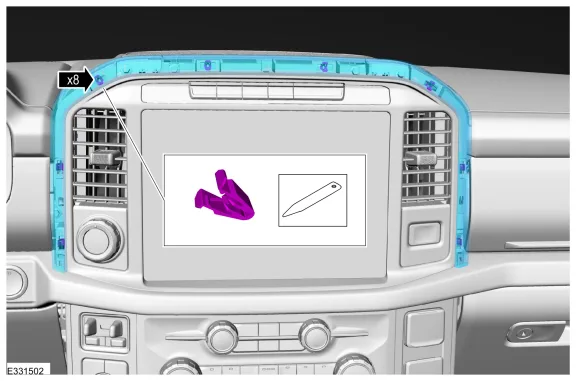
1. NOTE: 12 inch screen shown, 8 inch screen is similar.

Release the clips and remove the upper centerstack bezel. Use the General Equipment: Interior Trim Remover

Ford Sync 4 APIM Module (F150) diagram (page 1)
図 1
2. Release the clips and remove the RH instrument center trim panel.

On vehicles equipped with push button start disconnect the electrical connector. Use the General Equipment: Interior Trim Remover

Show 4 more labels / short text on this page
SYNC Module [APIM] · Interior Trim Remover · Removal · All vehicles
Page 2 of the Ford Sync 4 APIM Module (F150) user manual
2ページ · クリックして拡大
2ページ
Ford Sync 4 APIM Module (F150) diagram (page 2)
図 2

Vehicles equipped with a floor console

3. Remove the floor console. Refer to: Floor Console (501-12 Instrument Panel and Console, Removal and Installation).
4. Remove the lower centerstack trim panel.

Remove the bolts. Torque: 22 lb.in (2.5 Nm) Release the clips. Disconnect the electrical connectors.

Ford Sync 4 APIM Module (F150) diagram (page 2)
図 3
Page 3 of the Ford Sync 4 APIM Module (F150) user manual
3ページ · クリックして拡大
3ページ

Vehicles without a floor console

5. Remove the pin-type retainers and the RH lower instrument panel closeout trim panel.
Ford Sync 4 APIM Module (F150) diagram (page 3)
図 4
6. Remove the bolt. Torque : 22 lb.in (2.5 Nm)
Ford Sync 4 APIM Module (F150) diagram (page 3)
図 5
7. Release the clips and remove the instrument panel lower trim panel.
Page 4 of the Ford Sync 4 APIM Module (F150) user manual
4ページ · クリックして拡大
4ページ
Ford Sync 4 APIM Module (F150) diagram (page 4)
図 6
8. Release the clips and remove the LH lower centerstack trim panel. Use the General Equipment: Interior Trim Remover
Ford Sync 4 APIM Module (F150) diagram (page 4)
図 7
9. Release the clips and remove the RH lower centerstack trim panel. Use the General Equipment: Interior Trim Remover
Page 5 of the Ford Sync 4 APIM Module (F150) user manual
5ページ · クリックして拡大
5ページ
Ford Sync 4 APIM Module (F150) diagram (page 5)
図 8
10. Remove the lower centerstack trim panel.

Remove the bolts. Torque: 22 lb.in (2.5 Nm) Release the clips. Disconnect the electrical connectors.

Ford Sync 4 APIM Module (F150) diagram (page 5)
図 9
11. Disconnect the electrical connectors, remove the screws and the APIM .

All vehicles

Page 6 of the Ford Sync 4 APIM Module (F150) user manual
6ページ · クリックして拡大
6ページ
Ford Sync 4 APIM Module (F150) diagram (page 6)
図 10
1. To install, reverse the removal procedure.
2. If a new APIM is being installed, program the APIM to the correct software level. Refer to: Module Programming (418-01A Module Configuration, General Procedures).

© Copyright 2022, Ford Motor Company.

Installation

Ford Sync 4 APIM Module (F150)について質問する

ユーザーまたはスタッフが通常1日以内に回答します。あなたの質問が次の人の助けにもなります。

Add your email to get notified when it’s answered — no spam, ever.

0 questions
Ford Sync 4 APIM Module (F150)に関する質問はまだありません

最初の質問を投稿しましょう。他のユーザーや当チームが回答します。

原本

Ford Sync 4 APIM Module (F150) 取扱説明書(PDF)

6 ページ·1.1 MB·カーオーディオ・ナビ·PDF
上のページをクリックするとここに表示されます
ページ 1 / …
100%
ページを読み込み中…