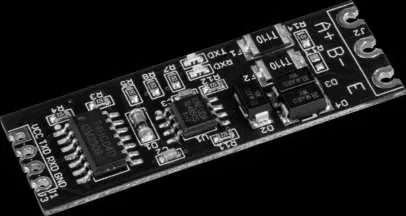

Dear customer, Thank you for purchasing our product. In the following, we will show you which things should be noted during the use. Should you encounter any unexpected problems, do not hesitate to contact us.

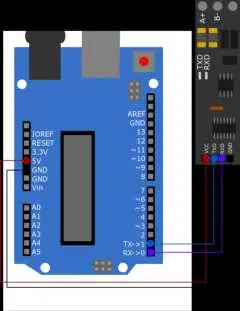
2. Code example In the following, you will find a code example with which you can test your device. However, for this, you will need an end device for the RS485 connection to enable communication. In this example, we have used the USB-RS485 adapter (SBC-TTL-RS485) from Joy-it. Note that A+ is connec- ted to A and B- is connected to B. Use the Arduino IDE for the code example. Make sure that the correct Port and Board are selected under Tools. Copy the following code and click on Upload. Open the serial monitor to see the output.
String testString; //Declaring a variable void setup() { Serial.begin(9600); // Enable serial communication } void loop() { Serial.println("Please enter Test-String: "); while (Serial.available()==0) {} // Waiting for input testString=Serial.readString(); //Read out the input Serial.println("The Test-String received is: " + testString); Serial.println(" "); delay(2000); }
Now you can communicate with your Arduino via a terminal programme such as HTerm. Make sure that you set the baud rate to the same speed as your Arduino, in this example 9600. The data received from the Arduino is displayed on the serial monitor.

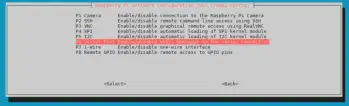
Select there under 3 Interface Options → P6 Serial Port.
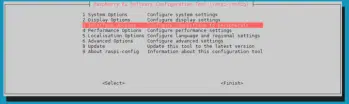
sudo raspi-config

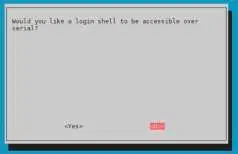
Negate the question Would you like a login shell to be accessible via serial?.
Agree with the following question.
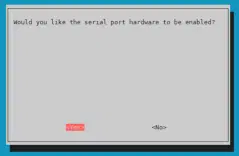
You have now successfully enabled the serial communication. Now restart your device once to apply the changes. Make sure that the serial library is installed on your Raspberry Pi. To do this, run the following command in your console.
sudo apt-get install python-serial
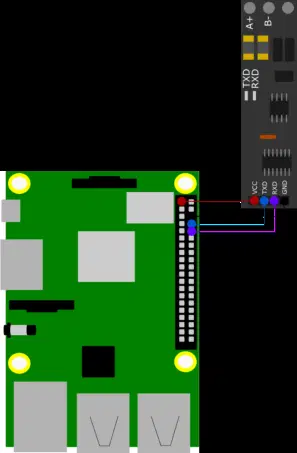
For the code example, however, you need an end device for the RS485 connection to enable a communication. In this example, we have used the USB-RS485 adapter (SBC-TTL-RS485) from Joy-it. Note, that A+ is connected to A and B- is connected to B. You can create a file with the following command. Paste the following code there.
nano ttlToRS485.py

import serial import time # Opening the serial port port = serial.Serial("/dev/ttyS0", baudrate=9600, timeout=3.0) print ("Starting test...") port.write(bytes("Please enter Test-String: \n",'ascii')) # Message is being sent while True: testString = port.readline() # Something is read testString = testString.decode('utf-8') # Convert to String if testString != "": print("The Test-String received is: " ,testString) # Output to console print(" ") time.sleep(2) port.write(bytes("Please enter Test-String: \n",'ascii'))
You can now execute the script with the following command:
python3 ttlToRS485.py
Now you can communicate with your Raspberry Pi via a terminal pro- gram such as HTerm. Make sure that you set the baud rate to the same speed as in your Python code, in this example 9600. The data received from the Raspberry Pi will be displayed in the console.

Our Information and Take-back Obligations according to the Electrical and Electronic Equipment Act (ElektroG) Symbol on Electrial and Electronic Products: This crossed-out bin means that electrical and electronic products do not belong into the household waste. You must hand over your old appliance to a registration place. Before you can hand over the old appliance, you must remove used batteries and replacement batteries which are not enclosed by the device. Return Options: As the end user, you can hand over your old appliance (which has essentially the same functions as the new one bought with us) free of charge for disposal with the purchase of a new device. Small devices, which do not have outer dimensions bigger than 25 cm can be handed in for disposal independently of the purchase of a new product in normal household quantities. 1. Possibility of return at our company location during our opening hours Simac Electronics Handel GmbH, Pascalstr. 8, D-47506 Neukirchen-Vluyn 2. Possibility of return nearby We will send you a parcel stamp with which you can send us your old appliance free of charge. For this possibility, please contact us via e-mail at service@joy-it.net or via telephone. Information about Package: Please package your old appliance safe for transport. Should you not have suitable packaging material or you do not want to use your own material, you can contact us and we will send you an appropriate package.
If any questions remained open or problems may arise after your purchase,we are available by e-mail, telephone and ticket support system to answer these. E-Mail: service@joy-it.net Ticket-system: http://support.joy-it.net Telephone: +49 (0)2845 98469 – 66 (10 - 17 o'clock) For further information visit our website: www.joy-it.net

www.joy-it.net SIMAC Electronics GmbH Pascalstr. 8, 47506 Neukirchen-Vluyn
この取扱説明書で参照されているリンク(メーカー、サポート、ダウンロード等)。
ユーザーまたはスタッフが通常1日以内に回答します。あなたの質問が次の人の助けにもなります。
最初の質問を投稿しましょう。他のユーザーや当チームが回答します。