JA
Jabra logo
公式取扱説明書

Jabra Evolve2 75

3 ページ·66 KB·ヘッドセット·PDF·EN
Jabra Evolve2 75
目次 2セクション Jabra Evolve2 75 - USB-C UC - Black · Why does call control not work with my ShoreTel softphone even though I followed the post installation steps of Jabra Direct? 表示非表示
Page 1 of the Jabra Evolve2 75 user manual — Jabra Evolve2 75 - USB-C UC - Black
1ページ · クリックして拡大
1ページ

19/10/2022 09:17

Jabra Evolve2 75 - USB-C UC - Black

Why does call control not work with my ShoreTel softphone even though I followed the post installation steps of Jabra Direct?

Mitel/Shoretel Communicator v.14, 15 Mitel/Shoretel Connect Onsite

Confirm successful installation Call control may not work because the ShoreTel Telephony Interface is not installed properly, or the Mitel/ShoreTel softphone failed to configure properly. Use the following steps to check the installation and configuration.

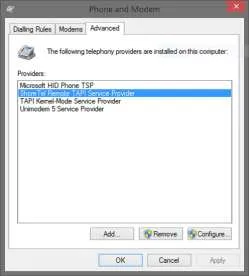
1. In the Control Panel , click Phone and Modem . 2. On the Advanced tab, verify that ShoreTel Remote TAPI Service Provider is listed as shown in the following screenshot.

https://www.jabra.com/supportpages/jabra-evolve2-75/27599-989-899/faq/07dfc668- 2241-48c8-a7f6-9a778e76c96f Page 1 of 3

Compatible Mitel/Shoretel Softphones

Page 2 of the Jabra Evolve2 75 user manual — Jabra Evolve2 75 - USB-C UC - Black
2ページ · クリックして拡大
2ページ

19/10/2022 09:17

Jabra Evolve2 75 — Jabra Evolve2 75 - USB-C UC - Black diagram (page 2)
図 1 · Jabra Evolve2 75 - USB-C UC - Black
3. Click Configure . The ShoreTel Remote TSP dialog opens.
Jabra Evolve2 75 — Jabra Evolve2 75 - USB-C UC - Black diagram (page 2)
図 2 · Jabra Evolve2 75 - USB-C UC - Black
4. In the Provider Usage section, verify that Use this service provider

https://www.jabra.com/supportpages/jabra-evolve2-75/27599-989-899/faq/07dfc668- 2241-48c8-a7f6-9a778e76c96f Page 2 of 3

Page 3 of the Jabra Evolve2 75 user manual — Jabra Evolve2 75 - USB-C UC - Black
3ページ · クリックして拡大
3ページ

19/10/2022 09:17

(enable) is selected. 5. If you cannot verify these steps, the ShoreTel Remote TAPI Service Provider is not installed properly. Reinstall it, and then reboot your computer. 6. Verify that the ShoreTel integration displays the Ready status in the Jabra Direct home screen.

https://www.jabra.com/supportpages/jabra-evolve2-75/27599-989-899/faq/07dfc668- 2241-48c8-a7f6-9a778e76c96f Page 3 of 3

情報源

参考資料・リンク

この取扱説明書で参照されているリンク(メーカー、サポート、ダウンロード等)。

Jabra Evolve2 75について質問する

ユーザーまたはスタッフが通常1日以内に回答します。あなたの質問が次の人の助けにもなります。

Add your email to get notified when it’s answered — no spam, ever.

0 questions
Jabra Evolve2 75に関する質問はまだありません

最初の質問を投稿しましょう。他のユーザーや当チームが回答します。

原本

Jabra Evolve2 75 取扱説明書(PDF)

3 ページ·66 KB·ヘッドセット·PDF
上のページをクリックするとここに表示されます
ページ 1 / …
100%
ページを読み込み中…