JA
Anker logo
公式取扱説明書

Anker Portable Power Station (535)

14 ページ·2 MB·ポータブル電源·PDF·ENDEITNL
Anker Portable Power Station (535)
目次 16セクション For FAQs and more information, please visit: · anker.com/support · @Anker_JP @anker_official · @Anker Deutschland · … 表示非表示
Page 1 of the Anker Portable Power Station (535) user manual — @Anker_JP @anker_official
1ページ · クリックして拡大
1ページ

For FAQs and more information, please visit:

anker.com/support

Anker Portable Power Station (535) — For FAQs and more information, please visit: diagram (page 1)
図 1 · For FAQs and more information, please visit:

@Anker_JP @anker_official

@Anker Deutschland

@AnkerOfficial

@anker_jp

@Anker Japan

@Anker

Anker 535 Portable Power Station (PowerHouse 512Wh)

Anker Portable Power Station (535) — @Anker_JP @anker_official diagram (page 1)
図 2 · @Anker_JP @anker_official
Page 2 of the Anker Portable Power Station (535) user manual — 日本語 17
2ページ · クリックして拡大
2ページ

日本語 17

English 01 · Français 09

Page 3 of the Anker Portable Power Station (535) user manual — Overview
3ページ · クリックして拡大
3ページ
Anker Portable Power Station (535) — Overview diagram (page 3)
図 3 · Overview

Overview

Anker Portable Power Station (535) — Overview diagram (page 3)
図 4 · Overview

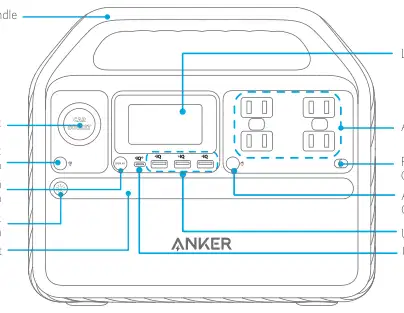
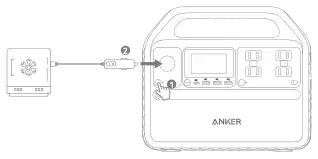
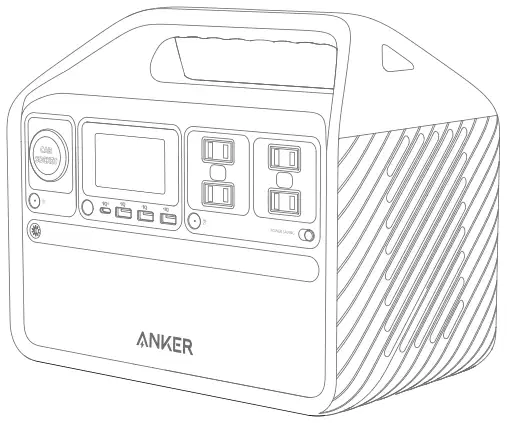
Car Socket On/Off Button

Power Saving Mode On/Off Switch

LCD Screen On/Off Button

AC Output Port On/Off Button

Ambient Light On/Off Button

USB-C Input/Output Port USB-A Output Port
Anker Portable Power Station (535) — Overview diagram (page 3)
図 5 · Overview
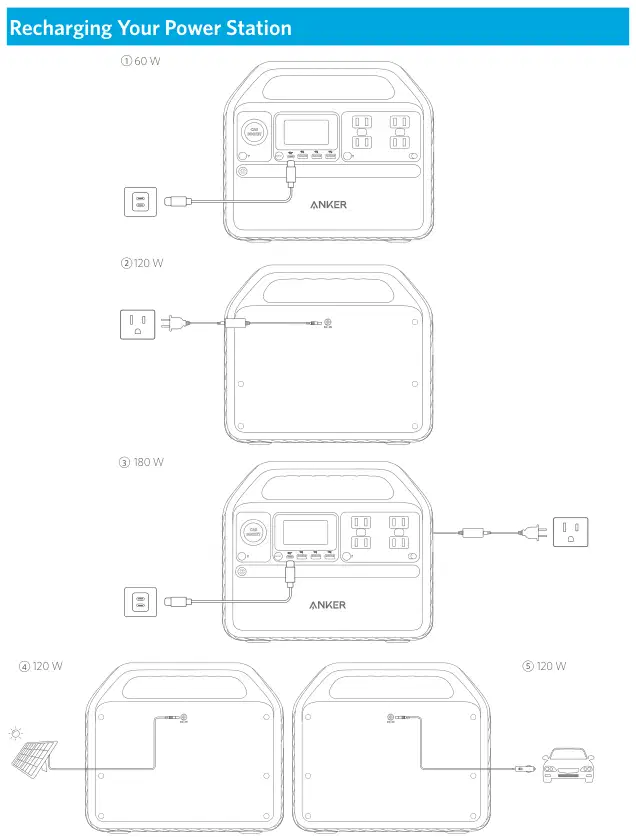
  • Please fully charge the product before using it for the first time.
  • When your portable power station only has 1% battery remaining, the indicators will flicker to remind you to recharge the device.
Show 6 more labels / short text on this page
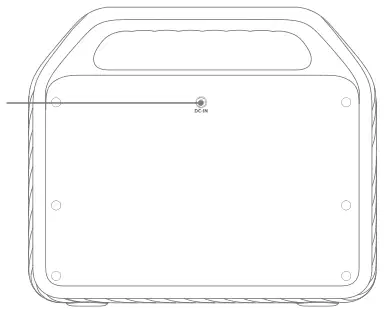
Handle · LCD Screen · Car Socket · AC Output Port · Ambient Light · DC Input Port
Page 4 of the Anker Portable Power Station (535) user manual — Power Saving Mode
4ページ · クリックして拡大
4ページ
Anker Portable Power Station (535) — Power Saving Mode diagram (page 4)
図 6 · Power Saving Mode
Anker Portable Power Station (535) — Power Saving Mode diagram (page 4)
図 7 · Power Saving Mode
Anker Portable Power Station (535) — Power Saving Mode diagram (page 4)
図 8 · Power Saving Mode

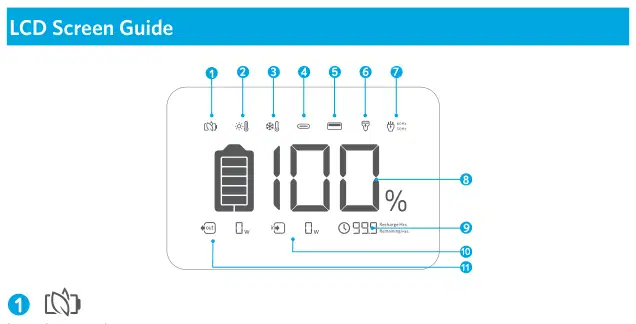
High-Temperature Alert • When this icon shows, stop using the product and leave it to cool down until the icon disappears.

Low-Temperature Alert • When this icon shows, stop using the product until the icon disappears.
Anker Portable Power Station (535) — Power Saving Mode diagram (page 4)
図 9 · Power Saving Mode

AC Charging and Voltage Frequency Press the AC output port on/off button for 2 seconds to switch the frequency.

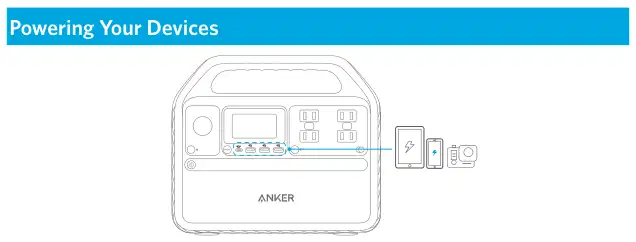
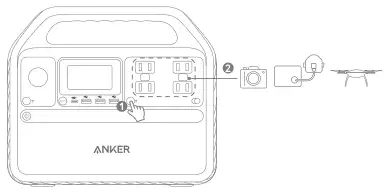
1. The USB-A and USB-C ports support plug and charge. When devices are plugged in, they will start charging automatically; when devices are unplugged, they will turn off automatically. 2. The car socket and AC output port do not support plug and charge. Use the corresponding on/off buttons to turn them on before charging. 3. To avoid draining the battery, we recommend keeping Power Saving Mode turned on except when you are charging low-powered devices like CPAP machines and cameras.

Power Saving Mode

Remaining Battery in Hours

Switching on the power saving mode prevents wasting power by automatically turning off the Power Station once all your devices are fully charged. Switching off the power saving mode will enable stable charging over an extended period, such as for time-lapse photography or for sleeping with a CPAP machine.

Show 7 more labels / short text on this page
Power Saving Mode · USB-C Input/Output Port · USB-A Output · Car Charging · Remaining Battery · Current Input Power · Current Output Power
Page 5 of the Anker Portable Power Station (535) user manual — Attention
5ページ · クリックして拡大
5ページ

FAQ Q1: What's the max power output of the AC port? 500W, and if you use the AC port for devices greater than 500W, the product will automatically turn off.

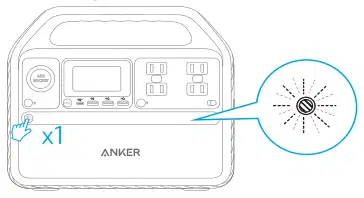
Flashlight Mode

Press the button once to turn on the ambient light.
Anker Portable Power Station (535) — Flashlight Mode diagram (page 5)
図 10 · Flashlight Mode

Q2: Can I recharge the product while charging connected devices? Yes.

Q3: Can this product power a CPAP? Yes, but do not forget to turn off the Power Saving Mode first.

Q4: Will this product lose power automatically if not powered off? Yes, when the car socket or AC control button is turned on, even if no devices are being charged, there will still be a certain amount of no-load power consumption. To avoid draining the battery, we recommend keeping Power Saving Mode turned on except when you are charging low-powered devices like CPAP machines and cameras.

Q5: What kind of solar charger can charge this product? Any 11V-28V solar charger with a DC 8mm(DC 7909)male connector.

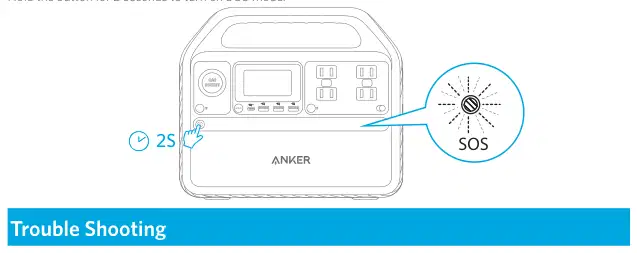
Hold the button for 2 seconds to turn on SOS mode.
Anker Portable Power Station (535) — Flashlight Mode diagram (page 5)
図 11 · Flashlight Mode
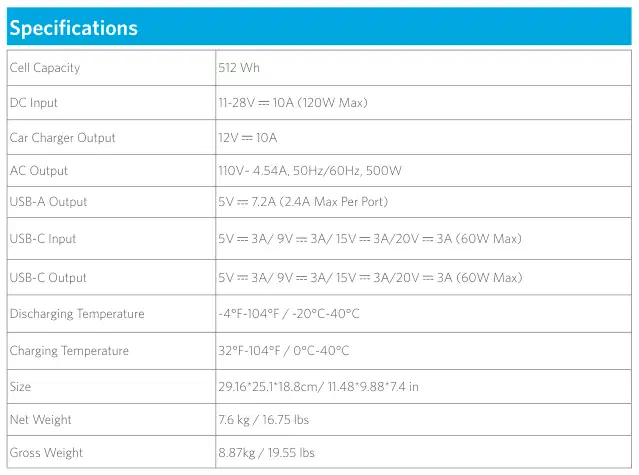
Specifications Cell Capacity512 Wh DC Input11-28V 10A (120W Max) Car Charger Output12V 10A AC Output110V~ 4.54A, 50Hz/60Hz, 500W USB-A Output5V 7.2A (2.4A Max Per Port) USB-C Input5V 3A/ 9V 3A/ 15V 3A/20V 3A (60W Max) USB-C Output5V 3A/ 9V 3A/ 15V 3A/20V 3A (60W Max) Discharging Temperature-4°F-104°F / -20°C-40°C Charging Temperature32°F-104°F / 0°C-40°C Size29.16*25.1*18.8cm/ 11.48*9.88*7.4 in Net Weight7.6 kg / 16.75 lbs Gross Weight8.87kg / 19.55 lbs
Anker Portable Power Station (535) — Flashlight Mode diagram (page 5)
図 12 · Flashlight Mode

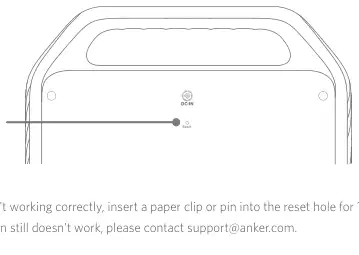
Resetting Your Power Station

Anker Portable Power Station (535) — Resetting Your Power Station diagram (page 5)
図 13 · Resetting Your Power Station

If your Power Station isn't working correctly, insert a paper clip or pin into the reset hole for 1 second for a factory

Attention

reset. If the Power Station still doesn't work, please contact support@anker.com.

Not permitted on aircraft.

Reset

Page 6 of the Anker Portable Power Station (535) user manual — Customer Service
6ページ · クリックして拡大
6ページ
  • IMPORTANT SAFETY INSTRUCTIONS WARNING - When using this product, basic precautions should always be followed, including the following: Read all the instructions before using the product.
  • To reduce the risk of injury, close supervision is necessary when the product is used near children.
  • Do not put fingers or hands into the product.
  • Do not expose the product to rain or snow.
  • Use of a power supply or charger not recommended or sold by the product manufacturer may result in a risk of fire or injury to persons. To reduce risk of damage to the electric plug and cord, pull the plug rather than the cord when disconnecting the product.
  • Do not use the product in excess of its output rating. Overload outputs above rating may result in a risk of fire or injury to persons.
  • Do not use the product that is damaged or modified. Damaged or modified batteries may exhibit unpredictable behavior resulting in fire, explosion or risk of injury. Do not operate the product with a damaged cord or plug, or a damaged output cable.
  • Do not disassemble the product. Take it to a qualified service person when service or repair is required. Incorrect reassembly may result in a risk of fire or electric shock.
  • Do not expose to fire or high temperatures. Exposure to fire or temperatures above 130°C may cause explosion. To reduce the risk of electric shock, unplug the power pack form the outlet before attempting any instructed servicing.
  • Have servicing performed by a qualified repair person using only identical replacement parts. This will ensure that the safety of the product is maintained.
  • When charging a device, the product may feel warm, this is a normal operating condition and should not be cause for concern. When charging the internal battery, work in a well ventilated area and do not restrict ventilation in any way.
  • Do not clean the product with harmful chemicals or detergents.
  • Misuse, dropping or excessive force may cause product damage.
  • When disposing of secondary cells or batteries, keep cells or batteries of different electrochemical systems separate from each other.
  • Do not use or store the power station in direct sunlight for an extended period, such as in a car, cargo bed, or any other place where it will be exposed to high temperatures. Doing so may cause the product to malfunction, deteriorate, or generate heat.
  • Do not use the product for applications such as data servers or medical equipment where a malfunction in an emergency could seriously endanger human life or property. Storage and Maintenance instructions 1. Store the product between 32°F-104°F (0°C-40°C). Avoid exposing the product to rain or using the product in a humid environment. 2. To preserve the battery lifespan, charge to 100% after using. If you plan to store your power station, recharge to 100% every 3 months. 3. Keep the product on a flat surface when using, charging, and storing. FCC Statement This device complies with Part 15 of the FCC Rules. Operation is subject to the following two conditions: (1) This device may not cause harmful interference, and (2) this device must accept any interference received, including interference that may cause undesired operation. Warning: Changes or modifications not expressly approved by the party responsible for compliance could void the user's authority to operate the equipment. Note: This equipment has been tested and found to comply with the limits for a Class B digital device, pursuant to Part 15 of the FCC Rules. These limits are designed to provide reasonable protection against harmful interference in a residential installation. This equipment generates, uses, and can radiate radio frequency energy and, if not installed and used in accordance with the instructions, may cause harmful interference to radio communications. However, there is no guarantee that interference will not occur in a particular installation. If this equipment does cause harmful interference to radio or television reception, which can be determined by turning the equipment off and on, the user is encouraged to try to correct the interference by one or more of the following measures: (1) Reorient or relocate the receiving antenna. (2) Increase the separation between the equipment and receiver. (3) Connect the equipment into an outlet on a circuit different from that to which the receiver is connected. (4) Consult the dealer or an experienced radio / TV technician for help. The following importer is the responsible party. Company Name: Fantasia Trading LLC Address: 5350 Ontario Mills Pkwy, Suite 100, Ontario, CA 91764 Telephone: +1-800-988-7973

IC Statement This device complies with Industry Canada license-ICES-003. Operation is subject to the following two conditions: (1) This device may not cause interference, and (2) This device must accept any interference, including interference that may cause undesired operation of the device. Le présent appareil est conforme aux CNR d'Industrie Canada applicables aux appareils radio exempts de licence. L'exploitation est autorisée aux deux conditions suivantes : (1) l'appareil ne doit pas produire de brouillage, et (2) l'utilisateur de l'appareil doit accepter tout brouillage radioélectrique subi, même si le brouillage est susceptible d'en compromettre le fonctionnement. This digital apparatus complies with CAN ICES-003(B)/NMB-003(B). Declaration of Conformity Hereby, Anker Innovations Limited declares that the product type A1751 is in compliance with Directives 2014/35/ EU & 2014/30/EU & 2011/65/EU. The full text of the EU declaration of conformity is available at the following internet address: https://www.anker.com GB Declaration of Conformity Hereby, Anker Innovations Limited declares that the product type A1751 is in compliance with Electrical Equipment (Safety) Regulations 2016 & Electromagnetic Compatibility Regulations 2016 & The Restriction of the Use of Certain Hazardous Substances in Electrical and Electronic Equipment Regulations 2012. The full text of the GB declaration of conformity is available at the followinginternet address: https://www.anker.com Anker Innovations Limited | Room 1318-19, Hollywood Plaza, 610 Nathan Road, Mongkok, Kowloon, HongKong The following importer is the responsible party(contract for EU and UK matters) Anker Innovations Deutschland GmbH | Georg-Muche-Strasse 3, 80807 Munich, Germany Anker Technology (UK) Limited, GNR8, 49 Clarendon Road, Watford, Hertfordshire, WD17 1HP, United Kingdom

Customer Service

5-Year Limited Warranty Please note that your rights under applicable law governing the sale of consumer goods remain unaffected by the warranties given in this Limited Warranty.

support@anker.com support.mea@anker.com (For Middle East and Africa Only)

(US/CA) +1 (800)988 7973 (UK) +44 (0) 1604 936200 (DE) +49 (0) 69 9579 7960 (Middle East & Africa) +971 42428633 (UAE) +971 8000320817 (KSA) +966 8008500030 (Kuwait) +965 22069086 (Egypt) +20 8000000826 (AU) +61 3 8331 4800 (TR) +90 0850 460 14 14 (RU) +8 (800) 511-86-23 ( 中国) +86 400 0550 036 ( 日本) 03 4455 7823 ( 한국) +82 02-1670-7098

Lifetime Technical Support

情報源

参考資料・リンク

この取扱説明書で参照されているリンク(メーカー、サポート、ダウンロード等)。

Anker Portable Power Station (535)について質問する

ユーザーまたはスタッフが通常1日以内に回答します。あなたの質問が次の人の助けにもなります。

Add your email to get notified when it’s answered — no spam, ever.

0 questions
Anker Portable Power Station (535)に関する質問はまだありません

最初の質問を投稿しましょう。他のユーザーや当チームが回答します。

原本

Anker Portable Power Station (535) 取扱説明書(PDF)

14 ページ·2 MB·ポータブル電源·PDF
上のページをクリックするとここに表示されます
ページ 1 / …
100%
ページを読み込み中…