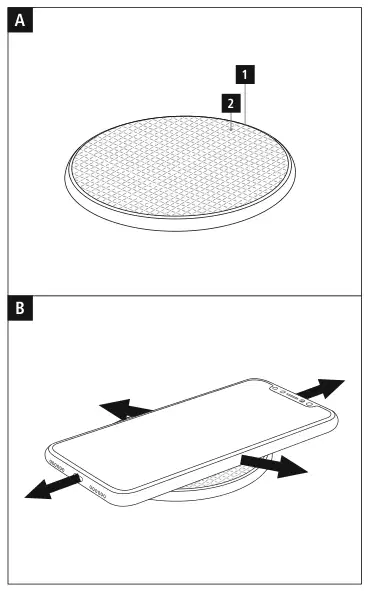
Controls and displays 1. USB-C input 2. Status LED
LED function indicator
Power supplyBrief lighting up, 1x blue, 1x red
Standbyoff
Charging processLights up red
End of chargingLights up blue 1)
Error messageFlashes red
Thank you for choosing a Hama product. Take your time and read the following instructions and information completely. Please keep these instructions in a safe place for future reference. If you sell the device, please pass these operating instructions on to the new owner.
1. Explanation of warning symbols and notes
Risk of electric shock This symbol indicates a risk of electric shock from touching uninsulated product parts that may carry hazardous voltage.
2. Package contents
“QI-FC10” Wireless Charger for Smartphones
1x USB-C cable
These operating instructions
3. Safety instructions
Protect the product from dirt, moisture and overheating and use it in dry environments only.
Do not drop the product and do not expose it to any major shocks.
Do not operate the product outside the power limits specified in the technical data.
Do not use the product in areas in which electronic products are not permitted.
Ensure that the product is not covered up by textiles, metal or other objects in order to avoid damage caused by overheating.
Dispose of packaging material immediately in accordance with the locally applicable regulations.
Do not modify the product in any way. Doing so voids the warranty.
Do not continue to operate the product if it is visibly damaged.
Use the product only for the intended purpose.
Do not use the product in the immediate vicinity of heaters, other heat sources or in direct sunlight.
Only use the article under moderate climatic conditions.
As with all electrical products, this device should be kept out of the reach of children.
Do not use the product in a damp environment and avoid splashing water.
4ページ · クリックして拡大
4ページ
Do not bend or crush the cable.
Never apply force when using the product or during installation.
Take care that components such as airbags, safety areas, controls, instruments, etc. and visibility are not blocked or restricted.
Ensure that the product is securely mounted before every journey.
Do not allow yourself to be distracted by the product when driving a vehicle. Always pay attention to the surrounding traffic and your environment.
Always pull directly on the plug when disconnecting the cable, never on the cable itself.
Risk of electric shock
Do not open the device or continue to operate it if it becomes damaged.
Do not use the product if the AC adapter, the adapter cable or the mains cable are damaged.
Do not attempt to service or repair the product yourself. Leave any and all service work to qualified experts.
Do not place any bank or similar cards with magnetic strips or magnetically sensitive objects on the product. The data on the cards could be damaged or completely deleted.
Warning
• Only operate the product from a socket that has been approved for the device. The socket must be installed close to the product and must be easily accessible. • Disconnect the product from the power supply using the On/Off switch – if this is not available, unplug the power cord from the socket. • If using a multi-socket power strip, make sure that the total power consumption of all connected devices does not exceed the power strip's maximum throughput rating. • If you will not be using the product for a prolonged period, disconnect it from mains power.
Note
• To be able to charge your device via the wireless charger, it must be compatible with induction charging technology. Please refer to the operating instructions of your device for more information. • Note that mobile phone cases, covers, etc., and other materials between the wireless charger and the back of your device may interfere with or even prevent the charging process.
Connect the enclosed USB-C cable to the USB-C input (1) of the inductive charger and a suitable USB charger. When doing so, consult the operating instructions for the USB charger.
Note
• The maximum charging power of up to 10 W is only achieved with a Qualcomm quick charging device (5 V / 2 A, 9 V / 1.67 A). • An active power supply is confrimed by the status LED (2) briefyl lighting up red.
Warning
Do not use defective chargers or USB ports and do not attempt to repair them.
5ページ · クリックして拡大
5ページ
Place your device with its back on the inductive charger (B).
The charging process begins as soon as an effective induction field has been established. The status LED (2) lights up solid red. The current charge status is displayed on your device.
If no induction connection can be established, change the position of your device if necessary (B).
The charging process ends automatically once your device’s battery is fully charged. The status LED (2) lights up solid blue.
5. Care and maintenance Only clean this product using a lint-free, slightly damp cloth and do not use any harsh cleaners. Ensure that no water is able to enter the product.
6. Warranty disclaimer Hama GmbH & Co KG assumes no liability and provides no warranty for damage resulting from improper installation/mounting, improper use of the product or from failure to observe the operating instructions and/ or safety notes.
7. Technical data
Wireless charger
Input5 V 2.0 A 9 V 1.67 A
Output (under optimised conditions)5W / 7.5W / 10W max.
DimensionsØ 101.5 mm x 6.6 mm
8. Declaration of conformity Hama GmbH & Co KG hereby declares that the radio equipment type [00201683] is in compliance with Directive 2014/53/EU. The full text of the EU declaration of conformity is available at the following Internet address: www.hama.com->00201683->Downloads
Frequency band(s)100.10 – 160.80kHz
Maximum radio-frequency power transmitted4.05dBµA/m at 10m distance
Hama Wireless Charger (00 201683)について質問する
ユーザーまたはスタッフが通常1日以内に回答します。あなたの質問が次の人の助けにもなります。
0 questions
Hama Wireless Charger (00 201683)に関する質問はまだありません
最初の質問を投稿しましょう。他のユーザーや当チームが回答します。
原本
Hama Wireless Charger (00 201683) 取扱説明書(PDF)
57ページ·993 KB·ワイヤレス充電器·PDF
上のページをクリックするとここに表示されます
ページ 1 / …
100%
ページを読み込み中…
スクロールまたは+/−で拡大縮小 · ドラッグで移動 · Escで閉じる
Related manuals
More from this brand and category, plus related models worth a look.