JA
Mini logo
公式取扱説明書

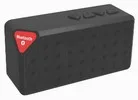
Mini Wireless Bluetooth Speaker (Mini X3)

4 ページ·50 KB·自動車·PDF·EN
Mini Wireless Bluetooth Speaker (Mini X3)
目次 5セクション BLUETOOTH SPEAKER · USER MANUAL · Button description · Tips : · … 表示非表示
Page 1 of the Mini Wireless Bluetooth Speaker (Mini X3) user manual — BLUETOOTH SPEAKER
1ページ · クリックして拡大
1ページ

BLUETOOTH SPEAKER

USER MANUAL

Mini Wireless Bluetooth Speaker (Mini X3) — BLUETOOTH SPEAKER diagram (page 1)
図 1

Thank you for choosing this product. We hope you will enjoy it very much.

Page 2 of the Mini Wireless Bluetooth Speaker (Mini X3) user manual — Button description
2ページ · クリックして拡大
2ページ
  • In the box
  • Bluetooth speaker
  • USB charging cable
  • Stereo aux. cable with 3.5mm jack
  • Instructional manual
  • Features
  • Works with Bluetooth 3.0
  • 30 foot range / 10 meters
  • 1000 mAh battery provides up to 6 hours of playback.
  • Includes 3.5mm aux. jack for non-bluetooth devices
  • Removable lithium battery

Safety Instructions Read this manual carefully before putting the applicance into operation and keep this manual for future reference.

  • Do not use the device with wet hands.
  • To minimize the risk of fire or electrical shock, keep device out of rain or excess humidity. Do not operate the device in the direct proximity of water (e.g. bathroom, swimming pool, etc.)
  • Keep device away from heat, and direct sunlight.
  • Do not insert any metal object into the device.
  • To avoid a static charge, do not use the device in an extremely dry climate.
  • Do not repair the device yourself, contact an authorized specialist.

Button description

OFF/ONSwitches unit on and off

: Answers and ends phone

calls.

Page 3 of the Mini Wireless Bluetooth Speaker (Mini X3) user manual — Tips :
3ページ · クリックして拡大
3ページ

: Press and hold to decrease the volume.

Press and quickly release to select the previous track.

: Press and hold to increase the volume.

Press and quickly release to select the next track.

: Press to play or pause the music.

Charge the Lithium Battery 1. Insert the micro USB plug into the USB port on the unit. Connect the USB plug into a PC or AC/DC adaptor. The LED indicator turns red, the battery is being charged. 2. When the battery is fully charged, the red LED indicator will turn off.

How to pair X3 (Bluetooth Speaker) to a mobile phone or other device

1. Switch on the speaker. 2. Turn on your mobile device and activate the Bluetooth function. 3. Search for the Bluetooth Speaker, “GEMS SPEAKER” will show up. 4. Pair your mobile device with X3. If password is needed, type in ‘0000’. After the Speaker is paired with your mobile device, connect it to your device

Tips :

Once this speaker is paired and connected to you mobile phone,

Page 4 of the Mini Wireless Bluetooth Speaker (Mini X3) user manual — Technical Specifications
4ページ · クリックして拡大
4ページ

it will connect to your mobile device automatically as long as Bluetooth in your mobile phone is on.

Technical Specifications

Bluetooth version Bluetooth profiles

Bluetooth operating distance Speaker output Working time

Charging input Charging time Unit weight

3.0 + EDR HSP, HFP, A2DP and AVRCP 10 meters (equal to 33 feet)

3w Music time6 hours; talk time: 8 hours DC 5V Approx 3 hours Approx. 150g

Mini Wireless Bluetooth Speaker (Mini X3)について質問する

ユーザーまたはスタッフが通常1日以内に回答します。あなたの質問が次の人の助けにもなります。

Add your email to get notified when it’s answered — no spam, ever.

0 questions
Mini Wireless Bluetooth Speaker (Mini X3)に関する質問はまだありません

最初の質問を投稿しましょう。他のユーザーや当チームが回答します。

原本

Mini Wireless Bluetooth Speaker (Mini X3) 取扱説明書(PDF)

4 ページ·50 KB·自動車·PDF
上のページをクリックするとここに表示されます
ページ 1 / …
100%
ページを読み込み中…