JA
Pyle logo
公式取扱説明書

Pyle Microphone XLR-to-USB Adaptor (PDUSBPP10)

2 ページ·224 KB·アダプター·PDF·EN
Pyle Microphone XLR-to-USB Adaptor (PDUSBPP10)
目次 2セクション INSTALLATIONWINDOWS 7/8/10 · CHANGE SOUND INPUT/OUTPUT ON MAC OS 表示非表示
Page 1 of the Pyle Microphone XLR-to-USB Adaptor (PDUSBPP10) user manual — CHANGE SOUND INPUT/OUTPUT ON MAC OS
1ページ · クリックして拡大
1ページ
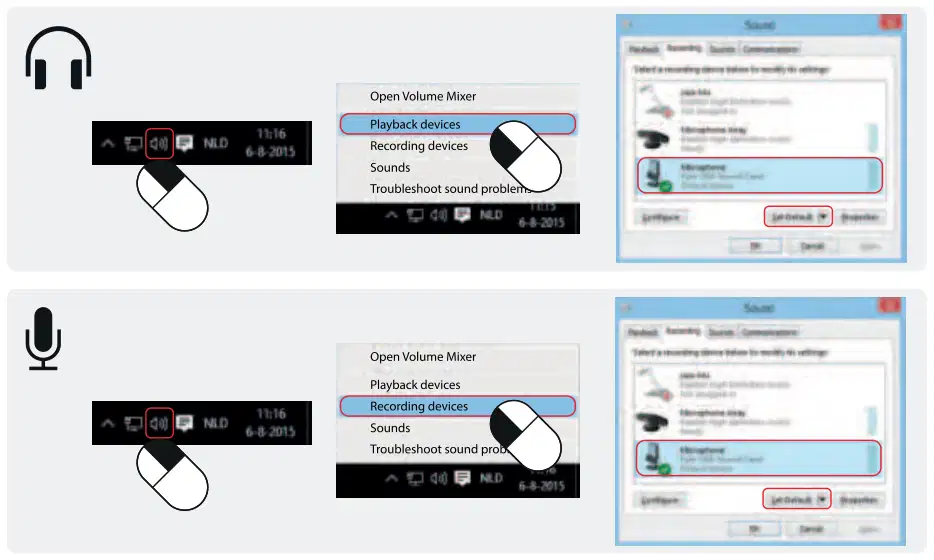
Pyle Microphone XLR-to-USB Adaptor (PDUSBPP10) — INSTALLATIONWINDOWS 7/8/10 diagram (page 1)
図 1

USB Mic Interface with Volume Control, Easy USB Plug-and-Play (+48V Phantom Power)

INSTALLATIONWINDOWS 7/8/10

Pyle Microphone XLR-to-USB Adaptor (PDUSBPP10) — INSTALLATIONWINDOWS 7/8/10 diagram (page 1)
図 2
Pyle Microphone XLR-to-USB Adaptor (PDUSBPP10) — INSTALLATIONWINDOWS 7/8/10 diagram (page 1)
図 3

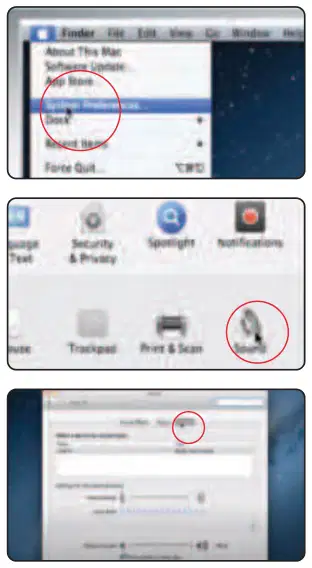
CHANGE SOUND INPUT/OUTPUT ON MAC OS

1. On your Mac, choose Apple menu > System Preferences, click Sound, then click Output.
2. Select the device you want to use in the list of sound output devices. For any device plugged into the computer’s sound port, choose Microphones.
3. Do any of the following to adjust your sound output settings: Adjust the balance or volume: Drag the volume slider. Show a volume control in the menu bar: Select the “Show volume in menu bar” tickbox so you can turn the volume up or down from anywhere.

To set a separate volume for alert sounds, click Sound Effects.

www.PyleUSA.com

Page 2 of the Pyle Microphone XLR-to-USB Adaptor (PDUSBPP10) user manual — INSTALLATIONWINDOWS 7/8/10
2ページ · クリックして拡大
2ページ
Pyle Microphone XLR-to-USB Adaptor (PDUSBPP10) — INSTALLATIONWINDOWS 7/8/10 diagram (page 2)
図 4
  • Features:
  • Universal USB Microphone Adapter
  • Allows the Use of XLR Microphones on Your Computer
  • Simple ‘Plug-and-Play’ Operation
  • Provides +48V Phantom Power
  • Connects to Computer via Included USB Cable
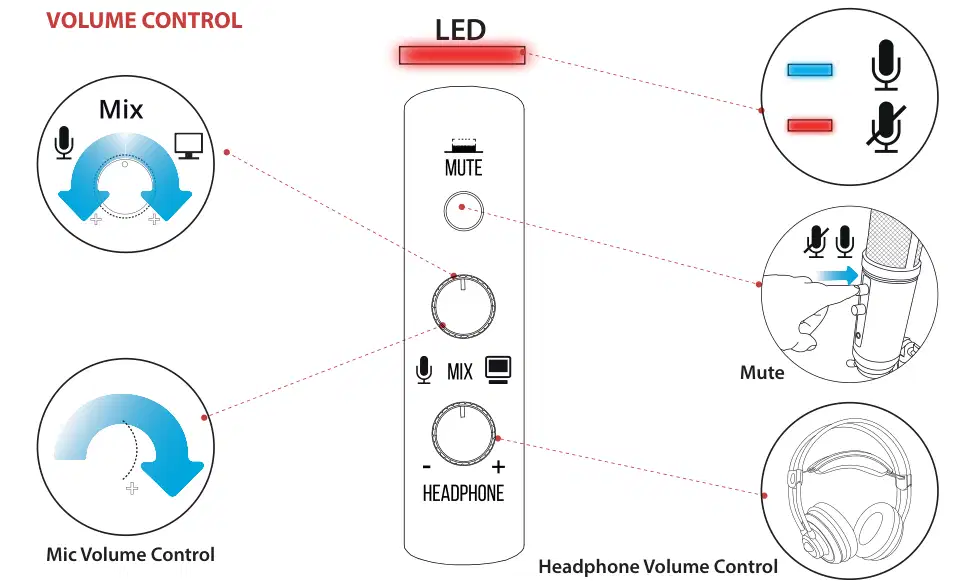
  • Adjustable Headphone Volume & Mix Audio Control
  • Compact, Mini USB Audio Interface Design
  • Universal Computer Compatibility: Works with PC, Mac, Linux
  • For Home, Office & Business Use
  • Technical Specs:
  • Connection Interface: USB Mini 2.0, Powered / XLR, 3-Pin
  • Frequency Response: 20-20kHz
  • Mic Gain: -15dB (22dB Max)
  • S/N Ratio: 90dB
  • Dynamic Range: 100dB
  • T.H.D.: 0.9%
  • Bit Depth: 24 bit
  • Sampling Rate: up to 96kHz
  • Construction Material: Engineered Aluminum Alloy
  • Computer Operating System Support: Windows XP, Vista, 7, 8, 10, Mac OS X, Linux
  • Power Output: USB-Powered, 500 mA
  • USB Cable Length: 5.9’ ft.
  • Dimensions (L x W x H): 5.7’’ x 1.14’’ x 1.14’’ -inches
  • What’s in the Box:
  • Mic Adaptor
  • USB Cable
Pyle Microphone XLR-to-USB Adaptor (PDUSBPP10) — INSTALLATIONWINDOWS 7/8/10 diagram (page 2)
図 5

Questions? Issues? We are here to help! Phone: (1) 718-535-1800 Email: support@pyleusa.com

www.PyleUSA.com

情報源

参考資料・リンク

この取扱説明書で参照されているリンク(メーカー、サポート、ダウンロード等)。

Pyle Microphone XLR-to-USB Adaptor (PDUSBPP10)について質問する

ユーザーまたはスタッフが通常1日以内に回答します。あなたの質問が次の人の助けにもなります。

Add your email to get notified when it’s answered — no spam, ever.

0 questions
Pyle Microphone XLR-to-USB Adaptor (PDUSBPP10)に関する質問はまだありません

最初の質問を投稿しましょう。他のユーザーや当チームが回答します。

原本

Pyle Microphone XLR-to-USB Adaptor (PDUSBPP10) 取扱説明書(PDF)

2 ページ·224 KB·アダプター·PDF
上のページをクリックするとここに表示されます
ページ 1 / …
100%
ページを読み込み中…