
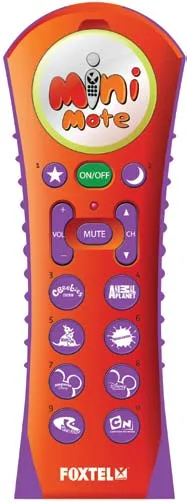


Remote Control
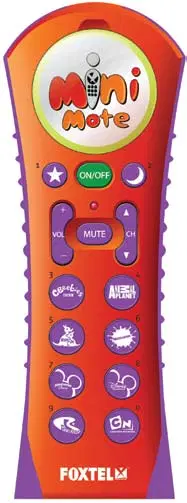


MiniMote was designed specifically for children ages three or older, with safety and simplicity in mind. MiniMote offers a simple means of control over what content your children are exposed to when they watch television. Basic setup is very simple, so you can give the remote to the children in your household to begin using in just a few minutes.
Using a screwdriver, remove the battery cover from the back side of the remote control. Insert 2 AAA batteries as shown below. Do not replace cover on battery compartment until programming is complete.
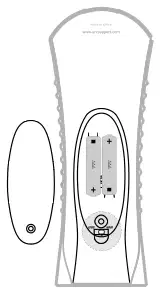
Set the switch located in the battery compartment to the middle position P to enter programming mode as shown below.
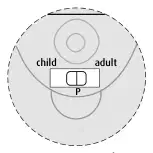
3-position switch

To test the new TV code: 3. Slide the switch on the back of the remote to CHILD mode.
MiniMote comes pre-programmed with 8 favourite kids channels assigned to keys 3 through 0. Two additional favourite channels can be added to the STAR(1) and MOON(2) keys on the remote.

Set the switch located in the battery compartment to the left position to enter CHILD user mode. CHILD mode is for children and limits them to only have access to the ten programmed channels on the remote.
Step 6: Replace battery door
Secure the battery compartment door back in place with a screwdriver using the screw provided.
Your MiniMote remote is now ready for use! Refer to this manual for additional features and functions.
MiniMote comes with a customisable image compartment. This allows the remote to be customised for the child or children using the remote. A photo or image of your child’s favourite character can be inserted in this location.
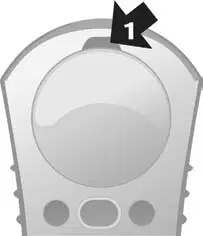
child · adult · 3-position switch

Cut a photo or another image to the size of the
circular image compartment and insert photo into opening. TIP: use the MiniMote character image
that comes with the remote as a template.
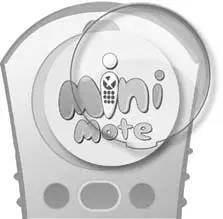
Replace clear plastic cover.

When the battery power is low in the MiniMote, the LED flashes five times with each key-press. Refer to “Step 1: Installing Batteries” on page 3 for battery replacement instructions

Use the illustration below to locate features on the MiniMote and then study the Key Charts (on the next three pages) to learn how they function.


Key Function
Press ON/OFF to turn the television and Set Top Unit (STU) on or off.
The STAR(1) and MOON(2) keys can be programmed to jump directly to the channel of your choice. When in programming mode, STAR is the 1 key and MOON is the 2 key,
VOL + turns the TV volume up.
VOL - turns the TV volume down. When in programming mode, VOL + initiates programming for TV and VOL - initiates programming for the STU.
MUTE mutes the TV volume. When in programming mode, MUTE acts as the SAVE key.
Child Mode: CH and CH cycles through the ten programmed kids channels on the remote. Adult Mode: CH and CH cycles through ALL channels. Programming Mode: CH and CH cycles through codes to set control of your television or STU.
The eight pre-programmed keys with children network icons jump directly to the channel associated with the icon when in Child mode or Adult mode. While in Programming mode, these keys act as number keys 3-0 for programming favourite channels.
The three-position switch in the battery compartment is used to set the user (Child/Adult) or Programming mode.
CHILD mode is for children and limits them to only have access to the ten programmed channels on the remote. ADULT mode is for older kids or adults and allows access to all channels when using channel up/down. P is Programming mode and is used while setting up the remote control to control the TV, STU, and to add or modify favourite channels.
child · adult · 3-position switch

Locate the three position switch within the battery compartment. Set the switch to the middle position P to enter programming mode.
When programming is complete, set the switch to either CHILD mode or ADULT mode before replacing the battery compartment door.
TV control can be set by inputting the code for your brand of TV or via a simple code search. Setting TV control by code input is described in the Quick Start on page 4.
Setting TV Code by Code Search 1. With your television ON, and the remote in Programming Mode, press the CH key. The LED blinks twice. 2. Press the ON/OFF key once. 3. Press the CH key once per second until the TV turns off. 4. Press ON/OFF. If the TV turns on, press MUTE to save the TV code. 5. If the TV does not turn on, press CH to go to the previous TV code and press MUTE to save once the TV turns on.
MiniMote comes pre-programmed with 8 favourite kids channels assigned to keys 3 through 0 (refer to Key chart on Page 7). The preprogrammed buttons can be programmed to new channels by following the steps below.
To program a favourite channel, follow these steps: 1. While in Programming Mode, press and hold the key that you wish to assign a favourite channel. Release the key when the LED blinks twice. 2. Press the digits for the channel number for the favourite channel that you wish to add. 3. Press and hold the key that you wish to assign again until the LED blinks twice.

Most users won’t need to perform any of the set-up procedures in this section.
Volume Control Settings Volume control functions are defaulted to the TV that the remote is set to control. The volume control setting can be changed by following these instructions.
Channel Control Settings Volume control functions are defaulted to the STU. The channel control setting can be changed to be through the TV by following these instructions.
The ON/OFF key has a default setting to control power on both the STU and TV each time it is pressed. Power control can be changed by following these steps:

Universal Electronics B.V. warrants to the original purchaser that this product will be free from defects in materials and workmanship under normal and correct use for a period of one (1) year from the date of original purchase. This product will be replaced free of charge if it has been proven to be defective within the one (1) year warranty period. This warranty does not cover product parts that are subject to wear, that can be considered as consumable parts by their nature or that are made of glass. Further, this warranty does not cover cartons, carrying cases, batteries, broken or marred cabinets or any other item used in connection with the product. To obtain warranty service during the warranty period, please contact our customer service. Please notice that we need your purchase receipt so that we may establish your eligibility for service.

3M 0737
Advent 0761, 0782, 0783, 0784,
0807, 0815, 0817, 0842,
Akai 0812, 0702, 0030, 0098,
0591, 0672, 1207, 1903,
Alaron 0179, 0183, 0216
Anam 0180, 0004, 0009, 0068
Anam National 0055, 0161
Apex Digital 0748, 0879, 0765, 0767,
Audiovox 0451, 0180, 0092, 0003,
0623, 0713, 0802, 0846,
0875, 1284, 1937, 1951,
Bang & Olufsen 0620
Barco 0410, 0479, 0556
Bell & Howell 0154, 0016
BenQ 1032, 1212, 1315

Brillian 1007, 1255, 1257, 1258
Broksonic 0236, 0463, 0003, 0426,
1905, 1911, 1929, 1935,
Byd:sign 1309, 1311
Candle 0030, 0046, 0056, 0186
Citizen 0060, 0030, 0092, 0039,
0046, 0056, 0186, 0280,
Commercial Solutions 1447, 0047, 1125, 1126
Contec 0180, 0157, 0158, 0185
Curtis Mathes 0047, 0054, 0154, 0451,
0093, 0060, 0702, 0030,
0145, 0166, 1919, 1347,
1147, 0747, 0466, 0415,
Daewoo 0451, 0092, 1661, 0019,
0039, 0066, 0067, 0091,

0623, 0661, 0672, 1909,
Dell 1080, 1178, 1264, 1403
Diamond Vision 1801, 1996, 1997
Digital Projection Inc. 1408, 1482
Durabrand 0463, 0180, 0178, 0171,
Electrohome 0463, 0381, 0389, 0409,
Emerson 0154, 0236, 0463, 0180,
0178, 0171, 0282, 0623,
1394, 1905, 1909, 1911,
1913, 1928, 1929, 1944,
1963, 0280, 0270, 0185,
0183, 0182, 0181, 0179,
0177, 0158, 0039, 0038,
Envision 0030, 0813, 1365
Epson 0831, 0833, 0840, 0881,
Fujitsu 0179, 0186, 0683, 0809,
Funai 0180, 0171, 0179, 1199,
1271, 1904, 1963, 1979
Gateway 1001, 1002, 1003, 1004,

0178, 1922, 1919, 1917,
1907, 1347, 0747, 0282,
0279, 0251, 0174, 0138,
0135, 0055, 0029, 0027, 0021
Gibralter 0017, 0030, 0019
GoldStar 0178, 0030, 0001, 0002,
0019, 0032, 0106, 0409,
Haier 1034, 0768, 1009
Hannspree 1348, 1351, 1352
Harley Davidson 0043, 0179, 1904
Hewlett Packard 1088, 1089, 1101, 1494,1502
Hitachi 1145, 0145, 1960, 1904,
1445, 0797, 0770, 0723,
0576, 0413, 0409, 0279,
0227, 0173, 0151, 0097,
0095, 0056, 0038, 0032,
Hyundai 0849, 1219, 1294
iLo 1286, 1603, 1990
InFocus 0736, 0738, 0741, 0752,
Insignia 0171, 1204, 1326, 1517,
JBL 0054

Jensen 0761, 0050, 0807, 0815,
0169, 0182, 0731, 1253,
Kawasho 0158, 0216, 0308
KEC 0180
KLH 0765, 0767, 1962
Kloss 0024, 0046, 0078
Konka 0628, 0632, 0638, 0703,
LG 1265, 0178, 0442, 0700,
0823, 0829, 0856, 1178,
1325, 1378, 1423, 1637,
Loewe 0136, 0633, 0693, 0694
MAG 1498
Magnavox 1454, 0054, 0030, 0706,
1990, 1963, 1944, 1931,
1913, 1904, 1525, 1365,
1254, 1198, 1054, 0802,
0386, 0230, 0187, 0186,
0179, 0096, 0036, 0028,
Marantz 0054, 0030, 0444, 0704,

0854, 0855, 1054, 1154, 1398
Maxent 0762, 1211, 1755
Megatron 0178, 0145, 0003
Memorex 0154, 0463, 0150, 0178,
0016, 0106, 0179, 0877,
1037, 1570, 1911, 1920,
Midland 0047, 0017, 0051, 0032,
Mitsubishi 0093, 1250, 0150, 0178,
1917, 1550, 1392, 1350,
1279, 1278, 0868, 0836,
0592, 0358, 0331, 0155,
Motorola 0093, 0055, 0835
0056, 0091, 0185, 0216
Multitech 0180, 0049, 0217
NEC 0030, 0019, 0036, 0056,
0170, 0434, 0455, 0497,
0882, 1135, 1398, 1704
Nikko 0178, 0030, 0092, 0317
Norcent 0748, 0824, 1089, 1365,
Norwood Micro 1286, 1296, 1303

Olevia 1144, 1240, 1331, 1610
Optimus 0154, 0250, 0166, 0650,
Optoma 0887, 1263, 1301
Orion 0236, 0463, 1463, 0179,
Panasonic 0250, 0051, 0055, 0162,
0226, 0338, 0375, 0650,
1291, 1410, 1919, 1924,
1927, 1941, 1946, 1947
Penney 0047, 0156, 0051, 0060,
0178, 0030, 1926, 1919,
1907, 1378, 1347, 0747,
0309, 0149, 0138, 0135,
0110, 0039, 0032, 0027,
0021, 0019, 0018, 0003, 0002
Philco 0054, 0030, 0019, 0020,
Philips 1454, 0054, 0645, 0690,
1054, 1154, 1354, 1483, 1961
Pilot 0030, 0019, 0039
Pioneer 0166, 0038, 0172, 0679,
0776, 0866, 1260, 1398
Polaroid 0765, 0865, 1262, 1276,
1314, 1316, 1326, 1327,
1328, 1341, 1498, 1523,
Portland 0092, 0019, 0039
Prima 0761, 0783, 0807, 0815,
Princeton 0685, 0700, 0717
Proscan 1447, 0047, 0747, 1347, 1922
Proton 0178, 0003, 0031, 0052, 0466
Proview 0835, 1401, 1498

Proxima 0734, 0735, 0737, 0742,
Quasar 0250, 0051, 0055, 0165,
0219, 0650, 1919, 1924
RadioShack 0047, 0154, 0180, 0178,
0030, 0019, 0032, 0039,
0056, 0165, 0409, 0747,
1953, 1948, 1922, 1919,
1917, 1907, 1547, 1347,
1247, 1147, 1047, 0747,
0679, 0278, 0254, 0174,
0135, 0090, 0038, 0029,
Realistic 0154, 0180, 0178, 0030,
0019, 0032, 0039, 0056,
Rhapsody 0183, 0185, 0216
Runco 0017, 0030, 0251, 0494,
0497, 0603, 0612, 1292,
1344, 1346, 1397, 1398,
Sampo 0030, 0032, 0039, 0052,
0100, 0110, 0762, 1755
Samsung 0060, 0812, 0702, 0178,
0030, 1959, 1903, 1575,
1395, 1312, 1060, 0814,
0766, 0482, 0427, 0408,
0329, 0056, 0032, 0019
Sansui 0463, 1409, 1904, 1911,
Sanyo 0154, 0088, 0107, 0146,
0159, 0232, 0484, 0798,
0799, 0893, 1142, 1907
Sceptre 0878, 1217, 1360, 1599
Scott 0236, 0180, 0178, 0019,
Sears 0047, 0054, 0154, 0156,

0178, 0171, 1926, 1904,
1007, 0747, 0281, 0179,
0168, 0159, 0149, 0148,
Sharp 0093, 1917, 1602, 1136,
0852, 0851, 0818, 0689,
0688, 0491, 0398, 0386,
0281, 0220, 0165, 0157,
Signet 0800, 0844, 1262
Sony 1100, 0000, 0011, 0080,
0111, 0273, 0353, 0810,
0834, 1317, 1904, 1925,
Soundesign 0180, 0178, 0179, 0186
SVA 0748, 0587, 0768, 0865,
Sylvania 0054, 0030, 0171, 0020,
0028, 0065, 0096, 0381,
1271, 1314, 1394, 1931,
Symphonic 0180, 0171, 1904, 1913,

Syntax 1144, 1240, 1331
Tatung 0003, 0049, 0055, 0396,
1101, 1285, 1286, 1287,
Techwood 0051, 0003, 0056
Teknika 0054, 0180, 0150, 0060,
0092, 0016, 0019, 0039,
0056, 0175, 0179, 0186,
Telefunken 0702, 0056, 0074, 0101
Thomson 0209, 0210, 0625
Toshiba 0154, 1256, 0156, 1265,
0060, 1945, 1936, 1935,
1918, 1704, 1656, 1635,
1356, 1343, 1325, 1306,
1164, 1156, 0845, 0832,
0822, 0650, 0149, 0036, 1971
US Logic 1286, 1303
Vidikron 0054, 0242, 1292, 1302,
Vidtech 0178, 0019, 0036

Viewsonic 0724, 0775, 0777, 0797,
0857, 0864, 0885, 1330,
1342, 1578, 1627, 1755
Vizio 0864, 0885, 1499, 1756, 1758
Wards 0054, 0178, 0030, 1156,
0866, 0202, 0179, 0174,
0165, 0111, 0096, 0080,
0056, 0029, 0028, 0027,
0021, 0020, 0019, 0016
Westinghouse 0885, 0889, 0890, 1282, 1577
White Westinghouse 0463, 0623, 1909
Yamaha 0030, 0019, 0769, 0797,
0833, 0838, 0839, 1526,
Zenith 0017, 0463, 1265, 0178,
0092, 0016, 0624, 1904,
Audiovox 1937, 1951, 1952
Diamond Vision 1801, 1997

LG 1993
RCA 1948, 1958, 2002
Setup Codes for TV/VCR Combos
Broksonic 1905, 1911, 1929
Emerson 0236, 1905, 1909, 1911,
JVC 1923
LG 1934
Magnavox 1904, 1913, 1931

Memorex 1920, 1924, 1926, 1927
Optimus 1913, 1924, 1927
Orion 1905, 1911, 1929
Panasonic 1919, 1924, 1927
Penney 1907, 1919, 1926
Sansui 1904, 1911, 1929
Zenith 1904, 1909, 1911, 1929
ESA 1944
RCA 1953


ユーザーまたはスタッフが通常1日以内に回答します。あなたの質問が次の人の助けにもなります。
最初の質問を投稿しましょう。他のユーザーや当チームが回答します。

