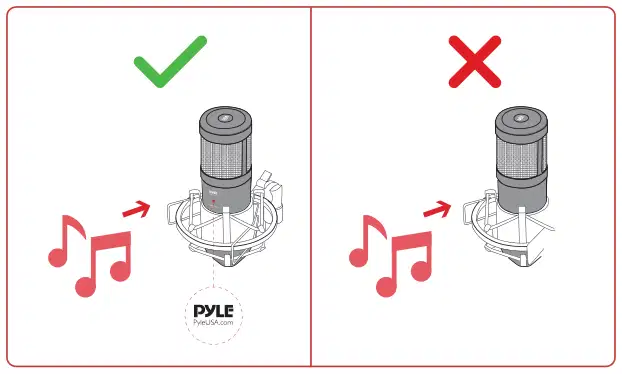
JA
Pyle logo
公式取扱説明書

Pyle Computer Desktop Microphone

6 ページ·231 KB·マイクロホン·PDF·EN
Pyle Computer Desktop Microphone
目次 5セクション PDMIKT200 · Computer Desktop Microphone · (for Podcast Recording, Streaming, Gaming) · What’s in the Box: · … 表示非表示
Page 1 of the Pyle Computer Desktop Microphone user manual — (for Podcast Recording, Streaming, Gaming)
1ページ · クリックして拡大
1ページ
Pyle Computer Desktop Microphone — PDMIKT200 diagram (page 1)
図 1

PDMIKT200

Computer Desktop Microphone

Streaming & Pro Audio Recording Mic Kit with Shock Mount Stand, Easy USB Plug-and-Play

(for Podcast Recording, Streaming, Gaming)

Page 2 of the Pyle Computer Desktop Microphone user manual — What’s in the Box:
2ページ · クリックして拡大
2ページ

READ THE OPERATING INSTRUCTIONS CAREFULLY BEFORE USING THE DEVICE.
What’s in the Box:

Pyle Computer Desktop Microphone — What’s in the Box: diagram (page 2)
図 2 · What’s in the Box:
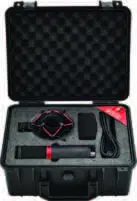
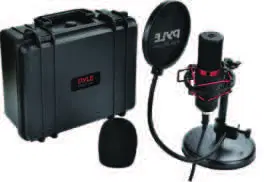
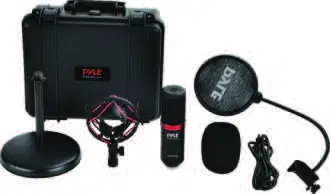
  • USB Microphone
  • Mic Shock Mount
  • Desktop Mic Stand
  • Pop Filter
  • USB Cable
  • Foam Cover
  • Storage / Travel Case

SAFETY AND CARE • Do not expose the microphone to high temperatures or frost, moisture, water

or other liquids, corrosives, poles or shocks. • Do not use the appliance if it is damaged or if you suspect that it is not working

properly, but stop using it indiscriminately and ask your dealer or authorized

  • service center for more information.
  • There are no user serviceable parts inside. Have the broken device serviced.
  • Children 8 years of age and older and persons with limited physical, sensory,

mental or lack of experience and knowledge should only use this device if they

are supervised or instructed in the safe use of the device and are aware of the

hazards involved. Children are not allowed to play with the appliance. Children

must not carry out cleaning and user maintenance without supervision. • Do not use cleaning agents, solvents, or alcohol to clean the device, as they

may damage the surface of the device. Wipe the device clean with a soft cloth

after use. • The device must be recycled at the end of its effective life.

Page 3 of the Pyle Computer Desktop Microphone user manual — What’s in the Box:
3ページ · クリックして拡大
3ページ

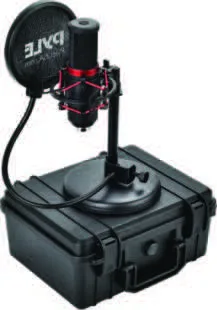
ASSEMBLING AND USING THE DEVICE 1. Carefully screw the microphone holder onto the table stand base. Tighten it to the correct position. 2. Carefully place the microphone onto the shock mount. 3. Carefully screw the shock mount onto the holder. 4. Carefully place the pop filter to your desired position. 5. Connect one end of the USB cable to the USB B connector on the microphone and the other end to the computer. The microphone light will be lit. The computer will automatically detect the microphone and install the necessary drivers. 6. You can mute the microphone by pressing the button on the top of the microphone. The microphone light turns red when the microphone is muted.
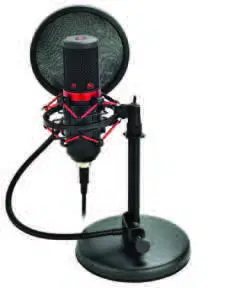
Pyle Computer Desktop Microphone — What’s in the Box: diagram (page 3)
図 3 · What’s in the Box:
Show 6 more labels / short text on this page
Mute button · Pop Filter · Microphone · Shock mount · Holder · Table stand base
Page 4 of the Pyle Computer Desktop Microphone user manual — What’s in the Box:
4ページ · クリックして拡大
4ページ
Pyle Computer Desktop Microphone — What’s in the Box: diagram (page 4)
図 4 · What’s in the Box:

SAFE DISPOSAL OF THE PRODUCT The appliance or its accessories must not be disposed of with normal household waste at the end of their life cycle. Return the device for recycling to your retailer or local recycling facility. contact your dealer or waste disposal company for more information.
Pyle Computer Desktop Microphone — What’s in the Box: diagram (page 4)
図 5 · What’s in the Box:
Page 5 of the Pyle Computer Desktop Microphone user manual — What’s in the Box:
5ページ · クリックして拡大
5ページ
  • FEATURES:
  • Pro Audio Broadcasting Desktop Microphone
  • Simple USB ‘Plug-and-Play’ Operation
  • Connects to Your Computer for Hassle-Free Sound Control
  • Used for Podcasts, Gaming, Streaming, Recording, Audio Editing
  • Lab Tested for Stage & Studio-Quality Performance
  • Crisp Vocal Pickup, High-Precision Audio Clarity
  • Gooseneck Adjustable Pop Filter
  • Detachable USB Cable
  • Compact Mic Style
  • Freestanding Placement on Any Desktop, Counter, Table
  • Includes Portable High-Quality Plastic Flight Case for Quick Transport & Set-Up
  • Universal Computer Compatibility: Works with PC, Mac, Linux
  • For Home, Office & Business Use
  • Fast Mute Switch on Top
  • With LED Indicator (Blue-working, Red-mute)
Pyle Computer Desktop Microphone — What’s in the Box: diagram (page 5)
図 6 · What’s in the Box:
  • TECHNICAL SPECS:
  • Connection Interface: USB type B
  • Pickup/Polar Pattern: Cardioid
  • Microphone Type: Back Electret Condenser
  • Frequency Response: 30-18KHz
  • Sensitivity: -36dB +/- 2dB (0dB=1V/Pa at 1KHz)
  • S/N Ratio: 74dB
  • Max SPL: 94dB
  • Mic Gain: −16dB (45dB Max)
  • Bit Depth: 16 bit
  • Sampling Rate: up to 48KHz
  • Computer Operating System Support: Windows XP, Vista, 7, 8, 10, Mac OS X, Linux
  • Mic Construction Material: Engineered Metal Alloy, Metal Iron Base
  • Power Output: USB Powered, 100 mA
  • USB Cable Length: 5.4’ ft.
  • Microphone Base Diameter: 6.0‘‘ -inches
  • Microphone Dimensions (L x W x H): 1.65” x 1.65” x 6.5” -inches
  • Total Assembled Dimensions (L x W x H): 7” x 5.9” x 12.2” -inches
Page 6 of the Pyle Computer Desktop Microphone user manual — Questions? Issues?
6ページ · クリックして拡大
6ページ
Pyle Computer Desktop Microphone — Questions? Issues? diagram (page 6)
図 7 · Questions? Issues?

Questions? Issues?

We are here to help! Phone: (1) 718-535-1800 Email: support@pyleusa.com

情報源

参考資料・リンク

この取扱説明書で参照されているリンク(メーカー、サポート、ダウンロード等)。

Pyle Computer Desktop Microphoneについて質問する

ユーザーまたはスタッフが通常1日以内に回答します。あなたの質問が次の人の助けにもなります。

Add your email to get notified when it’s answered — no spam, ever.

0 questions
Pyle Computer Desktop Microphoneに関する質問はまだありません

最初の質問を投稿しましょう。他のユーザーや当チームが回答します。

原本

Pyle Computer Desktop Microphone 取扱説明書(PDF)

6 ページ·231 KB·マイクロホン·PDF
上のページをクリックするとここに表示されます
ページ 1 / …
100%
ページを読み込み中…